Next.js SaaS landing page: section order and component structure
Published: September 12, 2026 · 7 min read
Structure a SaaS landing page in Next.js: section order from hero to CTA, what each section says, App Router folders, a copy file, and where motion belongs.
How to structure a SaaS landing page in Next.js
You've been asked to build your SaaS product's landing page in Next.js. The hero and features come easily, but you can't settle what goes after them, or in what order.
Hand it to an AI agent and you get a page of feature cards you've seen a hundred times. This guide is for that moment.
A SaaS landing page reads well in this order, because it follows the visitor's questions: header, hero, customer logos, problem, features, case studies and testimonials, pricing, FAQ, final CTA, footer.
In code, page.tsx lists the sections and each section gets its own file in components/sections/. Strong motion goes in two places only: the hero and the final CTA.
This guide covers:
Why this order works for SaaS
What to write in each section, and the usual mistakes
App Router folder structure and code that keeps copy in one file
Where to add motion, and how to brief Cursor or Claude
Why this section order works for a SaaS landing page
Visitors arrive with questions, roughly in this sequence:
What is this?
Does anyone else use it?
Is it about my problem?
How does it solve it?
Does it actually work?
What does it cost?
Will anything go wrong if we adopt it?
The order above answers them one at a time.
The most important part is putting proof before price. Show pricing before logos and case studies have earned trust, and visitors judge only on whether it looks expensive.
If decision-makers will read the page, as in most B2B sales, move case studies and numbers even further up. A single line of results right under the hero, like "Teams cut review time by 60%," makes people more likely to keep reading.
What to write in each SaaS landing page section
Here is what each section should say, and what to watch for.
What the SaaS header and hero should say
The header needs a logo, three or four in-page links, and a free-trial button. Make it sticky so the signup button is reachable from anywhere on the page.
Write the hero headline as who benefits and how things change, not as a feature name. "Close the books in 10 minutes, not a day" lands better than "AI invoice OCR."
Below it: one line of explanation, a primary button (start free) and a secondary one (see docs), and a product screenshot.
Customer logos that build trust
Right under the hero, show five to eight customer logos. With more, use a marquee that scrolls sideways. If you don't have many logos yet, a number like "used by X teams" or a one-line quote works instead.
Map SaaS problems to features
In the problem section, name about three frustrations your reader feels every day, in their own words. Then map features to those problems: problem, then the feature that solves it.
Features in identical cards make the page look like every other SaaS site. Add one layout with contrast, such as a bento grid that enlarges the main feature or alternating image-and-text rows. See https://design-layer.com/en/articles/nextjs-features-section-guide for how to build them.
Choosing case studies and testimonials
Testimonials earn more trust with a company name, job title, and photo. Pick quotes that describe a concrete change, like "month-end overtime dropped by 10 hours a week," over ones that just say "it's convenient."
What SaaS pricing and FAQ should cover
Keep pricing to about three plans and highlight one. If you add a monthly/annual toggle, state the annual discount plainly. The build is covered in https://design-layer.com/en/articles/nextjs-pricing-table-guide.
The FAQ should answer what stops people right before signing up: cancellation, data handling, onboarding time, integrations with existing tools. An accordion keeps it short. See https://design-layer.com/en/articles/nextjs-faq-accordion-guide.
The final sign-up button and footer
End the page with the same primary button as the hero. For people who read this far, add a line that lowers the barrier, like "Try it free for 14 days, no card required." The footer holds company info, terms, privacy policy, and contact details.
App Router folder structure for a SaaS landing page
SaaS teams often keep the landing page and the product dashboard in the same repository. Route groups (folders in parentheses) let you give the marketing pages and the app different layouts without changing URLs.
Without a top-level app/layout.tsx, each group's layout.tsx must render html and body, and moving between the groups triggers a full page reload.
app/
    layout.tsx          // html, body, fonts (shared root)
    (marketing)/
      layout.tsx        // header and footer
      page.tsx          // the landing page (URL: /)
      pricing/page.tsx  // if pricing gets its own page
    (app)/
      layout.tsx        // dashboard layout
      dashboard/page.tsx
  components/
    sections/
      Header.tsx
      Hero.tsx
      LogoCloud.tsx
      Problem.tsx
      Features.tsx
      Testimonials.tsx
      Pricing.tsx
      Faq.tsx
      FinalCta.tsx
      Footer.tsx
  lib/
    marketing-copy.ts   // all landing page copy
Let the page file just list sections
page.tsx should only list the sections in order and export metadata. When you want to reorder, this one file is all you need to open. Note that app/(marketing)/page.tsx and app/page.tsx both resolve to /, so keep only one of them.
import type { Metadata } from "next";
  import { Hero } from "@/components/sections/Hero";
  import { LogoCloud } from "@/components/sections/LogoCloud";
  import { Problem } from "@/components/sections/Problem";
  import { Features } from "@/components/sections/Features";
  import { Testimonials } from "@/components/sections/Testimonials";
  import { Pricing } from "@/components/sections/Pricing";
  import { Faq } from "@/components/sections/Faq";
  import { FinalCta } from "@/components/sections/FinalCta";
  import { copy } from "@/lib/marketing-copy";

  export const metadata: Metadata = {
    title: copy.meta.title,
    description: copy.meta.description,
  };

  export default function MarketingPage() {
    return (
      <>
        <Hero {...copy.hero} />
        <LogoCloud logos={copy.logos} />
        <Problem items={copy.problems} />
        <Features items={copy.features} />
        <Testimonials items={copy.testimonials} />
        <Pricing plans={copy.plans} />
        <Faq items={copy.faq} />
        <FinalCta {...copy.cta} />
      </>
    );
  }
Keep the landing page copy in one file
If headlines and button labels live inside components, every copy change means opening several files. Collect them in lib/marketing-copy.ts and a change request from sales or marketing touches only that file.
export const copy = {
    meta: {
      title: "Acme | Close the books in 10 minutes, not a day",
      description: "From reading invoices to checking entries. SaaS for finance teams.",
    },
    hero: {
      eyebrow: "For finance teams",
      title: "Close the books in 10 minutes, not a day",
      lead: "Upload invoices and Acme reads the amount and due date, then drafts the journal entries.",
      primaryCta: { label: "Start free", href: "/signup" },
      secondaryCta: { label: "See the docs", href: "/docs" },
    },
    // logos, problems, features, testimonials, plans, faq, and cta follow the same shape
  };
Where to add motion on a SaaS landing page
On a SaaS landing page, strong motion belongs in two places: the hero and the final CTA. The hero sets the first impression; the final CTA gives a reader who made it to the end a last push.
Everything else gets restrained motion:
Customer logos: a slow sideways marquee
Features: a one-time fade-up when they enter the viewport
Case studies: at most a border color change on hover
Pricing and FAQ: no motion (people read and compare here)
Make only the animated sections Client Components, and keep the page file and the rest on the server.
Putting the directive on the whole page ships more JavaScript and slows it down.
Briefing Cursor or Claude on a SaaS landing page
Don't open with "build a SaaS landing page." Give the agent a structure note first. With the order and content settled, the agent can focus on building each section.
Build app/(marketing)/page.tsx in this order.
  Put each section in its own file under components/sections/, and keep all copy in lib/marketing-copy.ts.

  1. Hero: headline "Close the books in 10 minutes, not a day", primary button "Start free", secondary "See the docs"
  2. LogoCloud: 6 customer logos (images are in public/logos/)
  3. Problem: 3 frustrations finance teams have
  4. Features: 3 features mapped to those problems; make the first one larger
  5. Testimonials: 3 case studies (company, title, concrete change)
  6. Pricing: 3 plans; highlight the middle one
  7. Faq: 5 questions (cancellation, data, onboarding time, integrations, support)
  8. FinalCta: "Try it free for 14 days, no card required"

  Build it static first; we'll swap in animated blocks later.
  Default to Server Components and add "use client" only to sections that need it.
Shipping a SaaS landing page in a day
Write the structure note, let the agent build the skeleton, then replace only the animated sections like the hero. That flow gets you to launch in a day. The steps are in https://design-layer.com/en/articles/cursor-nextjs-landing-page-guide.
Common SaaS landing page mistakes and fixes
A hero headline that's a feature name, so nobody knows who benefits or how
Every section in the same three-column cards, so nothing stands out
No logos, numbers, or case studies before pricing
Too many buttons — "Start free," "Contact," "Get the deck," "Book a demo" — and visitors hesitate
The whole page running in the browser, making it slow
Keep to one primary and one secondary button. If your sales motion depends on calls, make "Book a demo" the primary button and consider dropping the free trial entirely.
Copying finished animated sections for your SaaS page
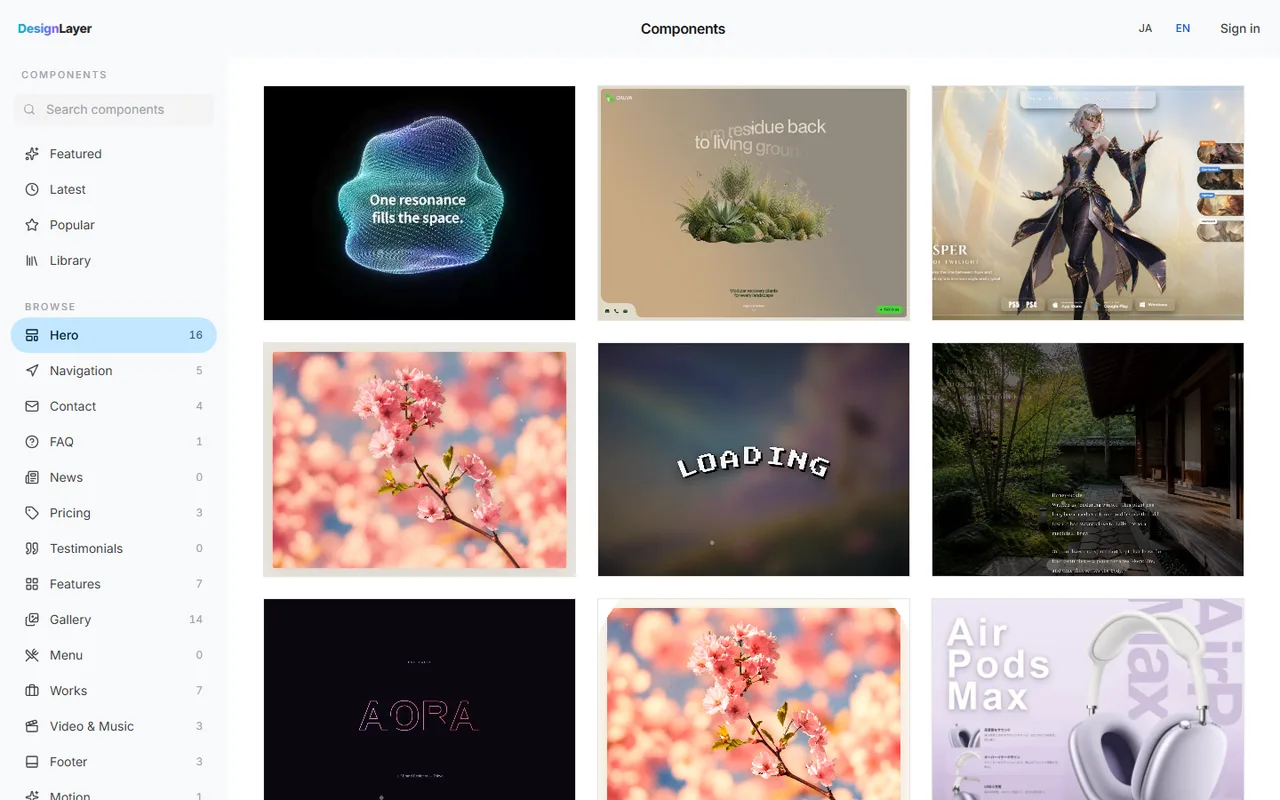
An agent can handle the structure and copy just fine. The difference shows in the feel: the hero and CTA motion, the logo marquee, the hover on feature cards. Tuning those from scratch takes time.
DesignLayer is a catalog of human-built React + Tailwind CSS sections with motion. You preview them live in the browser, then copy.
Browsing is free and needs no card. https://design-layer.com/en/components
Copy for Cursor copies the integration instructions, the live preview URL, the TSX, and the required npm packages together. Hand it to Cursor or Claude in your skeleton project and ask it to replace the matching section. Free copies are limited to the 10 Free Sample components with no monthly limit on a free account, plus 1 video prompt a month. The rest of the catalog and MCP are the 30-Day Build Pass ($19 once), Lifetime Access ($79 once), or Plus ($9/month).
Components outside the 10 Free Samples need the 30-Day Build Pass ($19 once), Lifetime Access ($79 once), or Plus ($9/month).
Next.js SaaS landing page: common questions
If the product itself runs on Next.js, sharing UI components and login state in one repository is a big win. Pages rendered on the server ship HTML that search engines read easily, and you can set metadata per page.
Summary: building a SaaS landing page in Next.js
Order: header, hero, logos, problem, features, case studies, pricing, FAQ, CTA, footer
Put proof — logos, numbers, case studies — before pricing
Let page.tsx only list sections, and keep copy in one file
Limit strong motion to the hero and the final CTA
Brief the agent with a structure note, then swap in animated parts later
Start by writing a structure note in this order and letting your agent build the skeleton. When you want the hero and CTA motion to feel right, preview options live in the DesignLayer catalog. https://design-layer.com/en/components


