Next.js animated hero section: entrance and background motion
Published: September 8, 2026 · 7 min read
Add a staggered entrance, a slowly drifting background, and scroll parallax to a Next.js hero section, with code. CSS-only and Framer Motion versions, plus checks.
How to animate a Next.js hero section
You built the top of your Next.js site: headline, short description, button.
The structure is fine, but nothing happens when the page opens, so it reads like a photo banner. That is the most common hero section complaint.
The fix is not more assets. Decide what moves first.
There are three candidates: a staggered entrance, a slowly moving background, and a response to the cursor. Pick at most two, build the entrance in CSS, and use Motion (formerly Framer Motion) for scroll-linked motion. That is the most reliable route.
This guide builds four things, with code.
A staggered entrance animation in plain CSS
A slowly drifting background glow in plain CSS
A Motion version: one-place entrance control plus scroll-linked parallax
Support for the reduced-motion setting (prefers-reduced-motion)
Why a still hero section looks like a banner
Before the code, pin down why a hero looks flat. Knowing the cause tells you where motion belongs.
Every hero element appears at once
When headline, body, button, and image show up together, there is no reading order. Pieces arriving one after another tell the eye where to go.
The hero ends the moment you scroll
If the next section cuts in as soon as you pass the viewport height, the first view is a poster. A background that moves slower than the copy is enough to turn it into an introduction.
Too much motion in the hero
Everything bounces, the background loops hard, something chases the mouse. Fatigue arrives before the impression does. Cap it at two of entrance, background, and hover.
The hero section animation we will build
Here is the target. The numbers go straight into the code.
A label appears first, then the headline rises 20px; body and button follow 0.08s apart
A soft background glow shifts position and size over 18 seconds
On a little scroll, the background photo lags behind the copy and the text fades out
The CTA button shrinks very slightly on hover
No 3D or shaders. For most landing pages, entrance and background motion already change the impression.
Hero entrance animation with CSS only
Entrance and hover need no library. You can stay in a Server Component, so no extra JavaScript ships to the browser.
One animation, staggered start times
The same animation on every element looks like everything appearing at once.
Label at 0s, headline at 0.08s, body at 0.16s, button at 0.24s is enough. Move 16 to 24px; bigger jumps look cheap.
The @media block at the end is for people who turned on reduced motion in their OS. It stops the animation and shows the content from the start.
@keyframes hero-rise {
  from {
    opacity: 0;
    transform: translateY(20px);
  }
  to {
    opacity: 1;
    transform: translateY(0);
  }
}

.hero-rise {
  animation: hero-rise 0.7s cubic-bezier(0.22, 1, 0.36, 1) both;
}

@media (prefers-reduced-motion: reduce) {
  .hero-rise {
    animation: none;
  }
}
Add the hero entrance animation to the page
In the App Router, make the hero the first section in page.tsx. min-h-[100svh] keeps the height stable as mobile address bars show and hide.
On hover, change scale a little; heavy shadows or blinking color fight the entrance. A transform hover on the same element as the entrance animation is overridden by the animation's final value. Wrap the button: put the entrance on the wrapper and the hover scale on the link inside.
export default function Page() {
  return (
    <section className="relative isolate min-h-[100svh] overflow-hidden px-6 pt-28">
      <p className="hero-rise text-sm tracking-wide">2026 Launch</p>
      <h1 className="hero-rise mt-4 text-4xl font-semibold" style={{ animationDelay: "80ms" }}>
        Ship a first view that moves, today
      </h1>
      <p className="hero-rise mt-5 max-w-xl text-zinc-600" style={{ animationDelay: "160ms" }}>
        Stagger headline, body, then button. That alone changes the feel.
      </p>
      <div className="hero-rise mt-8" style={{ animationDelay: "240ms" }}>
        <a
          href="#features"
          className="inline-flex rounded-full bg-zinc-950 px-5 py-3 text-white transition hover:scale-[0.98]"
        >
          Learn more
        </a>
      </div>
    </section>
  );
}
Slow-moving hero background with CSS only
A moving background makes the page feel alive even while the text sits still.
Here a soft glow drifts over 18 seconds. Faster becomes distracting; aim for barely noticeable.
Draw the glow already blurred with radial-gradient (a circular gradient). Animating the blur filter is expensive, so animate only position and scale (transform).
@keyframes hero-drift {
  0%,
  100% {
    transform: translate3d(0, 0, 0) scale(1);
  }
  50% {
    transform: translate3d(4%, -3%, 0) scale(1.08);
  }
}

.hero-glow {
  background: radial-gradient(circle at 50% 40%, rgb(56 189 248 / 0.35), transparent 60%);
  animation: hero-drift 18s ease-in-out infinite;
}

@media (prefers-reduced-motion: reduce) {
  .hero-glow {
    animation: none;
  }
}
Place the glow inside the hero section
Make it the first child of the section above. With relative and isolate on the section, the -z-10 glow stays behind the copy. aria-hidden keeps it out of screen readers.
<div
  aria-hidden
  className="hero-glow pointer-events-none absolute inset-x-0 -top-1/2 -z-10 h-[120%]"
/>
Hero entrance and parallax with Framer Motion
When position or opacity should follow scroll distance, use Motion. Install it with npm install motion.
The newer motion package (motion/react) works with the same code.
Files that use useScroll (which reads scroll progress) or motion need "use client" (a marker that says this component runs in the browser) at the top. Do not turn the whole page into a browser-side component; extract just the hero into its own file.
Write the hero stagger once with Framer Motion
In CSS you set delay per element. In Motion, staggerChildren on the parent (which plays children in sequence) does it once.
The hero is on screen at load, so animate plays it on mount. For sections further down, use whileInView (play when it enters the viewport) with viewport={{ once: true }} so it does not replay every time you scroll back.
"use client";

import { motion, type Variants } from "motion/react";

const container: Variants = {
  hidden: {},
  show: { transition: { staggerChildren: 0.08, delayChildren: 0.1 } },
};

const item: Variants = {
  hidden: { opacity: 0, y: 20 },
  show: { opacity: 1, y: 0, transition: { duration: 0.7, ease: [0.22, 1, 0.36, 1] } },
};

export function Hero() {
  return (
    <motion.section
      variants={container}
      initial="hidden"
      animate="show"
      className="min-h-[100svh] px-6 pt-28"
    >
      <motion.p variants={item} className="text-sm tracking-wide">2026 Launch</motion.p>
      <motion.h1 variants={item} className="mt-4 text-4xl font-semibold">
        Ship a first view that moves, today
      </motion.h1>
      <motion.p variants={item} className="mt-5 max-w-xl text-zinc-600">
        Stagger headline, body, then button. That alone changes the feel.
      </motion.p>
      <motion.a
        variants={item}
        href="#features"
        whileHover={{ scale: 0.98 }}
        className="mt-8 inline-flex rounded-full bg-zinc-950 px-5 py-3 text-white"
      >
        Learn more
      </motion.a>
    </motion.section>
  );
}
Scroll-linked parallax for the hero background
Parallax means the background moves slower than the text in front, which creates depth. useScroll gives the hero's scroll progress (0 to 1), and useTransform converts that value into background position and text opacity.
useReducedMotion returns true when reduced motion is on; in that case the background stays put. The background extends 10% above and below so its edges never show while it moves.
"use client";

import { useRef } from "react";
import { motion, useReducedMotion, useScroll, useTransform } from "motion/react";

export function HeroParallax() {
  const ref = useRef<HTMLElement>(null);
  const reduce = useReducedMotion();
  const { scrollYProgress } = useScroll({
    target: ref,
    offset: ["start start", "end start"],
  });
  const bgY = useTransform(scrollYProgress, [0, 1], ["0%", reduce ? "0%" : "15%"]);
  const textOpacity = useTransform(scrollYProgress, [0, 0.7], [1, 0]);

  return (
    <section ref={ref} className="relative isolate min-h-[100svh] overflow-hidden px-6 pt-28">
      <motion.div
        aria-hidden
        style={{ y: bgY, backgroundImage: "url(/hero.jpg)" }}
        className="absolute inset-x-0 -top-[10%] -z-10 h-[120%] bg-cover bg-center"
      />
      <motion.div style={{ opacity: textOpacity }}>
        <h1 className="text-4xl font-semibold text-white">A first view with depth</h1>
      </motion.div>
    </section>
  );
}
Weak vs strong hero animation
It looks weak when duration runs past 1.4 seconds or the motion bounces. A landing page hero introduces a product; it is not a loading screen.
It looks strong with decelerating easing and only the image delayed about 0.12 seconds. Text first, visual second reads like a magazine spread.
Keep parallax to a few percent on the background, and never make the text follow.
Hero animation checklist before launch
Once motion is in, check these five before you ship. Miss one and the motion works against you.
Entrance and background animations stop under reduced motion
Headline and sign-up button fit in the first view on phones
The largest image is not hidden by an opacity animation (it delays LCP, the loading-speed metric)
Sections after the hero do not carry equally loud motion
The browser marker is not on the whole page file
The third one is easy to miss. Keep the first photo visible from the start; fading the text and button is enough.
Copy a finished hero section instead
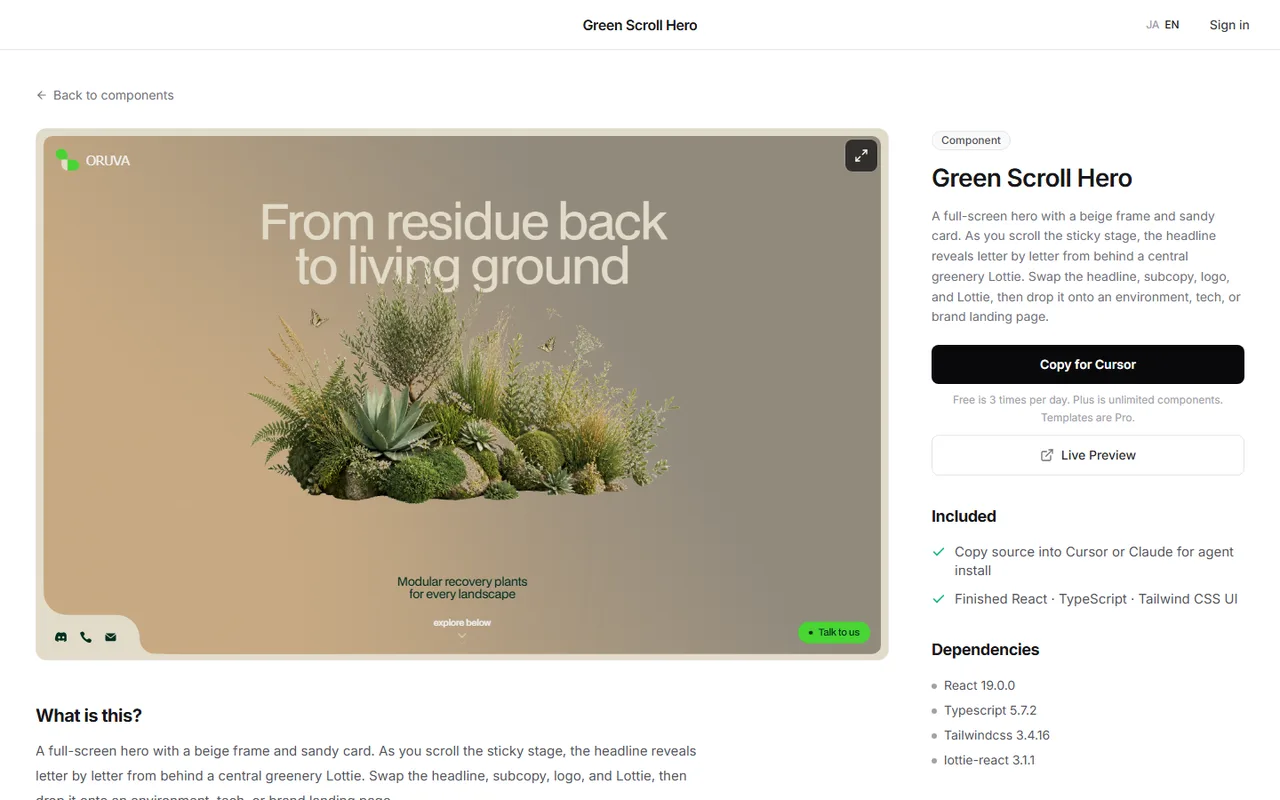
A headline that rises from behind foliage on scroll, photos that swap while pinned: combining the techniques above can still take half a day or more for effects like these.
Another route is to watch the real motion in the browser, then drop a React + Tailwind CSS hero into your Next.js app.
The DesignLayer catalog lets you check motion sections in a live preview and copy the source. Browsing needs no card, and free copies are 3 per day (JST). https://design-layer.com/en/components
After dropping one in, the work is swapping headline, CTA, and images. Leave the motion values alone and change copy and images first so nothing breaks.
If the hero is the core of the product and you need pixel-level control, writing it in Motion fits better.
Next.js hero section animation: common questions
Entrance, hover, and a slowly drifting background need only CSS. For changes tied to scroll distance, use a library such as Motion. Either way, the whole page does not need to be a Client Component.
Summary: animating a Next.js hero section
Move at most two of entrance, background, and hover
One CSS animation plus 0.08s steps builds the entrance
Drift the background glow by position and scale only, over about 18 seconds
Use Motion for scroll-linked motion, and put the browser marker on the hero file only
Before launch, check reduced motion and that the first photo is not hidden
Ship the CSS entrance first, then add the background and parallax if it still feels thin. To reveal a headline letter by letter, see https://design-layer.com/en/articles/nextjs-text-reveal-animation-guide
To learn Motion from the basics: https://design-layer.com/en/articles/nextjs-framer-motion-guide


