Consistent Cursor landing page design: fix color, spacing, motion
Published: September 12, 2026 · 5 min read
Cursor landing pages built section by section drift in spacing, radius, and motion. Lock three layers with tokens and one prompt to pull the page back together.
Why Cursor landing page design drifts section by section
You ask Cursor's Agent for a hero, open a new chat for the features block, then another for pricing. Each one looks fine on its own. Stack them, and the page looks like three sites taped together.
Most people who build a landing page with Cursor hit this at least once.
The drift is usually in the details:
Vertical padding changes from section to section, so the page loses its rhythm
Buttons and cards mix 8px and 16px corner radius
The brand blue shifts slightly every time
Every section fades in on scroll, so nothing reads as the focal point
This guide splits the problem into three layers, shows how to pull an existing page back into line, and how to prompt so new sections stay consistent from the start.
Cursor landing page drift comes from the handoff
An agent writes from what it can see in the current chat. Spacing and colors from a hero you built in a different chat are invisible unless you restate them. The more you split the work across chats, the further the assumptions drift.
The second cause is subjective prompts like "make it look modern" or "make it pop." With no reference, the agent rebuilds a generic SaaS look every time. You end up with parts that are similar but never identical.
The common detour is regenerating the sections you dislike. More generations will not converge without a reference. The fix is subtraction: set the reference first, then remove whatever falls outside it.
Three layers that keep landing page design consistent
Drift happens in three layers: color, type, and radius; spacing; and motion. Lock them in that order, and you can tell the agent "match this" in one line.
Layer 1: Put landing page color, type, and radius in one file
Keep brand color, fonts, and radius as CSS variables in one place. With Tailwind CSS v4, define them in @theme (the place for shared values) inside globals.css.
Those values then become classes like bg-brand (brand background) and rounded-card (card radius).
Keep the set small: one primary color, and two radius values (cards and buttons). Every extra option is another value the agent can pick at random.
/* app/globals.css */
@import "tailwindcss";

@theme {
  --color-brand: #2563eb;
  --color-brand-foreground: #ffffff;
  --color-muted: #71717a;
  --radius-card: 1rem;
  --radius-button: 9999px;
  --font-sans: "Inter", "Noto Sans JP", sans-serif;
}
Layer 2: Use a three-step spacing scale for landing page sections
Pick three vertical padding steps, such as py-24 / py-32 / py-40, and tie them to roles: regular sections get the smallest step, and only the hero and CTA get more room.
Do the same for width. Choose one max width for content, such as max-w-5xl, and use it everywhere. Even with matching padding, a page with varying widths will not look aligned.
Layer 3: Keep strong motion to the hero and CTA
Motion is the most visible source of inconsistency. When every section has an entrance animation, everything competes for attention and the page loses its flow.
Give strong motion to two places, the hero and the CTA. Leave other sections static or use a subtle fade. Use one easing curve and one duration, and sections built in different chats start to look like parts of the same page.
How to fix a Cursor landing page that has already drifted
If you already have a Cursor-built page, work through it in this order. Trimming what you have is faster than regenerating.
Step 1: Scroll the page top to bottom, keep the two strongest motions, and remove the other entrance animations
Step 2: Add the @theme block above and ask the agent to replace hard-coded colors and radius with tokens (shared design values)
Step 3: Normalize section padding to the three steps and use one max width
Step 4: If the rhythm still feels off, pick the one section you like best and pull the others toward it
Steps 2 and 3 fit into a single prompt. Naming the files keeps the diff easy to review.
Review app/(marketing)/page.tsx and everything under components/sections/.
- Use only the tokens in @theme in app/globals.css for color and radius (replace hard-coded hex values and rounded-[..])
- Set section vertical padding to py-24. Only the hero and CTA use py-32
- Use max-w-5xl as the content max width everywhere
- Remove entrance animations from every section except the hero and CTA
Do not change copy or layout structure.
Use a finished section as the landing page motion reference
Color and spacing are numbers. The right amount of motion is hard to describe in words. If the agent invents easing, delay, and distance every time, motion is the last thing that ever lines up.
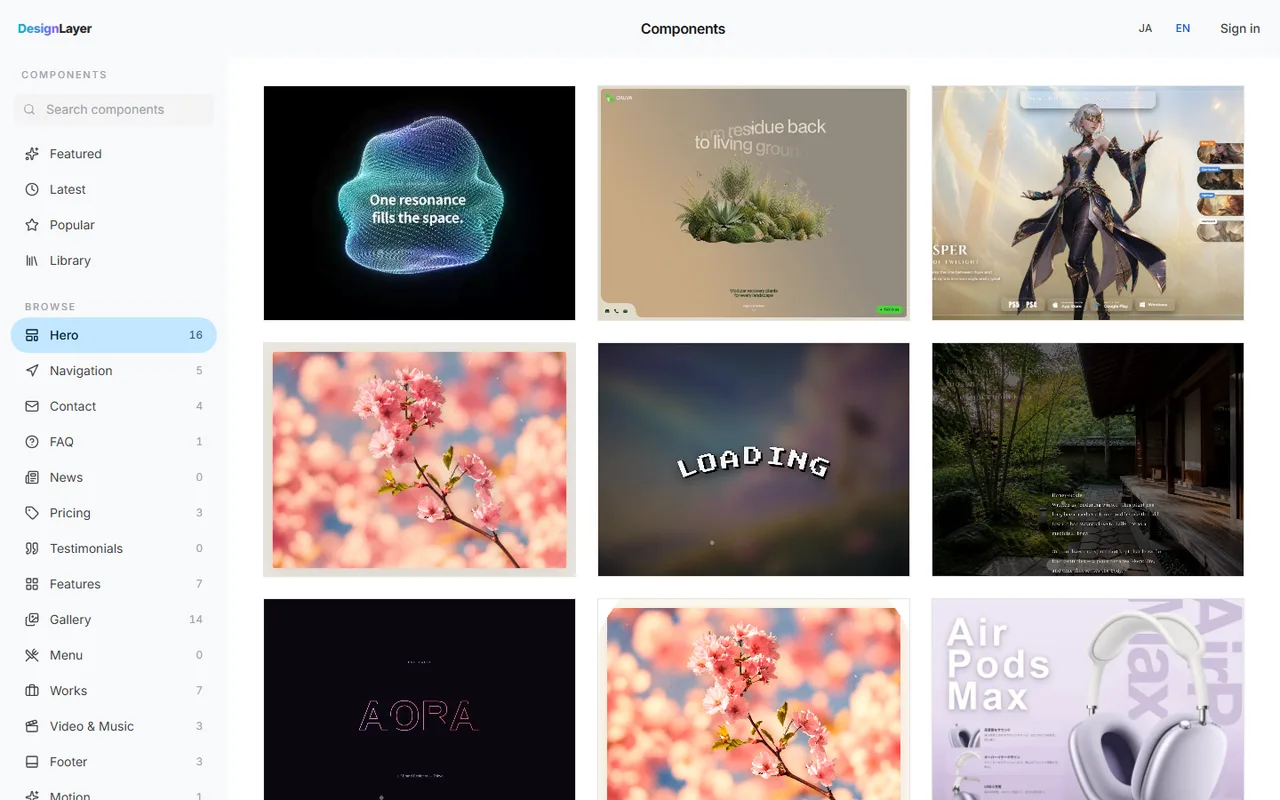
Another option is to stop generating motion and pick a finished section you have watched running in the browser. DesignLayer is a catalog of human-built React + Tailwind CSS sections with motion, which you can preview live before you copy. Browsing needs no account and no card. https://design-layer.com/en/components
Take only the most visible part of the page from the catalog, usually the hero. Copy for Cursor gives you unified instructions for the agent, the live preview URL, the TSX, and the list of npm dependencies in one copy. Paste it into Cursor and add one line: "match our existing tokens."
The rest of the page can stay static. A page with motion in one place looks more coherent than one where every section moves differently. For building the hero itself, see https://design-layer.com/en/articles/nextjs-animated-hero-section-guide
Who this landing page design fix fits, and who it does not
It fits developers building landing pages with Next.js and Tailwind CSS while letting Cursor or Claude write the code. If each part looks fine but the page never comes together, locking the three layers goes a long way.
It does not fit a full design system build. This is a quick way to tidy an existing landing page; token architecture for a large organization needs a different process.
DesignLayer's free plan includes unlimited live preview and the 10 Free Sample components with no monthly limit on a free account, plus 1 video prompt a month. Free cannot connect MCP. The rest of the catalog is the 30-Day Build Pass ($19 once, no auto-renewal), Lifetime Access ($79 once, first 100 buyers), or Plus ($9/month). That covers the 10 Free Samples. Sections outside that set need the 30-Day Build Pass ($19 once, no auto-renewal), Lifetime Access ($79 once, first 100 buyers), or Plus ($9/month) unlock the rest of the catalog and MCP.
Cursor landing page design: common questions
A token file for color, radius, and fonts, plus a spacing rule. Start each chat with "use only the @theme tokens in app/globals.css" and "sections use py-24," and new sections drift far less.
Summary: making a Cursor landing page design consistent
Cursor-built pages drift because each section is generated without shared assumptions
Lock three layers first: color/type/radius, spacing, and motion
To fix a page, cut strong motion down to two places and switch to shared values instead of regenerating
Use a finished section you have watched live as the motion reference
Start by removing entrance animations from everything except the hero and CTA. That alone changes how unified the page feels. For the full ship-in-a-day flow, read https://design-layer.com/en/articles/cursor-nextjs-landing-page-guide and to use the catalog from your agent directly, see https://design-layer.com/en/articles/cursor-mcp-component-catalog-guide


