Next.js FAQ Accordion: details/summary to Animated Open/Close
Published: September 11, 2026 · 8 min read
Build a Next.js FAQ accordion: details and summary, one-open-at-a-time behavior, a smooth grid-based open animation, and FAQPage structured data, with code.
Turn your FAQ into an accordion menu so the page stops growing
You are building a landing page in Next.js, added an FAQ under the pricing table, and with every answer showing, the page suddenly got very long. The standard fix is an accordion: list only the questions, and open the answer the reader taps.
Here is the answer. You can start with nothing but HTML's built-in disclosure elements, details and summary.
No JavaScript, and it works as a Server Component. When you want one-open-at-a-time behavior or a smooth animation, make only the FAQ file a Client Component.
This guide covers:
The simplest FAQ accordion, using only built-in HTML elements
An exclusive accordion where opening one closes the others (two ways)
A smooth open/close animation for answers of unknown height
Adding FAQPage structured data, and what to know about SEO
Why an FAQ works better as an accordion menu
On a landing page, the FAQ is where the last doubts get cleared. People arrive there after seeing the price, right before signing up, to check things like "Can I cancel anytime?" or "Can I try it free?". They need to tell within a second whether their question is on the list.
With every answer open, eight questions turn into several screens of text. Readers tire out before they find their question and never reach the signup button. With only the questions visible, the list can be skimmed and they open just the one they care about.
That is why the closed line should be short. "Regarding frequently received inquiries about using our service" is a preamble, not a question. Write the words visitors actually say: "Can I try it free?", "Can I cancel anytime?".
Three ways to build a Next.js FAQ accordion
The effort depends on the behavior you need. From least to most:
Step 1: Open and close with the built-in HTML elements (no JavaScript, several can be open)
Step 2: Make it exclusive so only one is open (add one attribute, or remember the open item)
Step 3: Add a smooth open/close animation (needs "use client", the marker for browser-side code)
If unsure, ship five questions with Step 1. Move to Step 2 if multiple open items bother you, and to Step 3 when you want to polish the motion.
Step 1: Build an FAQ accordion with details and summary
details is the browser's built-in disclosure element. Keyboard support and announcing the open state to screen readers come for free. It works as a Server Component, and the answer text is in the HTML from the start.
const items = [
    { q: "Can I try it free?", a: "Every feature is free for 14 days. No card required." },
    { q: "Can I cancel anytime?", a: "Cancel from settings at any time. You will not be charged after the next billing date." },
    { q: "Do you support invoice billing?", a: "Only on the Team plan. Contact us to set it up." },
  ];

  export function Faq() {
    return (
      <section className="mx-auto max-w-2xl px-6 py-24">
        <h2 className="text-3xl font-semibold">FAQ</h2>
        <div className="mt-10 divide-y divide-zinc-200 border-y border-zinc-200">
          {items.map((item) => (
            <details key={item.q} className="group py-2">
              <summary className="flex cursor-pointer list-none items-center justify-between gap-4 py-3 font-medium [&::-webkit-details-marker]:hidden">
                {item.q}
                <span aria-hidden="true" className="transition-transform group-open:rotate-45">+</span>
              </summary>
              <p className="pb-3 text-sm leading-relaxed text-zinc-600">{item.a}</p>
            </details>
          ))}
        </div>
      </section>
    );
  }
Replace the default triangle with your own icon
The question row comes with the browser's triangle marker. list-none removes it, and Safari also needs [&::-webkit-details-marker]:hidden. Put a + icon on the right instead and rotate it into an x with Tailwind's group-open:rotate-45.
FAQ questions in one line, answers in one to three sentences
Two sentences in a question row make the closed list hard to scan. Aim for one short question and a one-to-three-sentence answer.
Links belong inside the answer. If an answer keeps growing, move it to a help page.
Step 2: Make a one-open-at-a-time FAQ accordion
In Step 1 any number of items can be open. On a landing page, "read one, close the rest" keeps the eye on a single answer. There are two ways to do it.
Option A: give every details the same name
When details elements share a name attribute, the browser lets only one of them be open at a time. No JavaScript needed.
It works in current versions of Chrome, Safari, and Firefox. Older browsers simply allow several open, as in Step 1, so nothing breaks.
<details key={item.q} name="faq" className="group py-2">
    {/* summary and answer as in Step 1 */}
  </details>
Option B: keep the open index in state
Store the index of the open question and close it when the same question is clicked again. This guarantees one-at-a-time in every browser and lets you animate freely. The code is combined into Step 3 below.
If you also want arrow-key navigation between questions, the shadcn/ui Accordion (built on Radix UI) is a quick option. It covers the open/close primitive. The section design around it, such as a two-column layout with the heading or a background, is yours to build.
Step 3: Animate the FAQ accordion open and close
Answer height depends on the text, and CSS transitions do not work from a height of 0 to an automatic height.
Instead, wrap the answer in a grid and transition its row size (grid-template-rows) from 0fr to 1fr. It animates smoothly without knowing the content height.
"use client";

  import { useId, useState } from "react";

  type Item = { q: string; a: string };

  export function FaqAccordion({ items }: { items: Item[] }) {
    const [open, setOpen] = useState<number | null>(0); // Open the first one by default
    const baseId = useId();

    return (
      <div className="divide-y divide-zinc-200 border-y border-zinc-200">
        {items.map((item, i) => {
          const isOpen = open === i;
          const buttonId = baseId + "-q-" + i;
          const panelId = baseId + "-a-" + i;
          return (
            <div key={item.q}>
              <h3>
                <button
                  id={buttonId}
                  type="button"
                  aria-expanded={isOpen}
                  aria-controls={panelId}
                  onClick={() => setOpen(isOpen ? null : i)}
                  className="flex min-h-11 w-full items-center justify-between gap-4 py-4 text-left font-medium"
                >
                  {item.q}
                  <span
                    aria-hidden="true"
                    className={"transition-transform duration-300 " + (isOpen ? "rotate-45" : "")}
                  >
                    +
                  </span>
                </button>
              </h3>
              <div
                id={panelId}
                role="region"
                aria-labelledby={buttonId}
                inert={!isOpen}
                className={
                  "grid transition-[grid-template-rows] duration-300 ease-out motion-reduce:transition-none " +
                  (isOpen ? "grid-rows-[1fr]" : "grid-rows-[0fr]")
                }
              >
                <div className="overflow-hidden">
                  <p className="pb-4 text-sm leading-relaxed text-zinc-600">{item.a}</p>
                </div>
              </div>
            </div>
          );
        })}
      </div>
    );
  }
Key points in the code
Switch the row size between 0 and 1, and clip the overflow on the inner box. Height stays automatic and still animates
Closed answers remain in the HTML, so search engines and screen readers still get the content
inert keeps Tab from reaching links inside closed answers (supported from React 19; on React 18, add hidden when closed instead)
The animation is turned off for users who prefer reduced motion
Make each question a button that announces its state
A div with onClick cannot be operated by keyboard, and its open state is never announced. Make each question a button and link it to its answer with aria-expanded and aria-controls. Wrapping the button in an h3 lets screen reader users jump between questions via the heading list. If you have more than about six questions, you can drop role="region".
Animating the FAQ accordion with Motion
In a project using Motion (formerly Framer Motion), AnimatePresence with an animation to height: "auto" gives the same effect. The answer leaves the DOM when closed, though, so if you want search engines to read answers, the grid approach above is safer. Motion basics are in https://design-layer.com/en/articles/nextjs-framer-motion-guide.
FAQ accordion structured data and SEO notes
You can add schema.org FAQPage structured data to an FAQ. In Next.js, build the JSON-LD from the same question array you render and output it in a script tag. Sharing one array keeps the page and the data in sync.
type Item = { q: string; a: string };

  export function FaqJsonLd({ items }: { items: Item[] }) {
    const jsonLd = {
      "@context": "https://schema.org",
      "@type": "FAQPage",
      mainEntity: items.map((item) => ({
        "@type": "Question",
        name: item.q,
        acceptedAnswer: { "@type": "Answer", text: item.a },
      })),
    };

    return (
      <script
        type="application/ld+json"
        dangerouslySetInnerHTML={{
          __html: JSON.stringify(jsonLd).replace(/</g, "\\u003c"),
        }}
      />
    );
  }
FAQ rich results were retired in May 2026
In August 2023 Google limited FAQ rich results to well-known government and health sites, and since May 7, 2026 they no longer appear for any site (source: Google Search Central documentation updates, https://developers.google.com/search/updates ). FAQPage markup will not change how your result looks. Treat it only as a way to describe the content to machines, not as a ranking trick.
Keep answers in the HTML even when closed
With the built-in elements or the Step 3 approach, closed answers are in the HTML from the start. If you render answers only after opening, search engines may not see them. Also, never put questions in the JSON-LD that are not visible on the page.
Common FAQ accordion mistakes and pre-launch checks
Writing questions in internal jargon. "How many times can I use it per day?" beats "What is the plan quota?" because it matches what people search
Using answers for new sales copy. The FAQ's job is removing doubt, not repeating the hero
Listing 20 questions. Nobody reads them on a landing page. Keep what people actually ask and link the rest to a help page
Opening everything by default. If you open one, make it the most common worry, such as pricing or the trial
Small tap targets on mobile. Make each question row at least 44px tall
Putting "use client" at the top of page.tsx. Split out only the FAQ file
A good spot is right after pricing and before the final signup button or footer. Building the pricing table is covered in https://design-layer.com/en/articles/nextjs-pricing-table-guide.
Copy a finished FAQ section instead
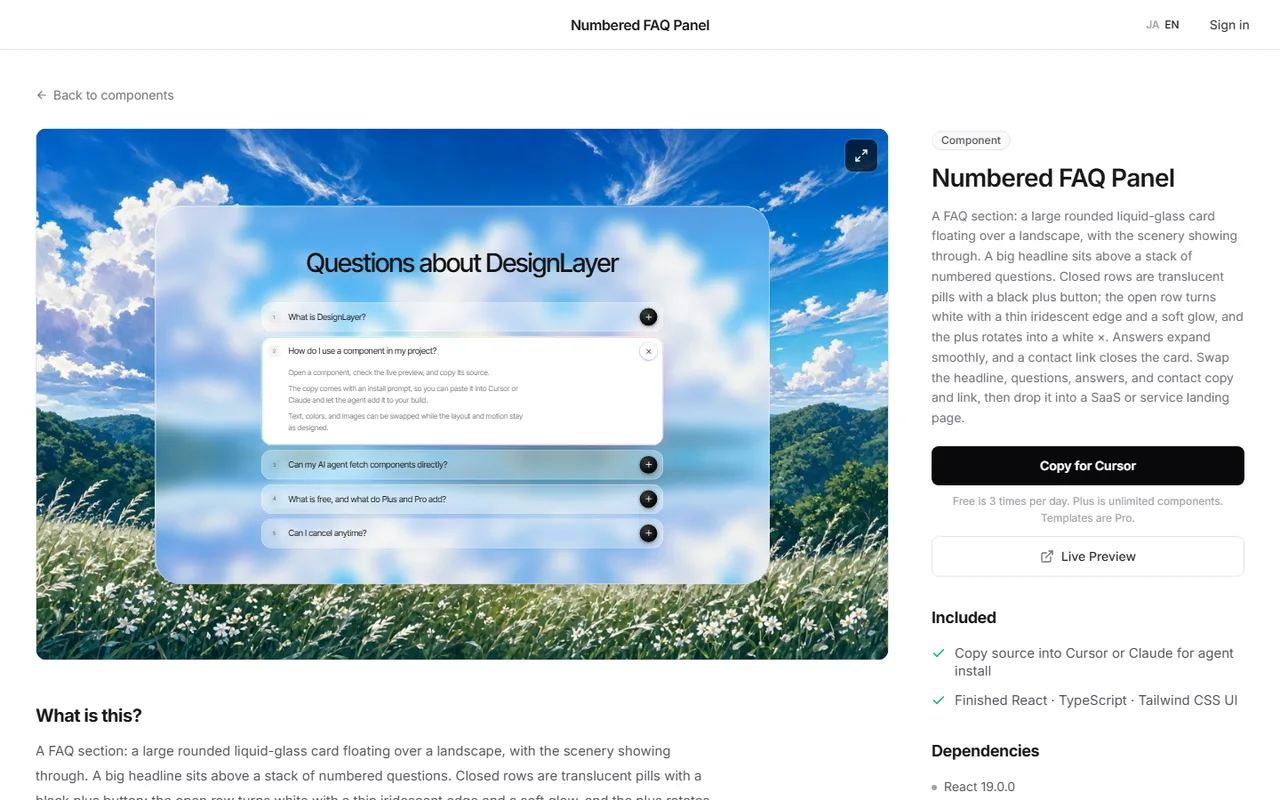
Heading on the left, accordion on the right, a dark background flowing on from pricing. Polishing the whole section takes time even after the Step 3 behavior works.
In that case you can open and close a finished FAQ section in the browser first, then bring its React + Tailwind code into your Next.js app.
In the DesignLayer catalog you watch the motion in a live preview, then hand the code to your AI agent with Copy for Cursor. Browsing needs no card, and free source copies are the 10 Free Sample components with no monthly limit on a free account, plus 1 video prompt a month. The rest of the catalog and MCP are the 30-Day Build Pass ($19 once), Lifetime Access ($79 once), or Plus ($9/month). https://design-layer.com/en/components
After that, the job is swapping questions, answers, and the heading. It suits SaaS and tool landing pages. Support sites with 100+ questions or in-app help are better served by searchable docs.
Next.js FAQ accordion: common questions
details and summary are enough to start. No library required.
For one-at-a-time, just add the name attribute. For animation, create one browser-side component for the FAQ.
Summary: building an FAQ accordion in Next.js
An FAQ accordion lets readers skim questions and keeps the page from growing
Start with the built-in HTML elements. No JavaScript or library needed
For one-at-a-time, give items a shared name or remember which one is open
Animate open/close by changing the row size of the grid that wraps each answer
Build FAQPage data from the same array you render. Google retired FAQ rich results in May 2026, so they no longer appear for any site
Start by putting five real questions from your customers into the Step 1 code. The call-to-action that follows the FAQ is covered in https://design-layer.com/en/articles/nextjs-cta-section-guide.


