21st.dev Alternative for Cursor? Compare React Catalogs First
Published: September 12, 2026 · 4 min read
Looking for a 21st.dev alternative? Why adding a second catalog beats switching, three criteria for React catalogs in Cursor, and a fair look at when each fits.
Found it on 21st.dev, then rebuilt it anyway
You find a component on 21st.dev, drop it into Cursor, and it does not quite match the motion or the feel of your page. You try another, then another, and half a day is gone.
If you are searching for a “21st.dev alternative,” you have probably been there.
Often the problem is not the registry itself but the fit between what you are looking for and where you are looking. This guide covers the criteria worth checking before you switch, and how to split the work in Cursor.
Why 21st.dev and other registry searches loop back
Community registries (shared places where many authors publish parts) list lots of candidates per search, and you can add them quickly with a CLI (a command-line tool) or an agent. For browsing small parts and many variations, that is a fast tool.
Hunting for a block that sets the tone of a whole page, like a landing-page hero, is different. The usual time sinks:
The part is good on its own, but spacing and type do not blend into your page
Every author writes and depends on things differently, so each integration needs tuning
Stills or short demos do not tell you enough about easing and scroll timing
You hand only the component file (TSX) to the agent, it guesses placement and dependencies, and the diff grows
None of this means the registry is bad. You are using a tool built for searching wide to do the job of picking one, so you end up checking more times.
Instead of a 21st.dev alternative, split the roles
You rarely need to drop the registry you use and move elsewhere. A better approach is to pick a place by purpose:
Small basic parts (buttons, inputs, loaders) and wide variation: an existing registry
Finished blocks where motion and spacing are already decided, like a hero or pricing section: a catalog with live preview
Foundation UI such as forms and dialogs: shadcn/ui
Split this way, searching and deciding happen in different places, and you back out of fewer integrations. Adding the one role you are missing is more realistic than finding a single replacement.
Three criteria for comparing 21st.dev and React catalogs for Cursor
When choosing what to add, compare on these three. They work no matter which service you are evaluating.
1. Does the live preview run as real React?
You cannot judge motion UI from a still. Check whether hover, scroll entrance, and looping backgrounds run as the actual component in the browser. Whether your team can agree on the motion before integrating decides how much rework you get.
2. Is the output React (TypeScript) + Tailwind?
For a Next.js project, TSX with Tailwind cuts porting cost sharply. Code tied to a CSS-in-JS setup (styles written inside JavaScript) or a custom runtime takes longer to fit in.
3. Is integration info packaged for Cursor?
When you hand code to Cursor or Claude, structured notes on where it goes, which npm packages it needs, and what to swap prevent wrong integrations. If you write those instructions yourself every time, this is where catalogs differ.
Adding DesignLayer alongside 21st.dev
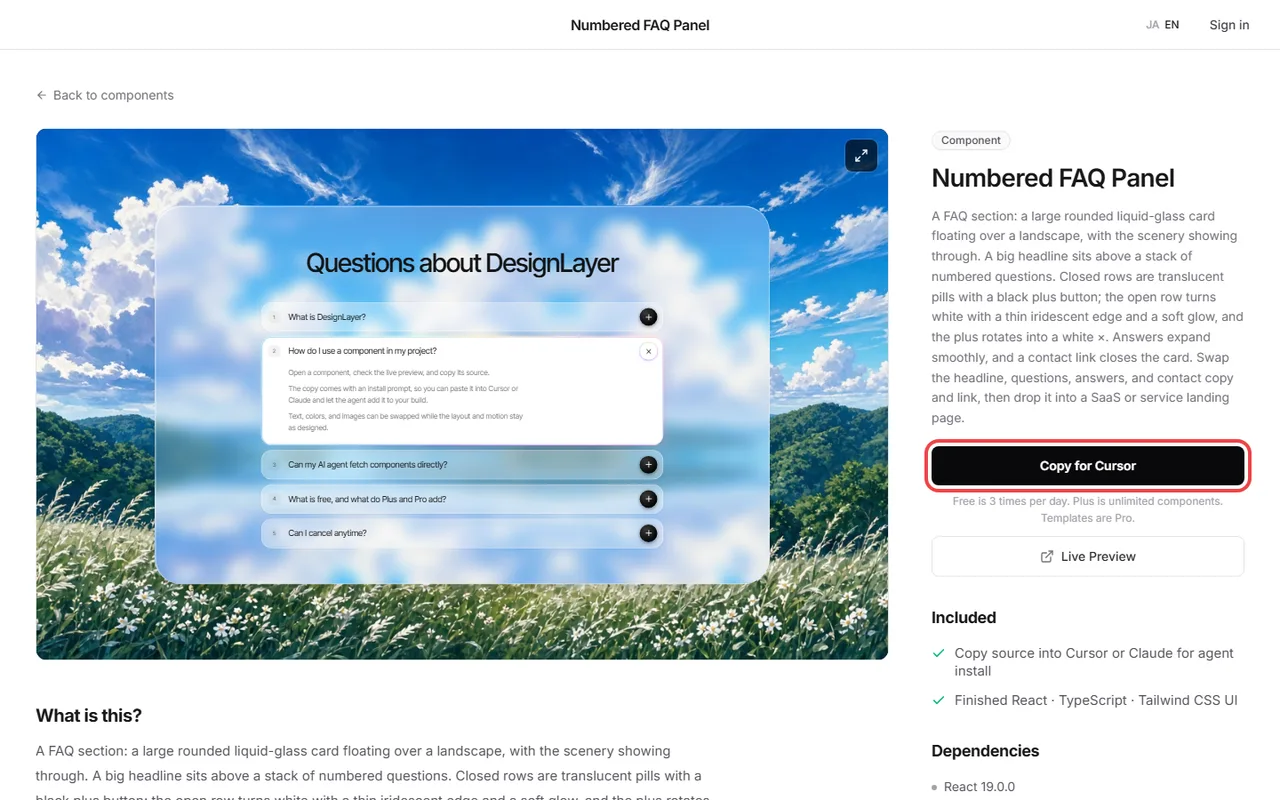
DesignLayer was built around those three criteria. It lists human-built React + Tailwind sections with motion that you watch as live previews before copying. Browsing needs no account and no card.
There are two ways to get a block into Cursor:
Copy for Cursor: copies integration instructions, the live preview URL, the TSX, and npm dependencies as one bundle for Cursor's Agent or Claude’s chat. A free account copies the 10 Free Sample components with no monthly limit. Full catalog copies are the 30-Day Build Pass ($19 once), Lifetime Access ($79 once), or Plus ($9/month)
DesignLayer MCP: search the catalog (search_catalog) and pull a block in (get_component) from inside the editor, no browser trip. Connecting is included with the 30-Day Build Pass ($19 once, no auto-renewal), Lifetime Access ($79 once, first 100 buyers), or Plus ($9/month). Free cannot connect
Some DesignLayer designs are also published on 21st.dev (author page: https://21st.dev/@DesignLayer). Try one there, then pick the rest from the catalog. The two are meant to be used side by side, so you do not have to choose.
When 21st.dev alone is enough, and when to add a catalog
To keep this fair: an existing registry alone is enough when
you need small parts or icon-like UI, not finished sections
you want to browse many authors’ variations for ideas
you care more about the number of candidates than motion detail
A live catalog is worth adding when
you want to lock in tone-setting blocks like the hero or CTA fast
you want fewer “the motion was wrong” rollbacks
rewriting agent instructions every time has become a chore
Motion sections that sit next to shadcn/ui can take half a day to assemble from basic parts. Filling just those with finished blocks is where the time savings are largest.
21st.dev alternatives: common questions
No. Use the registry for small parts and a live catalog for page-defining sections. Running both is the recommended setup.
Summary: why running both beats a 21st.dev alternative
Registry searches loop back when you use a search-wide tool to pick one block
Splitting places by purpose beats switching tools
Compare on three criteria: runs live, TSX + Tailwind, agent-ready integration info
DesignLayer reaches Cursor through Copy for Cursor (the 10 Free Sample components with no monthly limit on a free account) and MCP (30-Day Build Pass, Lifetime, or Plus)
Start by picking one hero for the page you are building now, from the live previews. https://design-layer.com/en/components
For the full paste-into-Cursor flow, see https://design-layer.com/en/articles/cursor-react-motion-components-guide. For more ways to compare catalogs, see https://design-layer.com/en/articles/react-motion-ui-catalog-guide.


