Next.js Tailwind CSS animation: entrance, hover, and loops
Published: September 12, 2026 · 6 min read
Add hover, entrance, logo loops, and scroll fade-ins to Next.js with Tailwind CSS alone: v4 @theme, v3 config, when to add Framer Motion, and common mistakes.
Next.js animation usually needs only Tailwind CSS
You are building a landing page in Next.js and want a little motion on an otherwise static page, but you are not sure an animation library is worth adding.
Start with Tailwind CSS alone. Hover effects, page-load entrances, and looping logo strips are all plain CSS animation.
Add Motion (formerly Framer Motion) only when values need to follow scroll position or when elements need exit animations. The boundary is covered later in this guide.
What this guide covers:
Hover motion with transition and hover:
Page-load entrance animation with a custom @keyframes
Continuous loops for logos or text
A small browser-side component that fades content in when it enters the viewport
Motion Tailwind CSS cannot reach, and common mistakes
Three benefits of Tailwind CSS animation
First, it works in Server Components (components rendered on the server). Tailwind classes are just CSS, so they run without "use client" (the line that marks a component to run in the browser). You do not have to move the whole page to the browser.
Second, it adds no JavaScript. The browser's CSS engine handles the motion. Animate only transform and opacity, and it stays smooth even on phones.
Third, changes live in one place. Register easing and duration in your theme, and the whole page moves with the same feel.
Tailwind CSS hover animation with transition and hover:
Hover is the easiest win. transition sets how long the change takes, and hover: describes the end state. Put group on the parent and you can move only the arrow inside a card when the card is hovered.
Limit hover to one or two of translate, scale, opacity, or color. Large box-shadow changes are expensive to paint and stutter when a page has many cards.
export function FeatureCard({ title, body }: { title: string; body: string }) {
    return (
      <article className="group rounded-2xl border border-zinc-200 p-6 transition duration-200 ease-out hover:-translate-y-1 hover:border-zinc-400">
        <h3 className="font-semibold">{title}</h3>
        <p className="mt-2 text-sm text-zinc-600">{body}</p>
        <span className="mt-4 inline-block text-sm transition-transform duration-200 group-hover:translate-x-1">
          Learn more →
        </span>
      </article>
    );
  }
Tailwind CSS entrance animation with custom @keyframes
Tailwind CSS ships animate-spin and animate-bounce, but neither suits a landing page entrance. Register one animation of your own that rises slightly into place.
Tailwind CSS v4: register the entrance in your CSS file
In v4, write it in @theme (the place for shared values) inside globals.css.
Put an --animate- name and its @keyframes (the motion itself) there, and you get a class like animate-rise. The example also registers marquee, used later for the loop.
/* app/globals.css */
  @import "tailwindcss";

  @theme {
    --animate-rise: rise 0.6s cubic-bezier(0.22, 1, 0.36, 1) both;
    --animate-marquee: marquee 30s linear infinite;

    @keyframes rise {
      from { opacity: 0; transform: translateY(16px); }
      to { opacity: 1; transform: translateY(0); }
    }

    @keyframes marquee {
      from { transform: translateX(0); }
      to { transform: translateX(-50%); }
    }
  }
Tailwind CSS v3: register the entrance in the config file
On a v3 project, add the same values to keyframes and animation under theme.extend. The class name is the same animate-rise.
// tailwind.config.ts
  import type { Config } from "tailwindcss";

  export default {
    content: ["./app/**/*.{ts,tsx}", "./components/**/*.{ts,tsx}"],
    theme: {
      extend: {
        keyframes: {
          rise: {
            from: { opacity: "0", transform: "translateY(16px)" },
            to: { opacity: "1", transform: "translateY(0)" },
          },
          marquee: {
            from: { transform: "translateX(0)" },
            to: { transform: "translateX(-50%)" },
          },
        },
        animation: {
          rise: "rise 0.6s cubic-bezier(0.22, 1, 0.36, 1) both",
          marquee: "marquee 30s linear infinite",
        },
      },
    },
  } satisfies Config;
Stagger the hero heading, copy, and button animation
Offsetting each element slightly gives the page a reading order the moment it loads. Delay with an arbitrary property such as [animation-delay:100ms]. Steps of 80 to 120ms work well.
animate-rise is a shorthand, so give the delay the same motion-safe: prefix or the shorthand resets it to 0.
With motion-safe:, people who reduce motion in their OS settings see no animation. This component stays a Server Component.
export function Hero() {
    return (
      <section className="px-6 py-32 text-center">
        <h1 className="text-5xl font-semibold tracking-tight motion-safe:animate-rise">
          Ship your landing page this week.
        </h1>
        <p className="mx-auto mt-6 max-w-xl text-zinc-600 motion-safe:animate-rise motion-safe:[animation-delay:100ms]">
          A light entrance animation built with Next.js and Tailwind CSS.
        </p>
        <a
          href="#pricing"
          className="mt-10 inline-flex rounded-full bg-zinc-950 px-6 py-3 text-sm text-white motion-safe:animate-rise motion-safe:[animation-delay:200ms]"
        >
          See pricing
        </a>
      </section>
    );
  }
Tailwind CSS loop animation for logos or text
A customer logo marquee is CSS only too. Render the list twice and move the whole strip to -50%, so the reset is invisible.
To keep the seam aligned, space items with px on each item rather than gap. Pausing on hover helps people who want to read the logos. Mark the duplicated half aria-hidden so screen readers do not read it twice.
const logos = ["Acme", "Globex", "Initech", "Umbrella", "Hooli"];

  export function LogoMarquee() {
    return (
      <div className="overflow-hidden py-10">
        <ul className="flex w-max motion-safe:animate-marquee hover:[animation-play-state:paused]">
          {[...logos, ...logos].map((name, i) => (
            <li
              key={i}
              aria-hidden={i >= logos.length}
              className="px-8 text-lg font-semibold text-zinc-400"
            >
              {name}
            </li>
          ))}
        </ul>
      </div>
    );
  }
Keep loop animation to one per page
Something that never stops moving keeps pulling the eye. A logo marquee next to an animated gradient background cancels both out.
Keep one loop per page with a long duration (20 to 40 seconds). The full build is in https://design-layer.com/en/articles/nextjs-logo-marquee-guide
Fade-in animation when content enters the viewport
The entrances above run on page load. To animate when a section scrolls into view, you need to know when it becomes visible, and classes alone cannot do that.
You do not need Motion for it. A small browser-side component using IntersectionObserver (an API that reports when an element enters the screen) is enough.
Only this file gets the directive. The page stays on the server and wraps content in Reveal.
"use client";

  import { useEffect, useRef, useState, type ReactNode } from "react";

  export function Reveal({ children, className = "" }: { children: ReactNode; className?: string }) {
    const ref = useRef<HTMLDivElement>(null);
    const [visible, setVisible] = useState(false);

    useEffect(() => {
      const el = ref.current;
      if (!el) return;
      const observer = new IntersectionObserver(
        ([entry]) => {
          if (entry.isIntersecting) {
            setVisible(true);
            observer.disconnect();
          }
        },
        { rootMargin: "0px 0px -10% 0px" }
      );
      observer.observe(el);
      return () => observer.disconnect();
    }, []);

    return (
      <div
        ref={ref}
        className={
          (visible ? "translate-y-0 opacity-100" : "translate-y-4 opacity-0") +
          " transition duration-700 ease-out motion-reduce:translate-y-0 motion-reduce:opacity-100 motion-reduce:transition-none " +
          className
        }
      >
        {children}
      </div>
    );
  }
A CSS-only option for scroll animation
CSS also has animation-timeline: view(), which uses scroll position in place of time. It needs no JavaScript. Chrome and Safari support it, but Firefox does not yet by default. If you use it on a landing page, make sure unsupported browsers show the content from the start.
Animation that Tailwind CSS alone cannot handle
The following gets complicated with classes alone. This is where Motion comes in.
Position or scale that changes gradually with scroll progress
Pinning a section and swapping its content as you scroll
Motion that follows drag or swipe
Exit animations, and smooth transitions between layout changes
Setup and trade-offs are covered in https://design-layer.com/en/articles/nextjs-framer-motion-guide . Your Tailwind entrance and hover classes can stay after you add Motion.
Common Tailwind CSS animation mistakes
1. Building class names from strings. Tailwind scans your source for complete class names, so something like "animate-" + name generates no CSS.
Write the full class, such as "animate-rise".
2. Animating width, height, or box-shadow. These trigger layout or heavy paint and tend to stutter.
Stick to transform and opacity.
3. Adding entrances to every section. When everything moves with the same strength, the page loses its high point.
Keep strong entrances to the hero and CTA, and use a light Reveal fade or no motion elsewhere.
4. Forgetting reduced motion. Add motion-safe: to loops and entrances so people who reduce motion see a still page.
Copying finished animated sections instead
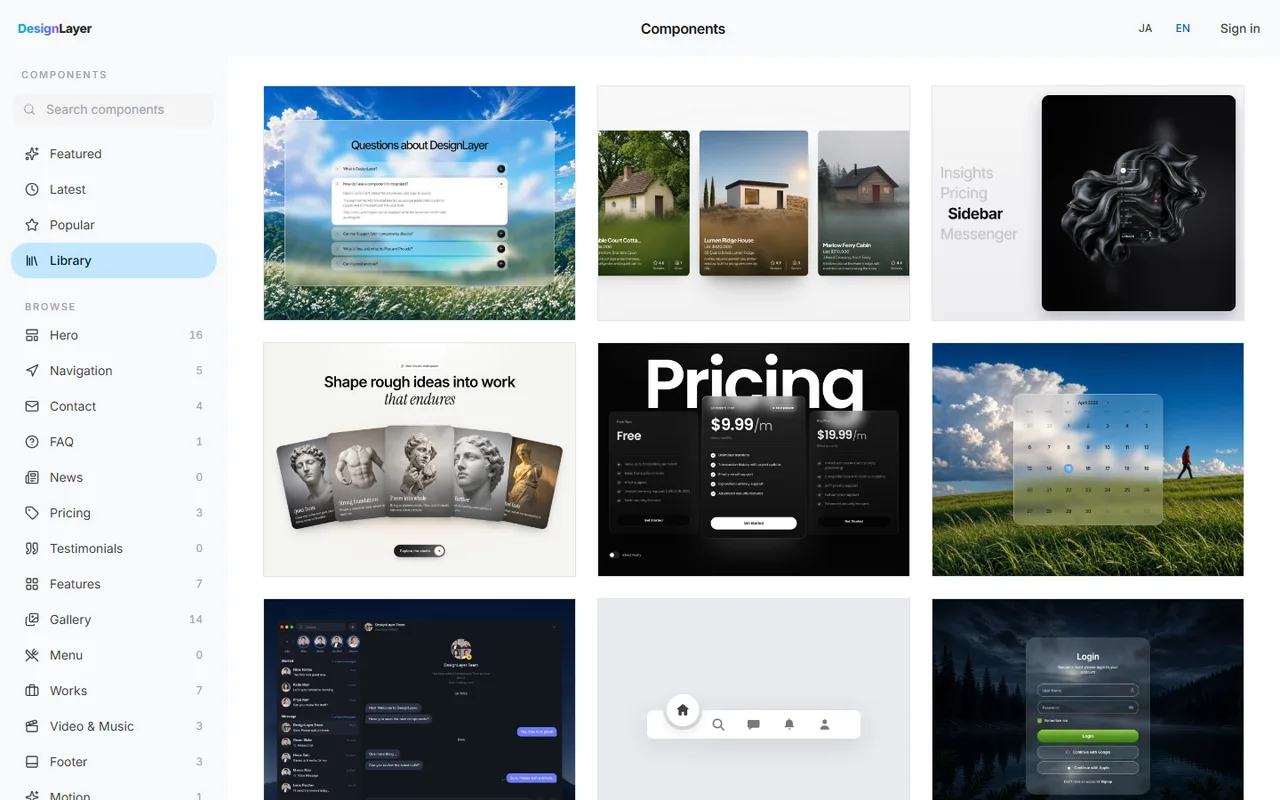
The code in this guide covers hover and entrance well. Tuning easing and delay combinations, or building scroll-linked motion with Motion from scratch, can still take half a day per section.
In that case, you can watch the real motion in the browser first and drop a finished section into your Next.js app. DesignLayer is a catalog of human-built React + Tailwind CSS sections with motion, which you preview live before you copy. Browsing needs no card. https://design-layer.com/en/components
The free plan includes the 10 Free Sample components with no monthly limit on a free account, plus 1 video prompt a month. Free cannot connect MCP. The rest of the catalog is the 30-Day Build Pass ($19 once, no auto-renewal), Lifetime Access ($79 once, first 100 buyers), or Plus ($9/month). A Free Sample can be copied with no monthly limit. Other heroes need the 30-Day Build Pass ($19 once), Lifetime Access ($79 once), or Plus ($9/month).
Tailwind CSS animation: common questions
Not for hover, entrance, or loops applied with classes. Add "use client" only to the component file that detects viewport entry or toggles visibility with state.
Summary: adding Tailwind CSS animation in Next.js
Hover, page-load entrance, and loops need only Tailwind CSS
Register one motion each for entrance and loop in your theme settings
Viewport entrance needs only a small browser-side component
Add Motion only for scroll-linked, drag, or exit motion
Keep strong motion to the hero and CTA, and use motion-safe: for people who prefer less motion
Start by adding animate-rise to your hero heading and button with 100ms steps of delay. For more on revealing content on scroll, see https://design-layer.com/en/articles/nextjs-scroll-reveal-guide


