Next.js Footer: 4-Column Layout and Brand Band, with Code
Published: September 12, 2026 · 6 min read
Build a Next.js footer that is not a link dump: grouping links, a 4-column Tailwind layout, sharing it via layout.tsx and route groups, and a big wordmark band.
A Next.js footer: fewer links, one shared component
You built a site in Next.js and added a footer at the end. You listed every link you could think of, and now it is a wall of tiny text that looks dated.
You also copied the footer into each page, so fixing one link means editing several files. These are the usual footer headaches.
A clean footer comes down to two things. Group the links into about three sets, such as Product, Resources, and Legal.
Then make the footer a single component and render it on every page from layout.tsx (the shared frame around every page). As for motion, a wordmark that fades in slowly is plenty.
Here is what this guide covers.
Why fewer links make a footer easier to use, and what makes footers look dated
Code for a 4-column footer with Tailwind CSS
Sharing the footer with the shared layout and route groups
A brand band built around a large wordmark
Keeping the footer at the bottom on short pages
Why fewer links make a better footer
People who scroll down to the footer are usually looking for something. Pricing again, a contact address, the privacy policy. The footer's job is to get them there quickly.
List every page on the site and the link they want gets buried. Group headings point to the general area, and keeping each group to four to six links makes the right one easy to spot.
The footer also sits right after the final CTA section (the block that asks visitors to sign up or buy). If the footer is as eye-catching as that block, it pulls attention away from the button you want clicked. As a rule, the footer should be one step quieter than the rest of the page.
Three things that make a footer look dated
Even if your goal is a fresher look, fixing these three first changes the impression the most.
It duplicates the sitemap
You do not need to repeat every header link in the footer. Focus on what does not fit in the header: company info, legal pages, social links.
Small text with low contrast
Tiny light-gray text may look refined, but nobody can read it. Use a size equal to or slightly smaller than body text, with enough contrast against the background. Legal links are pointless if they cannot be read.
Decorated as loudly as the final CTA
A flashy gradient or big animation right after the button you want clicked makes it unclear where the page ends. Use fewer colors in the footer and keep motion subtle.
Base code for a 4-column footer
The easiest layout to work with puts the logo and a short description on the left and three link groups on the right. Stack everything on mobile and switch to columns from md up. Keeping links in an array makes adding and reordering painless.
Wrap the link groups in nav with an aria-label. That separates it from the header navigation and helps screen reader users jump to it. There is no motion, so it works as a Server Component (rendered on the server).
import Link from "next/link";

  const groups = [
    {
      title: "Product",
      links: [
        { label: "Features", href: "/#features" },
        { label: "Pricing", href: "/pricing" },
        { label: "Articles", href: "/articles" },
      ],
    },
    {
      title: "Resources",
      links: [
        { label: "Docs", href: "/docs" },
        { label: "Blog", href: "/blog" },
        { label: "Contact", href: "/contact" },
      ],
    },
    {
      title: "Legal",
      links: [
        { label: "Terms of Service", href: "/terms" },
        { label: "Privacy Policy", href: "/privacy" },
        { label: "Legal Notice", href: "/legal" },
      ],
    },
  ];

  export function SiteFooter() {
    const year = new Date().getFullYear();

    return (
      <footer className="border-t border-zinc-200 bg-white">
        <div className="mx-auto grid max-w-6xl gap-10 px-6 py-16 md:grid-cols-4">
          <div>
            <Link href="/" className="text-lg font-semibold">Acme</Link>
            <p className="mt-3 text-sm leading-relaxed text-zinc-600">
              The fastest way to ship a landing page.
            </p>
          </div>
          <nav aria-label="Footer" className="grid gap-10 sm:grid-cols-3 md:col-span-3">
            {groups.map((group) => (
              <div key={group.title}>
                <h2 className="text-sm font-semibold text-zinc-900">{group.title}</h2>
                <ul className="mt-4 space-y-1">
                  {group.links.map((link) => (
                    <li key={link.href}>
                      <Link
                        href={link.href}
                        className="inline-flex min-h-11 items-center text-sm text-zinc-600 transition-colors hover:text-zinc-900"
                      >
                        {link.label}
                      </Link>
                    </li>
                  ))}
                </ul>
              </div>
            ))}
          </nav>
        </div>
        <div className="border-t border-zinc-200">
          <p className="mx-auto max-w-6xl px-6 py-6 text-xs text-zinc-500">
            © {year} Acme Inc.
          </p>
        </div>
      </footer>
    );
  }
About the copyright year
new Date().getFullYear() runs on the server. On statically generated pages, it shows the year the site was built. Redeploy after the new year, or hard-code the year and update it annually.
Leave room to tap
Adding min-h-11 (44px) to each link makes it harder to hit the wrong one on a phone. Giving every link its own tap area works better than packing them into tight lines.
Share the footer across pages with layout.tsx
In the App Router, anything in app/layout.tsx shows up on every page. Put the footer there and you no longer copy it per page, and link fixes happen in one place.
On pages with little content, the footer can float in the middle of the screen. To fix that, make body a min-h-dvh flex column, which is at least one screen tall.
Then give main (the page content) flex-1 so it fills the leftover height. The footer now always sits at or below the bottom of the viewport.
import { SiteFooter } from "@/components/SiteFooter";
  import "./globals.css";

  export default function RootLayout({ children }: { children: React.ReactNode }) {
    return (
      <html lang="en">
        <body className="flex min-h-dvh flex-col">
          <main className="flex-1">{children}</main>
          <SiteFooter />
        </body>
      </html>
    );
  }
Separate footers for marketing pages and the app
If the landing page should have a footer but the logged-in app should not, use route groups. Folders in parentheses, such as app/(marketing) and app/(app), get their own shared layout without changing URLs. Put the footer only in the (marketing) layout.
Then remove main and the footer component from the root app/layout.tsx, so the body just renders children (the nested page content).
import { SiteFooter } from "@/components/SiteFooter";

  export default function MarketingLayout({ children }: { children: React.ReactNode }) {
    return (
      <>
        <main className="flex-1">{children}</main>
        <SiteFooter />
      </>
    );
  }
A footer brand band with a large wordmark
A popular way to make a footer memorable is a huge wordmark under the links. Scale the text with the viewport width and let the bottom half spill out of view, and the end of the page becomes unmistakable.
A gradient that fades to transparent toward the bottom helps the text blend into the background. It is decorative, so mark it aria-hidden to keep screen readers from reading it.
export function FooterWordmark() {
    return (
      <div aria-hidden="true" className="overflow-hidden">
        <p className="translate-y-[20%] select-none bg-gradient-to-b from-zinc-900 to-transparent bg-clip-text text-center text-[18vw] font-bold leading-none tracking-tighter text-transparent">
          Acme
        </p>
      </div>
    );
  }
Animate the footer slowly, and only once
If you animate the wordmark, have it fade in gradually when it enters the viewport. Motion's (formerly Framer Motion) whileInView with viewport={{ once: true }} makes it play a single time.
See https://design-layer.com/en/articles/nextjs-framer-motion-guide for setup. For link hover, a color change is enough.
Pairing the footer with the header
If your header is transparent and floating, an opaque footer background makes the start and end of the page clearer. See https://design-layer.com/en/articles/nextjs-modern-header-guide for the header.
Copying a finished footer section
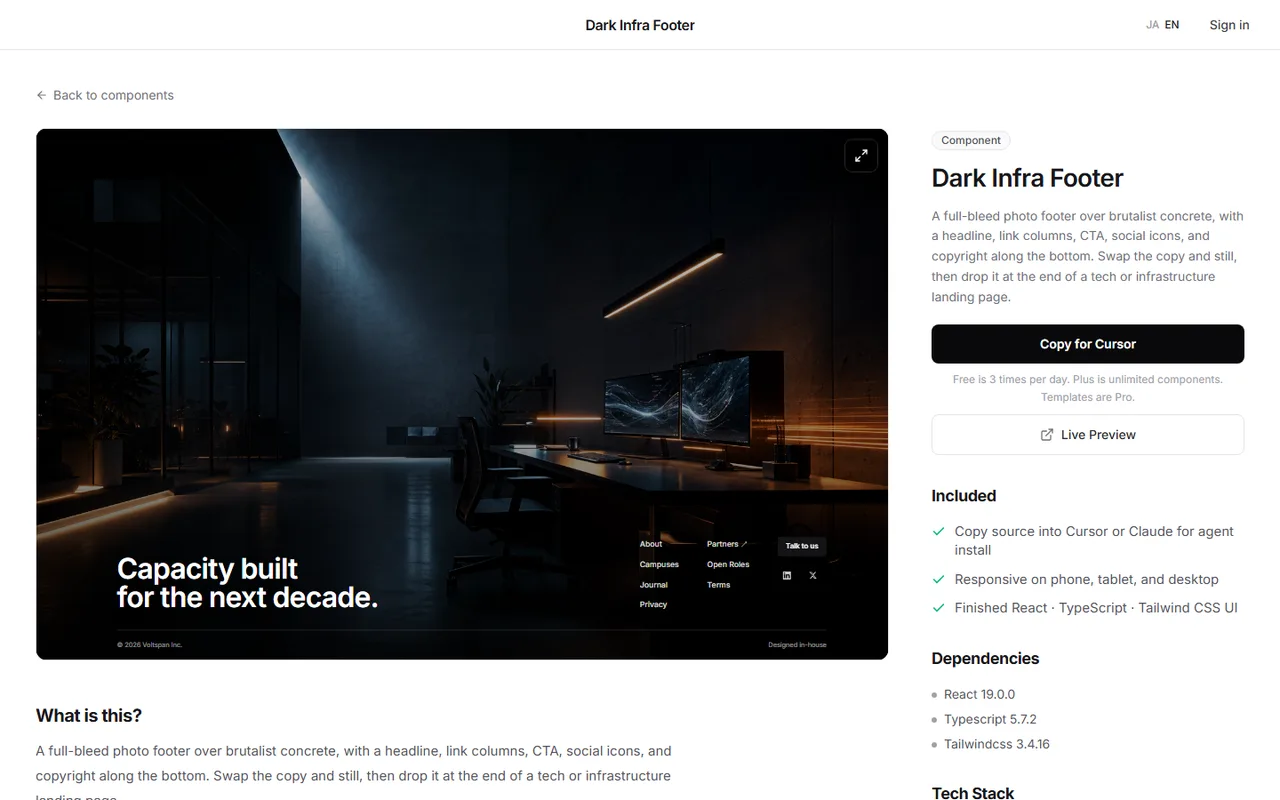
A footer with big typography, a slowly moving background, and polished link hovers can take half a day to build yourself. If you want to settle the look first, starting from a finished section is another option.
DesignLayer is a catalog of human-built React + Tailwind sections with motion, each with a live preview in the browser. You can check how a footer moves before using it. Browsing is free. https://design-layer.com/en/components
After copying, replace the links and legal pages such as the privacy policy right away. Never ship with placeholder links.
Footer checklist before launch
Legal links such as Terms and Privacy Policy are all there (if you sell to consumers in Japan, a Specified Commercial Transactions Act notice is also required)
No placeholder links (# or example.com) remain
Focus order feels natural when tabbing through
Links have about 44px of tap area on mobile
Colors and decoration do not clash with the button section above
Internal links do not carry an unnecessary target="_blank"
Next.js footer: common questions
Questions that come up often when building a footer in Next.js.
If the whole site shares one footer, put it in layout.tsx. If only the landing page needs a special footer, give it its own shared layout through a route group, or place it at the end of that page.
Summary: building a footer in Next.js
Group links into about three sets of four to six links each
Keep text size and contrast readable, one step quieter than the final CTA
Make the footer one component and render it from the shared layout
Use route groups to separate marketing pages from the app
Build the brand band with a large wordmark and animate it slowly, once
Start by sorting your current footer links into three groups. For the CTA section that sits right above the footer, see https://design-layer.com/en/articles/nextjs-cta-section-guide


