Animated Pricing Section in React: 4 Ready-Made Designs to Copy (and How to Pick One)
Published: October 18, 2026 · 7 min read
Four ready-made React pricing sections: rolling prices, a plan switch, an ROI calculator and a membership block. Pick by pricing model, copy into Cursor.
The quickest way to get an animated pricing section in React
Start from a finished section and swap in your own plans. Pick the design by your pricing model, not by looks:
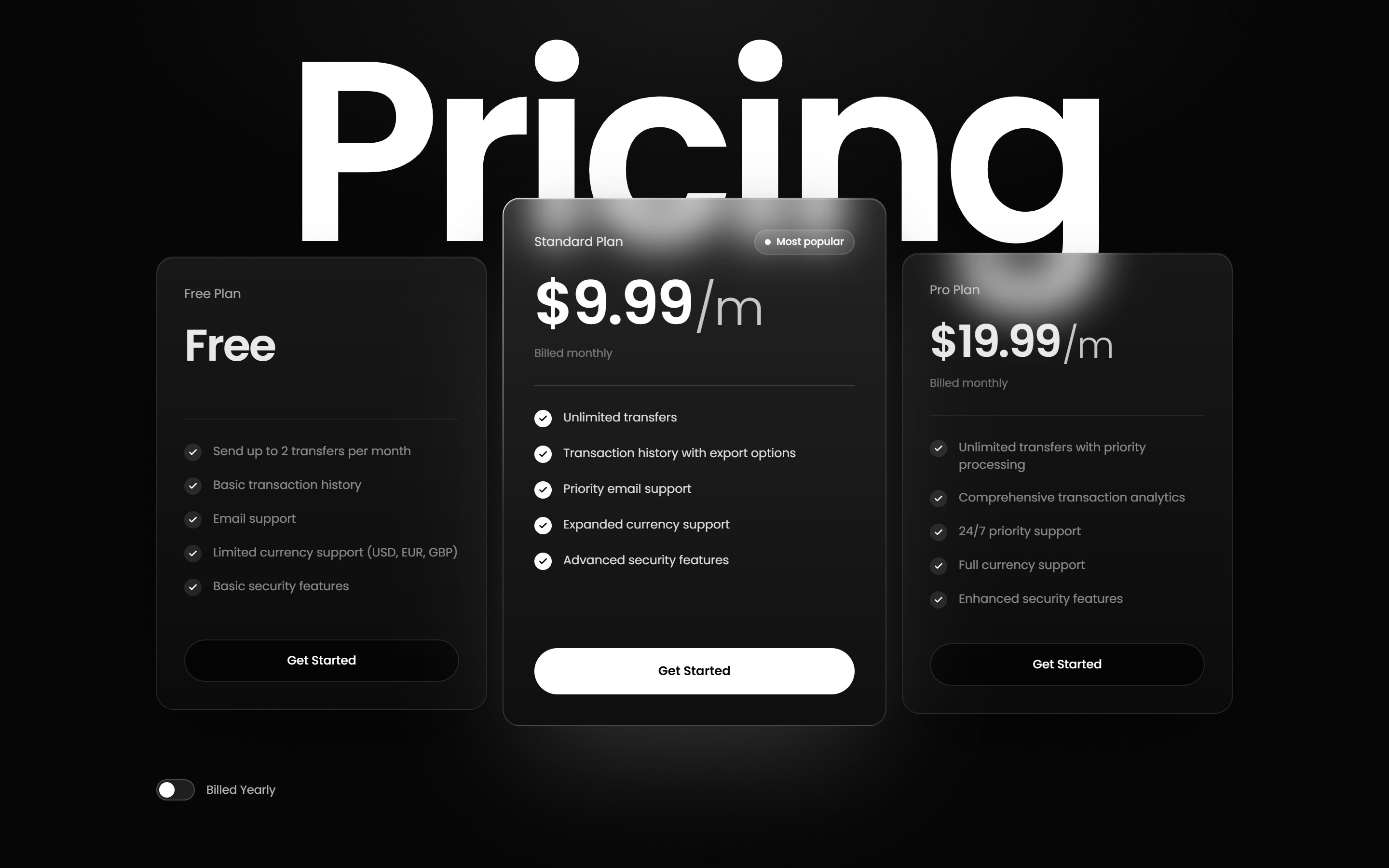
Three tiers with monthly and yearly billing: https://design-layer.com/en/components/kinetic-service-pricing . Prices roll digit by digit and a Billed Yearly switch rolls them to yearly rates.
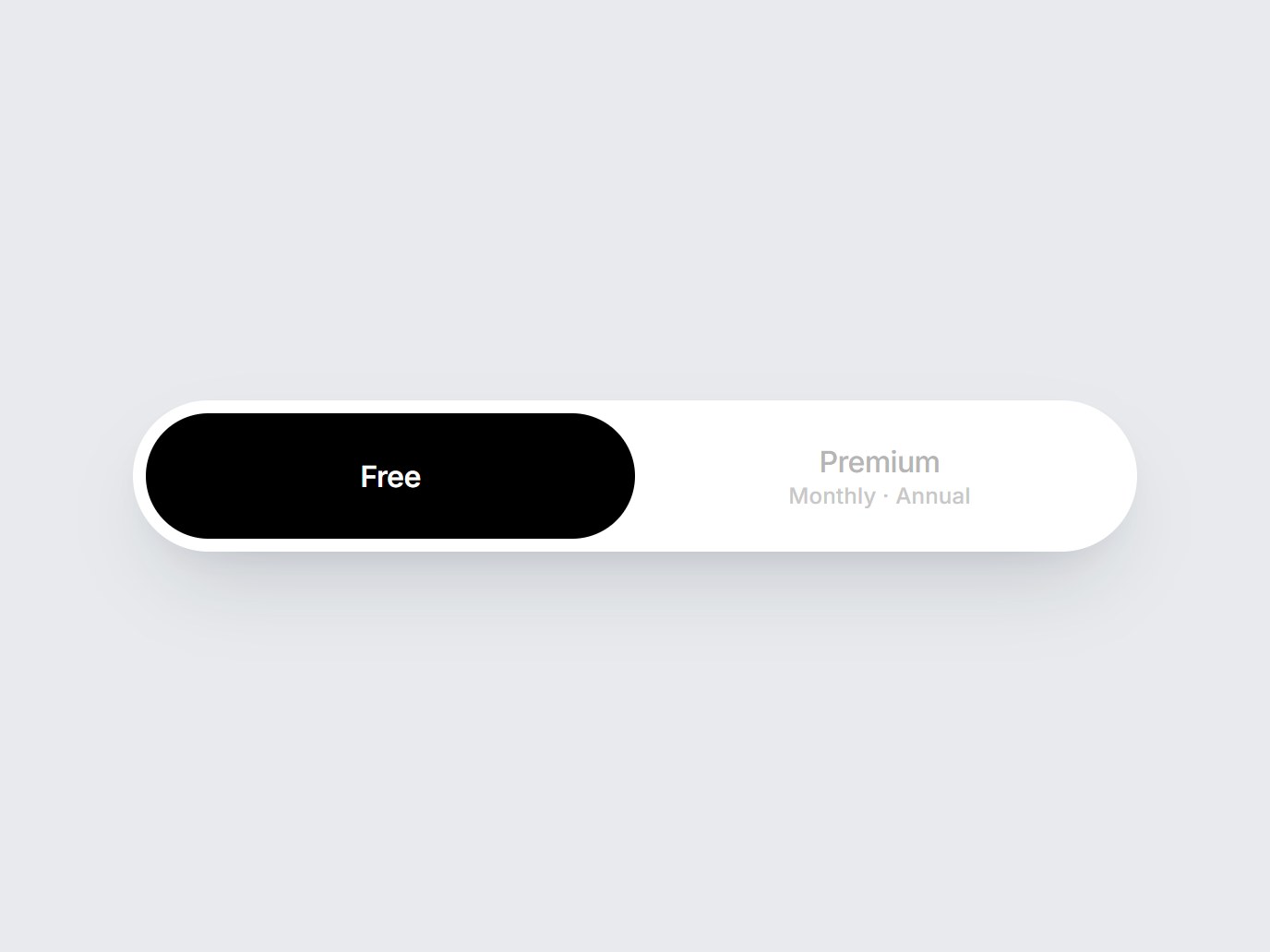
Free vs. paid, with a billing cycle choice: https://design-layer.com/en/components/plan-pill-switch . The selected plan slides into a black capsule.
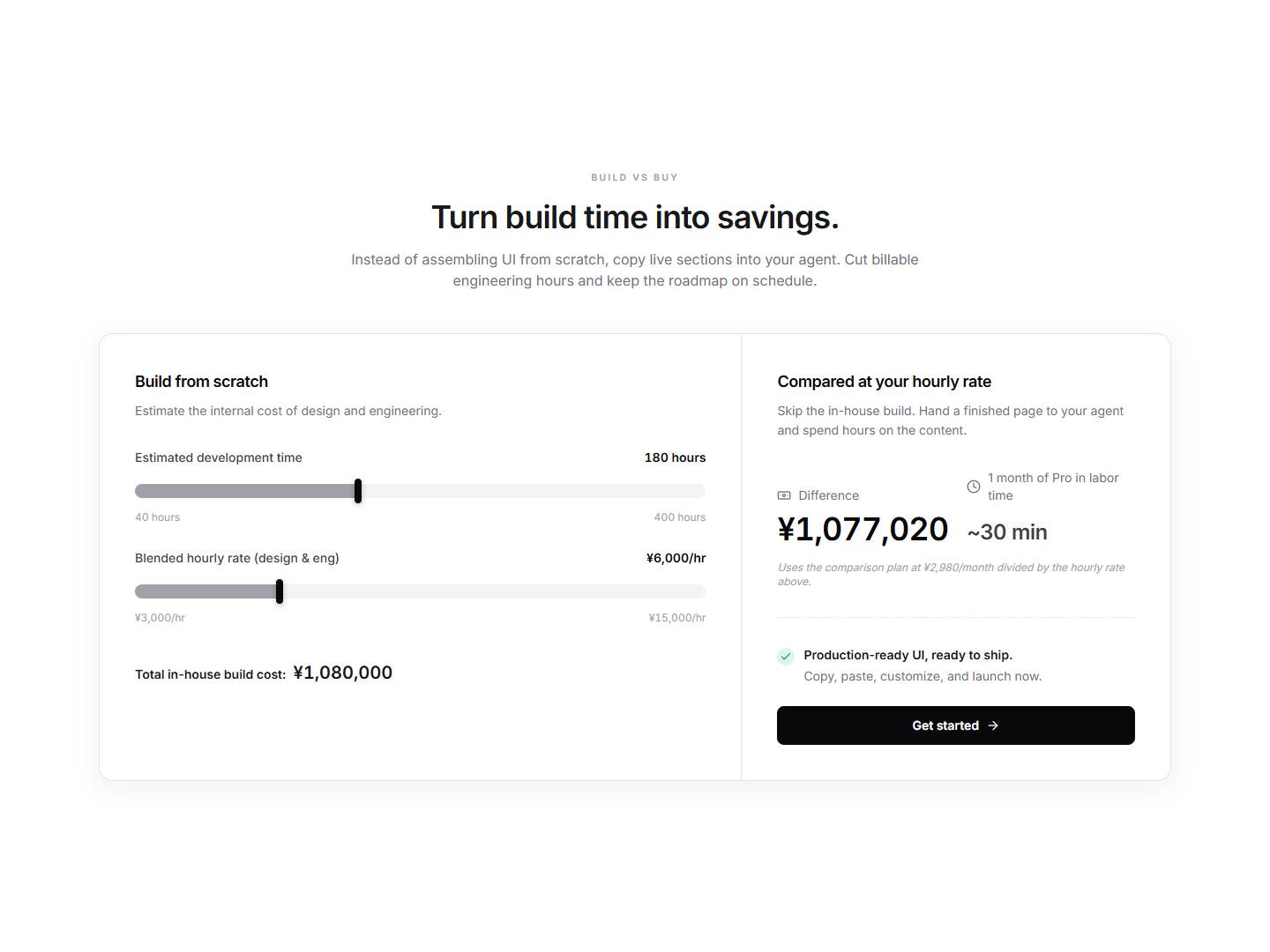
A price you need to justify: https://design-layer.com/en/components/pricing-roi-calculator . Visitors move sliders and see the gap versus your monthly plan.
One membership price: https://design-layer.com/en/components/owners-pricing-section . A single price block over a photo.
All four are React + TypeScript + Tailwind CSS. You can preview every one for free. Copying the source is 3 times a day on the Free plan, and unlimited on Plus for $9/month ( https://design-layer.com/en/pricing ), cancel anytime.
Why animate a pricing section at all?
The pricing section is where a visitor decides. It is also the section people read the least carefully. Most visitors scan for the cheapest number, glance at the button, and leave if nothing tells them which plan is meant for them.
Motion helps here only when it explains something:
A change. When a visitor switches from monthly to yearly, rolling the digits shows that the number changed, and by how much. A hard swap is easy to miss.
A recommendation. A lifted, brighter center card says "this one" without a wall of badges.
Value. A calculator that reacts as the visitor moves a slider turns "is $X worth it?" into a number they produced themselves.
Motion that does none of these things (a bouncing card, a looping gradient) is decoration. On a pricing page it competes with the price.
Sound familiar? Building it yourself takes longer than it looks
If you have built a pricing section from scratch, you have probably hit some of these:
The prices jump in width when they change, so the whole row of cards shifts when the toggle flips.
The monthly/yearly state lives in one card, and the other two cards forget to update.
The "featured" card is scaled up, and on a phone it clips or overlaps its neighbors.
The rolling-number effect works, but now you need a separate yearly price per plan and somewhere to keep them.
It looks fine on your machine, and then the CTA buttons don't line up because each card has a different number of features.
None of this is hard on its own. Together it is easily a day of work for one section. That is the case for starting from a finished one. If you would rather build it, our tutorial Next.js Pricing Table: 3 Plan Cards and a Monthly/Yearly Toggle walks through the code step by step: https://design-layer.com/en/articles/nextjs-pricing-table-guide .
Which animated pricing pattern fits your pricing model?
Start from what your pricing has to communicate. This table maps the common pricing models to the four pricing components in the DesignLayer catalog.
Your pricing | What the section must do | Component | Motion | Extra dependency |
|---|---|---|---|---|
3 tiers, monthly + yearly | Compare tiers, push one, show the yearly change | Kinetic Service Pricing | Wordmark rises letter by letter, cards sweep up, prices roll digit by digit, light orbits the featured card | lucide-react |
Free + one paid plan | Make the choice binary, then pick a cycle | Plan Pill Switch | Selected plan slides into a black capsule | none |
Price that needs justifying (B2B, agency, tools that replace hours) | Show value in the visitor's own numbers | Pricing ROI Calculator | Sliders update the result live | lucide-react |
One membership or subscription | Make one price feel premium | Owners Pricing | None (static layout) | none |
Every component also uses React 19, TypeScript 5.7 and Tailwind CSS 3.4, as listed on each component page.
The 4 designs, one by one
Kinetic Service Pricing: three tiers with rolling prices
Kinetic Service Pricing ( https://design-layer.com/en/components/kinetic-service-pricing ) is a black pricing section with a giant "Pricing" wordmark behind three frosted-glass plan cards. The featured center plan is larger, brighter and lifted, with light orbiting its edge and a magnetic white CTA. The wordmark rises letter by letter, the cards sweep up over it, the prices roll digit by digit, and the Billed Yearly switch rolls them to yearly rates.
Use it when: you sell a classic SaaS ladder (for example Starter / Pro / Team) and offer yearly billing.
What you change: plan names, prices, features, button copy and the accent color.
Watch out for: you set the yearly prices yourself. Decide them before you paste, so your agent can fill them in one pass.
Plan Pill Switch: free vs. paid in one tap
Plan Pill Switch ( https://design-layer.com/en/components/plan-pill-switch ) is a white pill switch. The selected plan slides into a black capsule, with Free on the left and Premium with Monthly · Annual on the right. It is a control, not a full section: it is meant to sit at the top of a pricing block.
Use it when: you have a free plan and one paid plan, and the real question is "free or paid?".
What you change: the labels.
Pair it with: your own plan cards, or the cards from Kinetic Service Pricing if you want both.
Pricing ROI Calculator: let visitors justify the price
Pricing ROI Calculator ( https://design-layer.com/en/components/pricing-roi-calculator ) is a light section with a heading and a two-column card. Sliders on the left estimate in-house hours and hourly rate. The right column shows the gap versus a monthly plan and the labor-time equivalent.
Use it when: your price only makes sense next to what it replaces (hours of work, an agency, a hire).
What you change: the copy and the comparison amount.
Watch out for: keep the default slider values realistic for your buyer. A calculator that starts at an inflated number reads as a sales trick.
Owners Pricing: one premium membership price
Owners Pricing ( https://design-layer.com/en/components/owners-pricing-section ) is a membership pricing block over a night-office photo with a 78% black overlay. The price, two-column perks, store badges and a product still sit on top.
Use it when: you have one price (a membership, an app subscription) and want it to feel like a product, not a table.
What you change: the copy and the photos.
Watch out for: remove the sample store badges if you are not on those stores.
How do you add one to your Next.js project with Cursor or Claude Code?
DesignLayer components are built for handing to an AI coding agent. The whole flow is four steps.
Check your project. It should be a Next.js App Router project with TypeScript, Tailwind CSS, and the cn helper at @/lib/utils (npm install clsx tailwind-merge). The details are in What your project needs: https://design-layer.com/en/docs/project-setup .
Pick by watching. Open the component page and play the Live Preview. Check it at phone width, too.
Press Copy for Cursor. One copy puts the project assumptions, a live preview URL, the files with their repo paths, the npm install line and implementation guidelines on your clipboard. See Hand a section to your agent: https://design-layer.com/en/docs/copy-for-cursor .
Paste it into Cursor Agent or Claude, and add your plans. For example:
Use this copy as-is.
Add the section to app/(marketing)/pricing/page.tsx.
Write each file to the path on the first line of its code fence, and run Install NPM dependencies.
Open the Live visual source of truth URL and match its motion, type, and spacing.
Then replace the sample plans with ours:
- Starter: $12/month, $120/year. Features: ...
- Pro (featured): $29/month, $290/year. Features: ...
- Team: $79/month, $790/year. Features: ...
Point each button to /signup?plan=<id>&cycle=<monthly|yearly>.
Tailwind version compatibility
If your project is on a different Tailwind major version from the one the component lists, say so in the prompt so the agent adapts the classes.
Should you build it, use a free block, or copy a finished section?
Option | Good when | Trade-off |
|---|---|---|
Build from scratch | You want full control and have a day to spend | You solve width jumps, shared toggle state and mobile clipping yourself. Start with our tutorial: https://design-layer.com/en/articles/nextjs-pricing-table-guide . |
Free copy-paste blocks | You need a standard card layout fast | Many free blocks are a single card or a basic grid. You may still add the toggle, the motion and the CTA wiring. |
A finished motion section (DesignLayer) | You want the whole section, with motion already timed, and you build with an AI agent | Fewer pricing designs than big block libraries (4 today). The look is opinionated, so check the preview first. |
What does it cost to copy these on DesignLayer?
Free | Plus | |
|---|---|---|
Price | $0, no card | $9/month (USD, tax included) |
Component preview | Unlimited | Unlimited |
Component source copies | 3 per day (resets at 00:00 Japan time) | Unlimited |
Video prompt copies | 1 per day | Unlimited |
MCP connection (Cursor, Claude Code) | Not included | Included |
Cancel | — | Anytime from your account. Plus stays active until the end of the period you paid for. |
Source: https://design-layer.com/en/pricing and https://design-layer.com/en/docs/plans .
A worked example. A complete pricing page usually needs more than the pricing cards. For instance:
Kinetic Service Pricing for the tiers
Pricing ROI Calculator below it, to justify the top tier
Magnetic CTA Button for the final call to action ( https://design-layer.com/en/components/magnetic-cta-button )
Numbered FAQ Panel for billing questions ( https://design-layer.com/en/components/numbered-faq-panel )
That is 4 copies, one more than the Free plan allows in a day. Copying the same section again later (for example after you change your mind on a design) spends another copy. If you are building the page this week, one month of Plus covers the whole build, and you can cancel when the page ships.
Animated pricing sections: common questions
Yes. On DesignLayer you can preview all four pricing sections for free, and copy up to 3 components a day on the Free plan without a card. Plus ($9/month) removes the daily limit.
Get your pricing section live today
Open the pricing components ( https://design-layer.com/en/components/kinetic-service-pricing ) and play the previews. It is free and needs no account.
Copy the one that fits your pricing model into Cursor or Claude Code with Copy for Cursor.
Building the whole page? Get Plus for $9/month for unlimited copies and MCP access, and cancel when you ship: https://design-layer.com/en/pricing
Related reading: https://design-layer.com/en/articles/nextjs-saas-landing-page-guide · https://design-layer.com/en/articles/nextjs-magnetic-button-guide · https://design-layer.com/en/articles/nextjs-faq-accordion-guide