Copy-Paste React Components: 3 Rules for TSX + Tailwind Picks
Published: September 12, 2026 · 4 min read
Copied a React component that broke in your Next.js app? Three rules for TSX + Tailwind sections that paste cleanly, a pre-paste checklist, and what to edit.
The copy-paste React component does not work in your project
A component looked great in its demo, so you copied it into your Next.js project. Then you find an unfamiliar styling setup mixed in, a package you have never heard of, or motion that does not reproduce. Half a day of fixes later, you rewrite it yourself anyway.
This guide covers what to look for when you hunt for copy-paste React components, what to check before pasting, and exactly what to change afterward.
Why copy-pasting on looks alone costs half a day
Most copy-paste failures come from choosing on looks alone. Whether a component is copy-paste ready depends on whether it drops into your current repo as is.
Code that tends to cost you time:
Depends on a styling system your project does not use, such as CSS-in-JS (styles written inside JavaScript)
Assumes a custom runtime or build setup
Comes from a gallery of screenshots, so you paste without knowing the motion or dependencies
Never lists the npm packages it needs
The other trap is granularity. Parts like buttons and inputs are well covered by shadcn/ui and similar libraries.
What takes time are section-sized blocks — hero, pricing, FAQ — with spacing and motion already put together. Search for parts and all of that assembly is still on you.
Three rules for picking copy-paste React components
Once you switch your target to finished sections, check these three.
1. You can watch the motion in a live preview
You cannot judge motion from a still. Choose blocks that run for real in the browser so you can check hover and scroll-entrance timing before pasting. Agreeing on “this motion” as a team before copying cuts rework later.
2. The component is written in TSX + Tailwind
For a Next.js project, React (TypeScript) with Tailwind CSS is the baseline. The class names carry over directly, so an agent has little to rewrite.
3. npm dependencies are listed
Pick blocks that list the packages they need, like an animation library (motion, formerly framer-motion) or icons (lucide-react). Then you install them before pasting, or ask the agent to add them, and that is it.
Checklist before you copy-paste a React component
With a candidate in hand, read the top of the file and check these five. It takes seconds and prevents most post-paste errors.
Are there imports for packages you do not have?
Is there a "use client" at the top — the marker that makes it run in the browser? (Animated components need it)
Where do the image and video URLs point?
How far are the colors and spacing from your design tokens?
Have you decided where it goes (for example components/sections/) and which page imports it?
If the top looks like this, you know you need motion and lucide-react.
"use client";

  import { motion } from "motion/react";
  import { ArrowRight } from "lucide-react";

  // If missing, install before pasting
  // npm install motion lucide-react
Find copy-paste-ready sections on DesignLayer
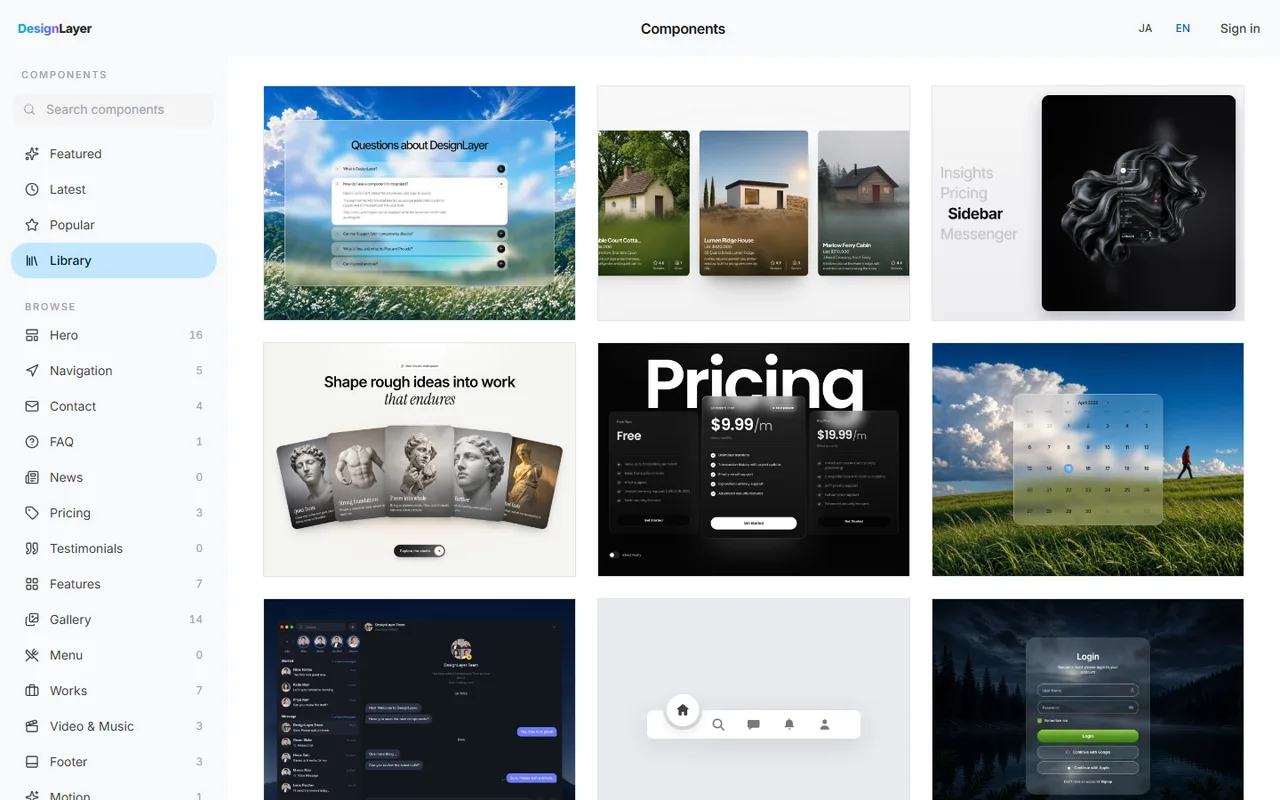
DesignLayer is one place to find sections that meet all three rules. It is a catalog of human-built React + Tailwind sections with motion that you watch as live previews before copying. Browsing needs no account and no card.
Filter the component list by use: hero, pricing, footer, and so on
Open a card and check the motion by scrolling and hovering
Use Copy for Cursor to copy integration instructions, the live preview URL, the TSX, and npm dependencies together
Paste into Cursor or Claude with a short note on placement and swaps
Because dependencies are written into the copy, the agent can read the “packages” and “placement” items from the checklist on its own. A reusable prompt for pasting is in https://design-layer.com/en/articles/claude-cursor-copy-paste-components.
After you copy-paste, change only four things
Once a finished section is in, these are the only four places to touch:
Copy: headings, body text, and CTA in your product’s words
Links: point CTA and nav links at your own pages
Images: keep the demo URLs at first, then swap in the images you will publish
Tokens: match colors, fonts, and spacing to your existing design tokens
There is no need to rebuild the easing (how motion speeds up and slows down) or delays. Start from the values you saw in the preview and nudge them to fit the page’s rhythm. Rebuild the motion from scratch and you throw away the time copy-paste saved you.
Who copy-paste-ready sections fit
You build landing or marketing pages with Next.js + Tailwind
You have the parts, but no time to assemble animated sections
You want Cursor or Claude to handle the integration
On a project without Tailwind, you will need to convert classes, which adds work. If you only need parts, basic building blocks like shadcn/ui fit better.
A free account copies the 10 Free Sample components with no monthly limit. Full catalog copies and MCP are the 30-Day Build Pass ($19 once, no auto-renewal), Lifetime Access ($79 once, first 100 buyers), or Plus ($9/month). A Free Sample can be copied with no monthly limit. The rest of the catalog is the 30-Day Build Pass ($19 once), Lifetime Access ($79 once), or Plus ($9/month).
If you pull many blocks a day, Plus with unlimited copies fits better.
Copy-paste React components: common questions
Terms differ by source, so check each one before you ship. For DesignLayer, read the site’s terms of service first.
Summary: choosing copy-paste React components
Copy-paste readiness depends on whether it drops into your repo as is, not on looks
Search for finished sections with spacing and motion, not parts
Three rules: runs live, TSX + Tailwind, dependencies listed
After pasting, change only copy, links, images, and tokens. Do not rebuild the motion
Start by finding one section your current page is missing. Previews need no card. https://design-layer.com/en/components
For the flow into Cursor, see https://design-layer.com/en/articles/cursor-react-motion-components-guide. For comparing catalogs, see https://design-layer.com/en/articles/21st-dev-alternative-for-cursor.


