DesignLayer
Liquid Glass Login
Back to components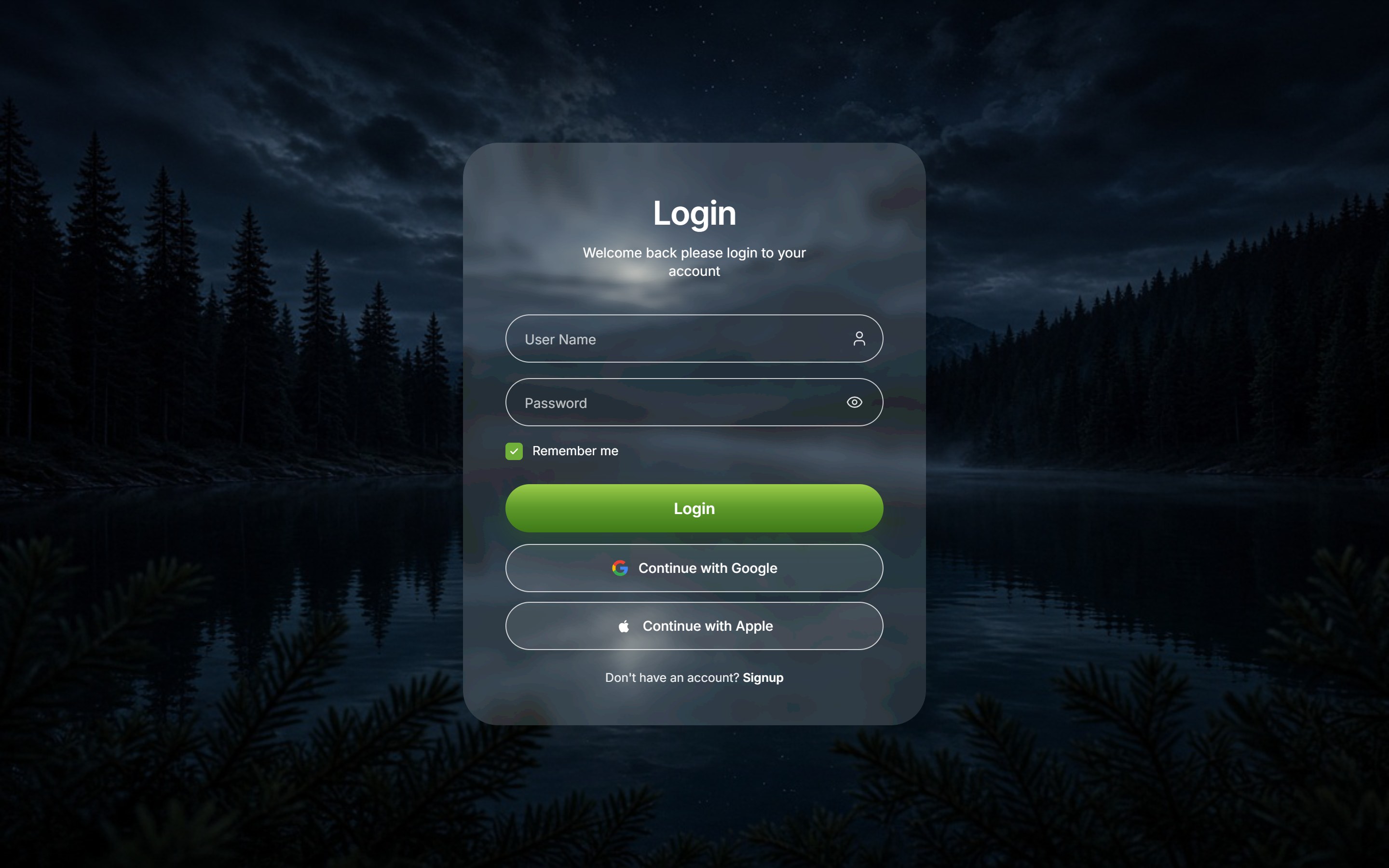
What is this?
A full-viewport nature login: a liquid-glass card over a landscape photo with username, password, Remember me, a green Login button, then Google and Apple sign-in. Swap the copy and background photo, then drop it onto an app or SaaS login screen.
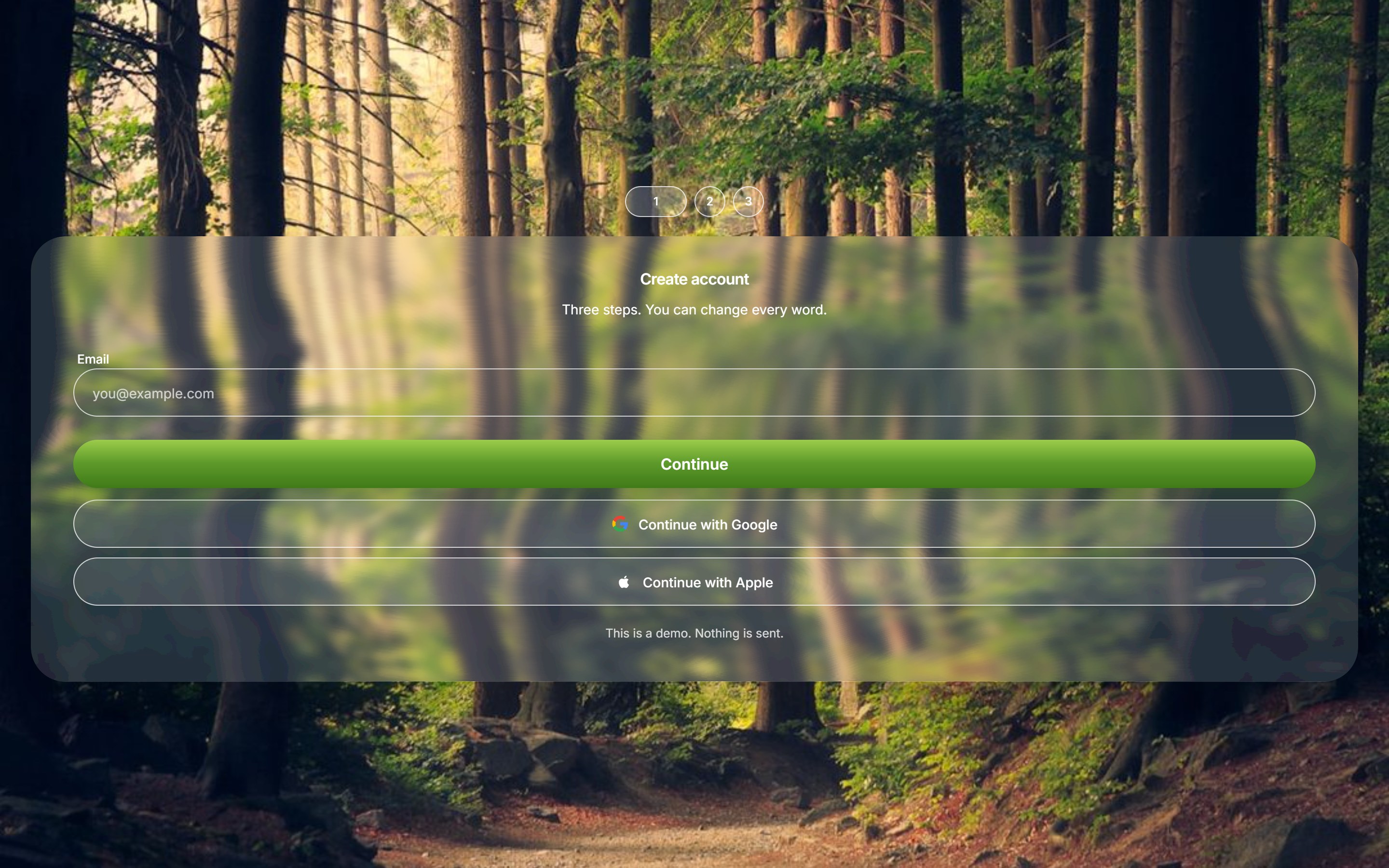
Need the signup screen too? Liquid Glass Signup Steps
View Full Source Code (Free Sample)
This is the component's real TSX. You can read it before you buy, including while signed out.
src/components/ui/liquid-glass-login.tsx
"use client";

import {
  useId,
  useState,
  type CSSProperties,
  type FormEvent,
  type ReactNode,
} from "react";
import { Eye, EyeOff, User } from "lucide-react";
import { GlassEffect, GlassFilter } from "@/components/ui/liquid-glass";
import { coerceDisplayText } from "@/generation/lib/coerceActionNodes";
import { cn } from "@/lib/utils";

export const LIQUID_GLASS_LOGIN_BG_SRC = "https://design-layer.com/dev/liquid-glass-login/nature-dark.png";

export type LiquidGlassLoginValues = {
  username: string;
  password: string;
  remember: boolean;
};

export type LiquidGlassLoginProps = {
  title?: string;
  subtitle?: string;
  usernamePlaceholder?: string;
  passwordPlaceholder?: string;
  rememberLabel?: string;
  submitLabel?: string;
  googleLabel?: string;
  appleLabel?: string;
  signupPrompt?: string;
  signupLabel?: string;
  signupHref?: string;
  googleHref?: string;
  appleHref?: string;
  defaultRemember?: boolean;
  onSubmit?: (values: LiquidGlassLoginValues) => void;
  onGoogleSignIn?: () => void;
  onAppleSignIn?: () => void;
  className?: string;
  contentClassName?: string;
};

const UI_FONT =
  'Inter, "SF Pro Display", "Helvetica Neue", Helvetica, Arial, ui-sans-serif, sans-serif';

function asPlainString(value: ReactNode, fallback: string): string {
  const text = coerceDisplayText(value);
  if (typeof text === "string" && text.trim()) return text;
  if (typeof text === "number" || typeof text === "bigint") return String(text);
  return fallback;
}

function GoogleMark({ className }: { className?: string }) {
  return (
    <svg
      viewBox="0 0 24 24"
      className={className}
      aria-hidden
      focusable="false"
    >
      <path
        fill="#4285F4"
        d="M22.56 12.25c0-.78-.07-1.53-.2-2.25H12v4.26h5.92c-.26 1.37-1.04 2.53-2.21 3.31v2.77h3.57c2.08-1.92 3.28-4.74 3.28-8.09z"
      />
      <path
        fill="#34A853"
        d="M12 23c2.97 0 5.46-.98 7.28-2.66l-3.57-2.77c-.98.66-2.23 1.06-3.71 1.06-2.86 0-5.29-1.93-6.16-4.53H2.18v2.84C3.99 20.53 7.7 23 12 23z"
      />
      <path
        fill="#FBBC05"
        d="M5.84 14.09c-.22-.66-.35-1.36-.35-2.09s.13-1.43.35-2.09V7.07H2.18C1.43 8.55 1 10.22 1 12s.43 3.45 1.18 4.93l2.85-2.22.81-.62z"
      />
      <path
        fill="#EA4335"
        d="M12 5.38c1.62 0 3.06.56 4.21 1.64l3.15-3.15C17.45 2.09 14.97 1 12 1 7.7 1 3.99 3.47 2.18 7.07l3.66 2.84c.87-2.6 3.3-4.53 6.16-4.53z"
      />
    </svg>
  );
}

function AppleMark({ className }: { className?: string }) {
  return (
    <svg
      viewBox="0 0 24 24"
      className={className}
      aria-hidden
      focusable="false"
    >
      <path
        fill="currentColor"
        d="M16.365 12.78c-.02-2.16 1.76-3.2 1.84-3.25-1.01-1.47-2.57-1.67-3.12-1.69-1.32-.14-2.59.78-3.26.78-.68 0-1.72-.76-2.83-.74-1.45.02-2.8.85-3.55 2.16-1.52 2.64-.39 6.54 1.09 8.68.72 1.05 1.58 2.22 2.71 2.18 1.09-.05 1.5-.7 2.81-.7 1.31 0 1.68.7 2.83.67 1.17-.02 1.91-1.06 2.62-2.12.83-1.21 1.17-2.39 1.19-2.45-.03-.01-2.27-.87-2.33-3.52zM14.54 6.54c.59-.72.99-1.72.88-2.72-.85.04-1.88.57-2.49 1.28-.55.63-1.04 1.65-.91 2.62.96.07 1.94-.49 2.52-1.18z"
      />
    </svg>
  );
}

function FieldShell({ children }: { children: ReactNode }) {
  return (
    <div className="relative">
      <div
        className="pointer-events-none absolute inset-0 rounded-full border border-white/75"
        aria-hidden
      />
      {children}
    </div>
  );
}

/**
 * 自然風景のフルブリード背景に浮かぶリキッドガラスのログインカード。
 * ユーザー名/パスワード、Remember me、Login、Google / Apple。
 */
export function LiquidGlassLogin({
  title = "Login",
  subtitle = "Welcome back please login to your account",
  usernamePlaceholder = "User Name",
  passwordPlaceholder = "Password",
  rememberLabel = "Remember me",
  submitLabel = "Login",
  googleLabel = "Continue with Google",
  appleLabel = "Continue with Apple",
  signupPrompt = "Don't have an account?",
  signupLabel = "Signup",
  signupHref = "#",
  googleHref = "#",
  appleHref = "#",
  defaultRemember = true,
  onSubmit,
  onGoogleSignIn,
  onAppleSignIn,
  className,
  contentClassName,
}: LiquidGlassLoginProps) {
  const heading = asPlainString(title, "Login");
  const lead = asPlainString(
    subtitle,
    "Welcome back please login to your account",
  );
  const userHint = asPlainString(usernamePlaceholder, "User Name");
  const passHint = asPlainString(passwordPlaceholder, "Password");
  const rememberText = asPlainString(rememberLabel, "Remember me");
  const loginText = asPlainString(submitLabel, "Login");
  const googleText = asPlainString(googleLabel, "Continue with Google");
  const appleText = asPlainString(appleLabel, "Continue with Apple");
  const signupLead = asPlainString(signupPrompt, "Don't have an account?");
  const signupText = asPlainString(signupLabel, "Signup");

  const fieldId = useId();
  const usernameId = `${fieldId}-username`;
  const passwordId = `${fieldId}-password`;
  const [username, setUsername] = useState("");
  const [password, setPassword] = useState("");
  const [remember, setRemember] = useState(defaultRemember);
  const [showPassword, setShowPassword] = useState(false);

  const handleSubmit = (event: FormEvent<HTMLFormElement>) => {
    event.preventDefault();
    onSubmit?.({ username, password, remember });
  };

  const handleProvider = (
    event: FormEvent,
    href: string,
    callback?: () => void,
  ) => {
    if (!href || href === "#") event.preventDefault();
    callback?.();
  };

  return (
    <>
      <GlassFilter />
      <GlassEffect
        className={cn(
          "w-[min(100%,480px)] rounded-[36px] border-0 font-normal",
          className,
        )}
        contentClassName="w-full"
        overlay="rgba(255, 255, 255, 0.14)"
        rimShadow="none"
        blur={6}
        style={
          {
            fontFamily: UI_FONT,
            boxShadow: "0 24px 60px rgba(0, 0, 0, 0.22)",
          } as CSSProperties
        }
      >
        <form
          className={cn(
            "flex w-full flex-col px-9 pb-9 pt-12 sm:px-11 sm:pb-10 sm:pt-14",
            contentClassName,
          )}
          onSubmit={handleSubmit}
        >
          <h1 className="text-center text-[34px] font-semibold leading-none tracking-tight text-white">
            {heading}
          </h1>
          <p className="mx-auto mt-3.5 max-w-[18rem] text-center text-[14px] leading-snug text-white/92">
            {lead}
          </p>

          <div className="mt-9 space-y-4">
            <FieldShell>
              <label className="sr-only" htmlFor={usernameId}>
                {userHint}
              </label>
              <input
                id={usernameId}
                name="username"
                autoComplete="username"
                value={username}
                onChange={(event) => setUsername(event.target.value)}
                placeholder={userHint}
                className="h-[50px] w-full rounded-full bg-transparent py-0 pl-5 pr-12 text-[14px] text-white outline-none placeholder:text-white/70"
              />
              <User
                className="pointer-events-none absolute right-4 top-1/2 h-[18px] w-[18px] -translate-y-1/2 text-white/85"
                strokeWidth={1.7}
              />
            </FieldShell>

            <FieldShell>
              <label className="sr-only" htmlFor={passwordId}>
                {passHint}
              </label>
              <input
                id={passwordId}
                name="password"
                type={showPassword ? "text" : "password"}
                autoComplete="current-password"
                value={password}
                onChange={(event) => setPassword(event.target.value)}
                placeholder={passHint}
                className="h-[50px] w-full rounded-full bg-transparent py-0 pl-5 pr-12 text-[14px] text-white outline-none placeholder:text-white/70"
              />
              <button
                type="button"
                className="absolute right-3 top-1/2 inline-flex h-9 w-9 -translate-y-1/2 items-center justify-center text-white/85"
                aria-label={showPassword ? "Hide password" : "Show password"}
                onClick={() => setShowPassword((open) => !open)}
              >
                {showPassword ? (
                  <EyeOff className="h-[18px] w-[18px]" strokeWidth={1.7} />
                ) : (
                  <Eye className="h-[18px] w-[18px]" strokeWidth={1.7} />
                )}
              </button>
            </FieldShell>
          </div>

          <label className="mt-4 flex cursor-pointer items-center gap-2.5 text-[13px] text-white">
            <input
              type="checkbox"
              className="peer sr-only"
              checked={remember}
              onChange={(event) => setRemember(event.target.checked)}
            />
            <span
              aria-hidden
              className="flex h-[18px] w-[18px] items-center justify-center rounded-[4px] border border-white/80 bg-transparent peer-checked:border-[#6faf3a] peer-checked:bg-[#6faf3a]"
            >
              {remember ? (
                <svg viewBox="0 0 16 16" className="h-3 w-3" fill="none">
                  <path
                    d="M3.5 8.2 6.4 11.1 12.5 4.8"
                    stroke="white"
                    strokeWidth="1.8"
                    strokeLinecap="round"
                    strokeLinejoin="round"
                  />
                </svg>
              ) : null}
            </span>
            {rememberText}
          </label>

          <button
            type="submit"
            className="mt-6 h-[50px] w-full rounded-full bg-[linear-gradient(180deg,#9ccc4a_0%,#5d9a2a_48%,#3f7a18_100%)] text-[16px] font-semibold text-white shadow-[0_10px_22px_rgba(61,110,20,0.28)] transition hover:brightness-105 active:scale-[0.99]"
          >
            {loginText}
          </button>

          <a
            href={googleHref}
            className="mt-3 flex h-[50px] w-full items-center justify-center gap-2.5 rounded-full border border-white/75 bg-white/10 text-[14px] font-medium text-white transition hover:bg-white/16"
            onClick={(event) => handleProvider(event, googleHref, onGoogleSignIn)}
          >
            <GoogleMark className="h-[18px] w-[18px] shrink-0" />
            {googleText}
          </a>
          <a
            href={appleHref}
            className="mt-2.5 flex h-[50px] w-full items-center justify-center gap-2.5 rounded-full border border-white/75 bg-white/10 text-[14px] font-medium text-white transition hover:bg-white/16"
            onClick={(event) => handleProvider(event, appleHref, onAppleSignIn)}
          >
            <AppleMark className="h-[18px] w-[18px] shrink-0" />
            {appleText}
          </a>

          <p className="mt-5 text-center text-[12.5px] text-white/90">
            {signupLead}{" "}
            <a
              href={signupHref}
              className="font-semibold text-white underline-offset-2 hover:underline"
              onClick={(event) => {
                if (!signupHref || signupHref === "#") event.preventDefault();
              }}
            >
              {signupText}
            </a>
          </p>
        </form>
      </GlassEffect>
    </>
  );
}

/** 自然風景を1画面いっぱいに敷くステージ */
export function LiquidGlassLoginStage({
  children,
  className,
  backgroundSrc = LIQUID_GLASS_LOGIN_BG_SRC,
}: {
  children?: ReactNode;
  className?: string;
  backgroundSrc?: string;
}) {
  const src = asPlainString(backgroundSrc, LIQUID_GLASS_LOGIN_BG_SRC);

  return (
    <div
      data-tsuna-id="liquid-glass-login"
      className={cn(
        "relative flex min-h-svh w-full items-center justify-center overflow-hidden bg-[#0c1418]",
        className,
      )}
    >
      {/* eslint-disable-next-line @next/next/no-img-element */}
      <img
        src={src}
        alt=""
        className="pointer-events-none absolute inset-0 h-full w-full object-cover object-center"
        draggable={false}
      />
      <div className="relative z-10 flex w-full items-center justify-center px-5 py-10 sm:px-8">
        {children ?? <LiquidGlassLogin />}
      </div>
    </div>
  );
}
Read the guide
- Read the guide: Lifetime React Component Libraries in 2026: One-Time Prices Compared (and When a Pass or Subscription Is Cheaper)
- Read the guide: Liquid Glass Login Page in React: 3 Ways to Build One (and a Finished Screen to Copy)
- Read the guide: Aceternity UI Alternatives in 2026: Animated React Libraries Compared (Free vs Paid)
- Read the guide: Next.js Login Page Design with Tailwind: Layout, Form, and Glass Card
- Read the guide: Next.js Glassmorphism with Tailwind: Liquid Glass-Style Frosted UI

ComponentFree Sample
Liquid Glass Login
A full-viewport nature login: a liquid-glass card over a landscape photo with username, password, Remember me, a green Login button, then Google and Apple sign-in. Swap the copy and background photo, then drop it onto an app or SaaS login screen.
Checking access…
Live PreviewVerified Technical Spec
- Animation
- CSS / Tailwind
- Reduced motion
- Standard motion
- Keyboard focus
- Not detected in source
- Compatibility
- Tailwind CSS v3.4 + v4 · React 19 / Next.js 15 App Router + Vite / Remix compatible
Included
- Copy source into Cursor or Claude for agent install
- Responsive on phone, tablet, and desktop
- Finished React · TypeScript · Tailwind CSS · Lucide UI
Dependencies
- React 19.0.0
- Typescript 5.7.2
- Tailwindcss 3.4.16
- Lucide-react 1.23.0
Tech Stack
- React
- TypeScript
- Tailwind CSS
- Lucide
Version 1.0.0