What is this?
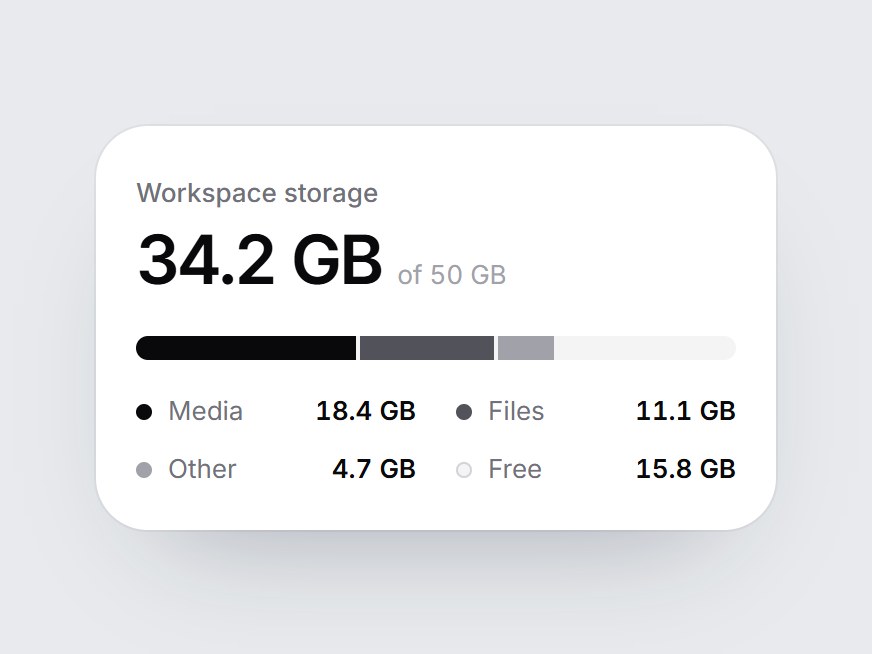
A white storage tile: a label, the amount used out of the total, one linear bar split by type, and a legend. When the card comes into view, the used segments fill from left to right one after another, the figure counts up, and the free space stays as the gray track. Swap the label, capacity, unit, and segments, then drop it into workspace settings, a billing page, or a storage feature block.
Full TSX source. No account needed.
storage-split-meter.tsx
"use client"; import * as React from "react";import { cn } from "@/lib/utils"; export type StorageSplitSegment = { label: string; value: number; /** Any CSS color. Falls back to a zinc step by position. */ color?: string;}; /** Used space only. The free remainder is the track. */export const STORAGE_SPLIT_DEFAULT_SEGMENTS: readonly StorageSplitSegment[] = [ { label: "Media", value: 18.4, color: "#09090b" }, { label: "Files", value: 11.1, color: "#52525b" }, { label: "Other", value: 4.7, color: "#a1a1aa" },]; export type StorageSplitMeterProps = React.ComponentPropsWithoutRef<"div"> & { label?: string; /** Used amount. Defaults to the sum of the segments. Counts up from 0. */ value?: number; /** Total capacity. */ max?: number; /** Unit after each amount, e.g. "GB". */ unit?: string; /** Used segments, largest first. */ segments?: readonly StorageSplitSegment[]; /** Legend name for the unused remainder. */ freeLabel?: string; /** Word between the used amount and the capacity. */ ofLabel?: string;}; const EASE = "cubic-bezier(0.22, 1, 0.36, 1)";const SEGMENT_MS = 650;const STAGGER_MS = 80;const COUNT_MS = 1000;const FALLBACK_COLORS = ["#09090b", "#52525b", "#a1a1aa"]; function usePrefersReducedMotion() { const [reduced, setReduced] = React.useState(false); React.useEffect(() => { const query = window.matchMedia("(prefers-reduced-motion: reduce)"); const update = () => setReduced(query.matches); update(); query.addEventListener("change", update); return () => query.removeEventListener("change", update); }, []); return reduced;} function amount(n: number) { return n.toLocaleString("en-US", { minimumFractionDigits: 1, maximumFractionDigits: 1 });} export const StorageSplitMeter = React.forwardRef<HTMLDivElement, StorageSplitMeterProps>( ( { label = "Workspace storage", value, max = 50, unit = "GB", segments = STORAGE_SPLIT_DEFAULT_SEGMENTS, freeLabel = "Free", ofLabel = "of", className, ...props }, ref, ) => { const safeMax = Math.max(0.1, max); const sum = segments.reduce((total, segment) => total + Math.max(0, segment.value), 0); const used = Math.min(safeMax, Math.max(0, value ?? sum)); const free = Math.max(0, safeMax - used); const localRef = React.useRef<HTMLDivElement>(null); React.useImperativeHandle(ref, () => localRef.current as HTMLDivElement); const reduced = usePrefersReducedMotion(); const [started, setStarted] = React.useState(false); const [count, setCount] = React.useState(0); React.useEffect(() => { const node = localRef.current; if (!node || typeof IntersectionObserver === "undefined") { setStarted(true); return; } const observer = new IntersectionObserver( ([entry]) => { if (entry?.isIntersecting) { setStarted(true); observer.disconnect(); } }, { threshold: 0.35 }, ); observer.observe(node); return () => observer.disconnect(); }, []); React.useEffect(() => { if (!started) return; if (reduced) { setCount(used); return; } let frame = 0; const from = performance.now(); const tick = (now: number) => { const t = Math.min(1, (now - from) / COUNT_MS); setCount(used * (1 - Math.pow(1 - t, 3))); if (t < 1) frame = requestAnimationFrame(tick); }; frame = requestAnimationFrame(tick); return () => cancelAnimationFrame(frame); }, [started, reduced, used]); const parts = segments .filter((segment) => segment.value > 0) .map((segment, index) => ({ label: segment.label, value: segment.value, color: segment.color ?? FALLBACK_COLORS[index % FALLBACK_COLORS.length] ?? "#09090b", })); const capacity = safeMax.toLocaleString("en-US", { maximumFractionDigits: 1 }); return ( <div ref={localRef} data-tsuna-id="storage-split-meter" className={cn( "w-[340px] max-w-full rounded-[26px] bg-white p-5 text-zinc-950", "shadow-[0_30px_60px_-34px_rgba(15,23,42,0.35),0_0_0_1px_rgba(15,23,42,0.05)]", className, )} {...props} > <span className="text-[13px] font-medium text-zinc-500">{label}</span> <div className="mt-1.5 flex items-baseline gap-2"> <span className="text-[34px] leading-none font-semibold tabular-nums tracking-[-0.04em]"> {amount(count)} {unit} </span> <span className="text-[13px] text-zinc-400 tabular-nums"> {ofLabel} {capacity} {unit} </span> </div> <div role="meter" aria-label={label} aria-valuemin={0} aria-valuemax={safeMax} aria-valuenow={used} aria-valuetext={`${amount(used)} ${unit} of ${capacity} ${unit}`} className="mt-5 flex h-3 gap-[2px] overflow-hidden rounded-full bg-zinc-100" > {parts.map((part, index) => ( <span key={part.label} className="h-full min-w-0" style={{ width: `${(part.value / safeMax) * 100}%` }} > <span className="block h-full w-full origin-left motion-reduce:!transition-none" style={{ backgroundColor: part.color, transform: `scaleX(${started ? 1 : 0})`, transition: `transform ${SEGMENT_MS}ms ${EASE} ${index * (STAGGER_MS + 260)}ms`, }} /> </span> ))} </div> <ul className="m-0 mt-4 grid list-none grid-cols-2 gap-x-5 gap-y-2.5 p-0"> {[...parts, { label: freeLabel, value: free, color: "" }].map((part, index) => ( <li key={part.label} className="flex items-center gap-2 motion-reduce:!transition-none" style={{ opacity: started ? 1 : 0, transition: `opacity 400ms ${EASE} ${300 + index * 80}ms`, }} > <span aria-hidden className={cn( "size-2 shrink-0 rounded-full", !part.color && "bg-zinc-100 shadow-[inset_0_0_0_1px_#d4d4d8]", )} style={part.color ? { backgroundColor: part.color } : undefined} /> <span className="min-w-0 flex-1 truncate text-[13px] text-zinc-500">{part.label}</span> <span className="text-[13px] font-semibold tabular-nums"> {amount(part.value)} {unit} </span> </li> ))} </ul> </div> ); },); StorageSplitMeter.displayName = "StorageSplitMeter";
Storage Split Meter
A white storage tile: a label, the amount used out of the total, one linear bar split by type, and a legend. When the card comes into view, the used segments fill from left to right one after another, the figure counts up, and the free space stays as the gray track. Swap the label, capacity, unit, and segments, then drop it into workspace settings, a billing page, or a storage feature block.
Verified Technical Spec
- Animation
- CSS / Tailwind
- Reduced motion
- Verified
- Keyboard focus
- Not detected in source
- Compatibility
- Tailwind CSS v3.4 + v4 · React 19 / Next.js 15 App Router + Vite / Remix compatible
Included
- Copy source into Cursor or Claude for agent install
- Finished React · TypeScript · Tailwind CSS UI
Dependencies
- React 19.0.0
- Typescript 5.7.2
- Tailwindcss 3.4.16
Tech Stack
- React
- TypeScript
- Tailwind CSS
Version 1.0.0