コンポーネント一覧へ戻る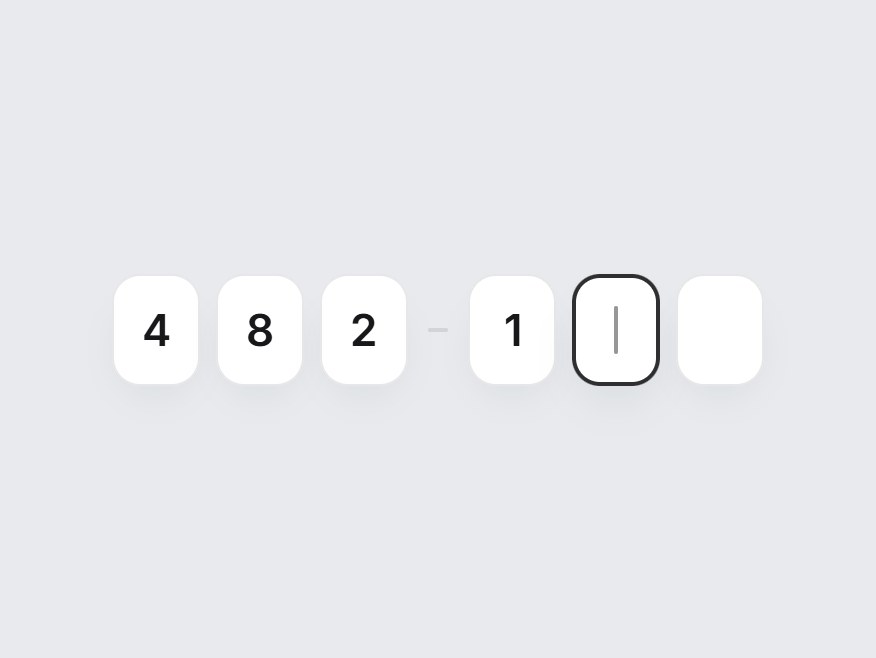
これは何か
6つの箱に確認コードを入れる入力欄です。入力すると次の箱へ進み、Backspace で戻り、コードを貼り付けると全部の箱が一度に埋まります。次に入れる箱ではキャレットが点滅し、全桁そろうと枠が緑に変わります。桁数とラベルを差し替えて、ログインや2段階認証、メール確認の画面にそのまま置けます。
TSX の全文です。アカウントは不要です。
otp-digit-input.tsx
"use client"; import * as React from "react";import { cn } from "@/lib/utils"; export type OtpDigitInputProps = Omit< React.ComponentPropsWithoutRef<"div">, "onChange" | "defaultValue"> & { /** Number of boxes. 4–8 reads best. */ length?: number; /** Controlled code (digits only, filled from the left). */ value?: string; defaultValue?: string; onValueChange?: (value: string) => void; /** Fires once every box is filled. */ onComplete?: (value: string) => void; disabled?: boolean; ariaLabel?: string;}; const EASE = "cubic-bezier(0.22, 1, 0.36, 1)"; const CSS = `@keyframes otp-digit-input-caret { 0%, 45% { opacity: 1; } 55%, 100% { opacity: 0; } }.otp-digit-input-caret { animation: otp-digit-input-caret 1.05s steps(1, end) infinite; }@keyframes otp-digit-input-pop { from { opacity: 0; transform: translateY(6px) scale(0.86); } to { opacity: 1; transform: none; } }.otp-digit-input-pop { animation: otp-digit-input-pop 320ms ${EASE} both; }@media (prefers-reduced-motion: reduce) { .otp-digit-input-caret, .otp-digit-input-pop { animation: none; }}`; function digitsOnly(text: string) { return text.replace(/\D/g, "");} export const OtpDigitInput = React.forwardRef< HTMLDivElement, OtpDigitInputProps>( ( { length = 6, value, defaultValue = "", onValueChange, onComplete, disabled = false, ariaLabel = "Verification code", className, ...props }, ref, ) => { const size = Math.max(1, Math.min(12, Math.round(length))); const [uncontrolled, setUncontrolled] = React.useState(() => digitsOnly(defaultValue).slice(0, size), ); const code = digitsOnly(value ?? uncontrolled).slice(0, size); const [focused, setFocused] = React.useState<number | null>(null); const inputs = React.useRef<Array<HTMLInputElement | null>>([]); const complete = code.length === size; // Latest code for focus handlers that run before the next render. const latest = React.useRef(code); latest.current = code; const focusBox = (index: number) => { const target = inputs.current[Math.max(0, Math.min(size - 1, index))]; target?.focus(); target?.select(); }; const commit = (next: string) => { const clean = digitsOnly(next).slice(0, size); if (clean === code) return; latest.current = clean; if (value === undefined) setUncontrolled(clean); onValueChange?.(clean); if (clean.length === size) onComplete?.(clean); }; /** Writes `text` starting at `index`, keeping the code contiguous. */ const writeAt = (index: number, text: string) => { const incoming = digitsOnly(text); if (!incoming) return; const start = Math.min(index, code.length); const next = ( code.slice(0, start) + incoming + code.slice(start + incoming.length) ).slice(0, size); commit(next); focusBox(Math.min(start + incoming.length, size - 1)); }; const onKeyDown = (index: number) => (event: React.KeyboardEvent<HTMLInputElement>) => { if (event.key === "Backspace") { event.preventDefault(); if (index < code.length) { commit(code.slice(0, index) + code.slice(index + 1)); focusBox(index); } else if (index > 0) { commit(code.slice(0, index - 1)); focusBox(index - 1); } } else if (event.key === "ArrowLeft") { event.preventDefault(); focusBox(index - 1); } else if (event.key === "ArrowRight") { event.preventDefault(); focusBox(Math.min(index + 1, code.length)); } else if (event.key === "Home") { event.preventDefault(); focusBox(0); } else if (event.key === "End") { event.preventDefault(); focusBox(Math.min(code.length, size - 1)); } }; const onPaste = (event: React.ClipboardEvent<HTMLInputElement>) => { const pasted = digitsOnly(event.clipboardData.getData("text")); if (!pasted) return; event.preventDefault(); commit(pasted.slice(0, size)); focusBox(Math.min(pasted.length, size - 1)); }; // When nothing is focused, the next empty box carries the caret. const activeIndex = focused ?? (complete || disabled ? -1 : code.length); return ( <div ref={ref} role="group" aria-label={ariaLabel} data-tsuna-id="otp-digit-input" data-complete={complete ? "" : undefined} className={cn("inline-flex items-center gap-2", className)} {...props} > <style>{CSS}</style> {Array.from({ length: size }, (_, index) => { const char = code[index] ?? ""; const active = index === activeIndex; const showCaret = active && !char && !disabled; return ( <React.Fragment key={index}> {size >= 6 && size % 2 === 0 && index === size / 2 ? ( <span aria-hidden className="mx-0.5 h-[2px] w-2.5 rounded-full bg-zinc-300" /> ) : null} <span className="relative grid"> <input ref={(node) => { inputs.current[index] = node; }} type="text" inputMode="numeric" autoComplete={index === 0 ? "one-time-code" : "off"} pattern="[0-9]*" aria-label={`Digit ${index + 1} of ${size}`} disabled={disabled} value={char} onChange={(event) => writeAt( index, event.target.value.replace(char, "") || event.target.value, ) } onKeyDown={onKeyDown(index)} onPaste={onPaste} onFocus={(event) => { if (index > latest.current.length) { focusBox(latest.current.length); return; } setFocused(index); event.target.select(); }} onBlur={() => setFocused((current) => current === index ? null : current, ) } className={cn( "col-start-1 row-start-1 h-14 w-11 rounded-[14px] border-0 bg-white text-center text-[22px] font-semibold tracking-[-0.02em] text-transparent caret-transparent outline-none", "shadow-[0_10px_24px_-16px_rgba(15,23,42,0.35),inset_0_0_0_1px_rgba(15,23,42,0.1)]", "transition-[box-shadow,transform] duration-300 motion-reduce:transition-none", "focus-visible:shadow-[0_12px_28px_-16px_rgba(15,23,42,0.4),inset_0_0_0_2px_rgba(24,24,27,0.9)]", "disabled:cursor-not-allowed disabled:opacity-50 selection:bg-transparent", active && "shadow-[0_12px_28px_-16px_rgba(15,23,42,0.4),inset_0_0_0_2px_rgba(24,24,27,0.9)]", complete && "shadow-[0_10px_24px_-16px_rgba(16,185,129,0.45),inset_0_0_0_1.5px_rgba(16,185,129,0.75)]", )} style={{ transitionTimingFunction: EASE }} /> <span aria-hidden className="pointer-events-none col-start-1 row-start-1 grid place-items-center text-[22px] font-semibold tracking-[-0.02em] text-zinc-900" > {char ? ( <span key={`${index}-${char}`} className="otp-digit-input-pop" > {char} </span> ) : showCaret ? ( <span className={cn( "h-6 w-[2px] rounded-full bg-zinc-900", // Blinks only while focused; the idle hint stays still. focused === index ? "otp-digit-input-caret" : "opacity-45", )} /> ) : null} </span> </span> </React.Fragment> ); })} </div> ); },); OtpDigitInput.displayName = "OtpDigitInput";ガイドを読む
コンポーネント
OTP 桁入力
6つの箱に確認コードを入れる入力欄です。入力すると次の箱へ進み、Backspace で戻り、コードを貼り付けると全部の箱が一度に埋まります。次に入れる箱ではキャレットが点滅し、全桁そろうと枠が緑に変わります。桁数とラベルを差し替えて、ログインや2段階認証、メール確認の画面にそのまま置けます。
Verified Technical Spec
- アニメーション
- CSS / Tailwind
- Reduced motion
- 確認済み
- キーボードフォーカス
- 確認済み
- 対応環境
- Tailwind CSS v3.4 + v4 · React 19 / Next.js 15 App Router + Vite / Remix 対応
含まれるもの
- ソースを Cursor / Claude に渡してエージェントに組み込める
- React · TypeScript · Tailwind CSS の完成 UI
依存パッケージ
- React 19.0.0
- Typescript 5.7.2
- Tailwindcss 3.4.16
技術スタック
- React
- TypeScript
- Tailwind CSS
バージョン 1.0.0