コンポーネント一覧へ戻る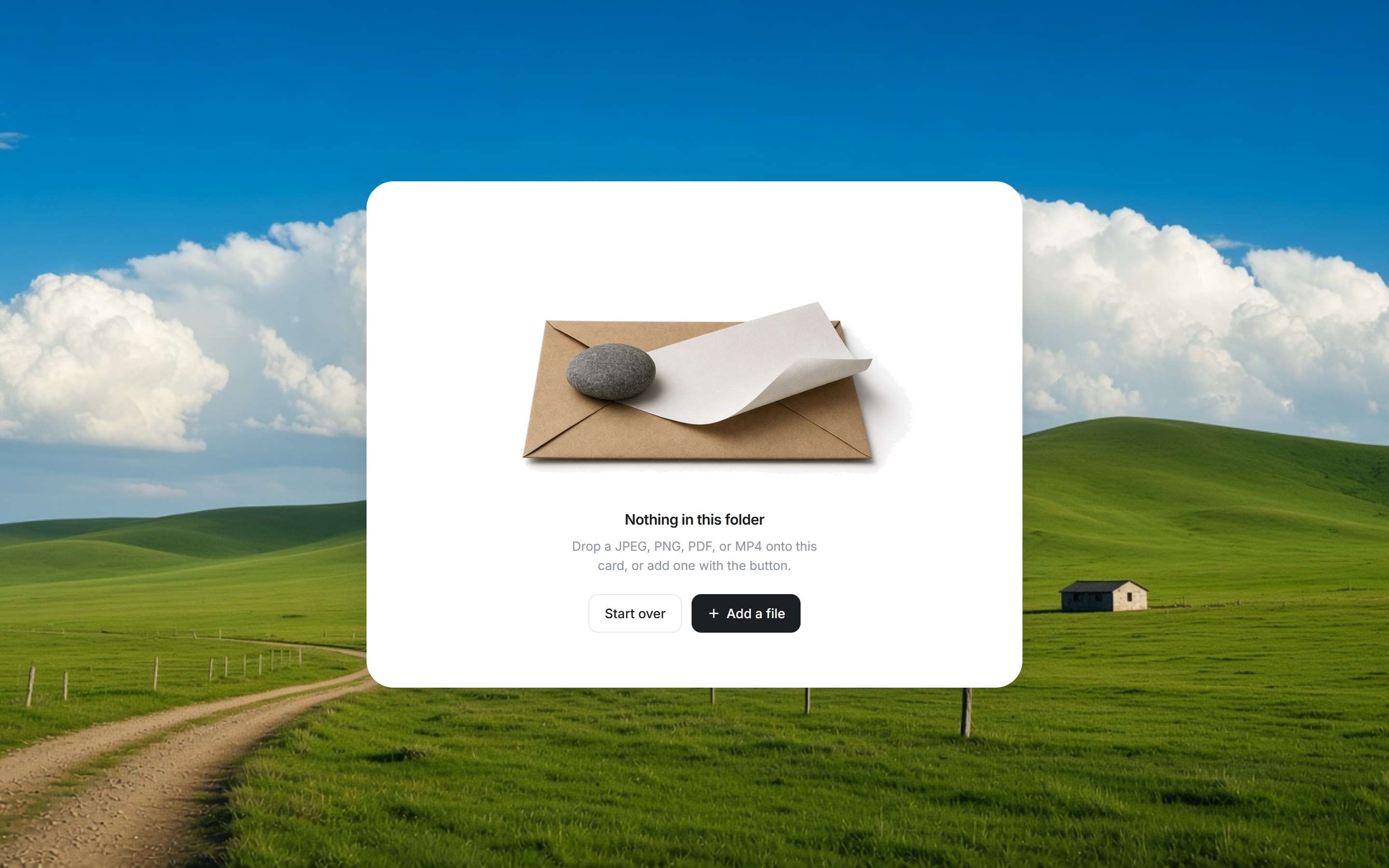
これは何か
緑の丘陵と積雲の写真を背景に、空のフォルダを置くカードです。中央に封筒と石の静物イラストを置き、その下に見出しと説明、Start over と Add a file を置きます。ファイルを入れると Mac 風フォルダと Uploading Files に替わり、完了後は同じカードに Upload complete とファイル名を残します。見出し・説明・ボタン文言とイラストを差し替えて、ダッシュボードにそのまま置けます。
TSX の全文です。アカウントは不要です。
file-upload-panel.tsx
"use client"; import { useEffect, useId, useRef, useState, type DragEvent, type ReactNode,} from "react";import { AnimatePresence, motion, useReducedMotion } from "motion/react";import { Check, Plus } from "lucide-react";import { coerceDisplayText } from "@/generation/lib/coerceActionNodes";import { cn } from "@/lib/utils"; const MAX_BYTES = 50 * 1024 * 1024;const ACCEPT = "image/jpeg,image/png,application/pdf,video/mp4,.jpg,.jpeg,.png,.pdf,.mp4"; const UI_FONT = 'Inter, "SF Pro Display", "Helvetica Neue", Helvetica, Arial, ui-sans-serif, sans-serif'; export const FILE_UPLOAD_PANEL_EMPTY_SRC = "https://design-layer.com/dev/file-upload-panel/empty-files.png";export const FILE_UPLOAD_PANEL_FOLDER_SRC = "https://design-layer.com/dev/file-upload-panel/upload-folder.png";export const FILE_UPLOAD_PANEL_BG_SRC = "https://design-layer.com/dev/file-upload-panel/backdrop.jpg"; export type FileUploadPanelItem = { id: string; name: string; sizeLabel: string; progress: number; status: "uploading" | "done" | "error";}; export type FileUploadPanelProps = { title?: string; description?: string; clearLabel?: string; createLabel?: string; uploadingLabel?: string; doneLabel?: string; importedLabel?: string; recordsLabel?: string; illustrationSrc?: string; className?: string; onFiles?: (files: File[]) => void; onClear?: () => void;}; function asPlainString(value: ReactNode, fallback: string): string { const text = coerceDisplayText(value); if (typeof text === "string" && text.trim()) return text; if (typeof text === "number" || typeof text === "bigint") return String(text); return fallback;} function formatBytes(bytes: number): string { if (bytes < 1024) return `${bytes} B`; if (bytes < 1024 * 1024) return `${(bytes / 1024).toFixed(0)} KB`; return `${(bytes / (1024 * 1024)).toFixed(1)} MB`;} function UploadSpinner({ reduced }: { reduced: boolean }) { return ( <svg viewBox="0 0 16 16" className={cn("size-4 shrink-0", !reduced && "animate-spin")} aria-hidden > <circle cx="8" cy="8" r="6" fill="none" stroke="#e4eef1" strokeWidth="1.6" /> <path d="M8 2a6 6 0 0 1 5.2 3" fill="none" stroke="#49c6de" strokeWidth="1.6" strokeLinecap="round" /> </svg> );} function UploadFolder({ src, label,}: { src: string; label: string;}) { return ( // eslint-disable-next-line @next/next/no-img-element <img src={src} alt={label} className="mx-auto h-[196px] w-auto object-contain" draggable={false} /> );} function isAllowedFile(file: File): boolean { const name = file.name.toLowerCase(); const type = file.type.toLowerCase(); return ( type === "image/jpeg" || type === "image/png" || type === "application/pdf" || type === "video/mp4" || /\.(jpe?g|png|pdf|mp4)$/.test(name) );} /** * 明るいキャンバスに浮かぶ空のファイル状態。 * 中央は封筒と石の静物イラスト。 */export function FileUploadPanel({ title = "Nothing in this folder", description = "Drop a JPEG, PNG, PDF, or MP4 onto this card, or add one with the button.", clearLabel = "Start over", createLabel = "Add a file", uploadingLabel = "Uploading Files", doneLabel = "Upload complete", illustrationSrc = FILE_UPLOAD_PANEL_EMPTY_SRC, className, onFiles, onClear,}: FileUploadPanelProps) { const reduce = useReducedMotion(); const inputId = useId(); const liveId = useId(); const fileRef = useRef<HTMLInputElement>(null); const dragDepth = useRef(0); const [dragging, setDragging] = useState(false); const [items, setItems] = useState<FileUploadPanelItem[]>([]); const [notice, setNotice] = useState(""); const titleText = asPlainString(title, "Nothing in this folder"); const descriptionText = asPlainString( description, "Drop a JPEG, PNG, PDF, or MP4 onto this card, or add one with the button.", ); const clearText = asPlainString(clearLabel, "Start over"); const createText = asPlainString(createLabel, "Add a file"); const uploadingText = asPlainString(uploadingLabel, "Uploading Files"); const doneText = asPlainString(doneLabel, "Upload complete"); const illustration = asPlainString(illustrationSrc, FILE_UPLOAD_PANEL_EMPTY_SRC); const uploadingCount = items.filter((item) => item.status === "uploading").length; const uploading = uploadingCount > 0; const uploadingCountLabel = uploadingCount === 1 ? "1 file" : `${uploadingCount} files`; const uploaded = items.length > 0 && !uploading; const uploadedSummary = items .map((item) => item.name) .slice(0, 3) .join(", "); useEffect(() => { if (!uploading) return; if (reduce) { setItems((current) => current.map((item) => item.status === "uploading" ? { ...item, progress: 100, status: "done" } : item, ), ); return; } const timer = window.setInterval(() => { setItems((current) => current.map((item) => { if (item.status !== "uploading") return item; const next = Math.min(100, item.progress + 3); return next >= 100 ? { ...item, progress: 100, status: "done" } : { ...item, progress: next }; }), ); }, 280); return () => window.clearInterval(timer); }, [uploading, reduce]); function pushNotice(message: string) { setNotice(message); } function enqueue(next: Omit<FileUploadPanelItem, "id" | "progress" | "status">[]) { setItems((current) => [ ...current, ...next.map((item) => ({ ...item, id: `${item.name}-${Date.now()}-${Math.random().toString(36).slice(2, 7)}`, progress: reduce ? 100 : 8, status: reduce ? ("done" as const) : ("uploading" as const), })), ]); } function acceptFiles(list: FileList | File[]) { const files = [...list]; const accepted: File[] = []; const rejected: string[] = []; for (const file of files) { if (!isAllowedFile(file)) { rejected.push(`${file.name} は対応していない形式です`); continue; } if (file.size > MAX_BYTES) { rejected.push(`${file.name} は 50 MB を超えています`); continue; } accepted.push(file); } if (accepted.length) { enqueue(accepted.map((file) => ({ name: file.name, sizeLabel: formatBytes(file.size) }))); onFiles?.(accepted); pushNotice(`${accepted.length} 件を追加しました`); } if (rejected.length) pushNotice(rejected[0] ?? ""); } function isFileDrag(event: DragEvent<HTMLElement>) { return [...(event.dataTransfer?.types ?? [])].includes("Files"); } function onDragEnter(event: DragEvent<HTMLElement>) { if (!isFileDrag(event)) return; event.preventDefault(); dragDepth.current += 1; setDragging(true); } function onDragOver(event: DragEvent<HTMLElement>) { if (!isFileDrag(event)) return; event.preventDefault(); if (event.dataTransfer) event.dataTransfer.dropEffect = "copy"; } function onDragLeave(event: DragEvent<HTMLElement>) { if (!isFileDrag(event)) return; dragDepth.current = Math.max(0, dragDepth.current - 1); if (dragDepth.current === 0) setDragging(false); } function onDrop(event: DragEvent<HTMLElement>) { event.preventDefault(); dragDepth.current = 0; setDragging(false); if (event.dataTransfer?.files?.length) acceptFiles(event.dataTransfer.files); } const spring = reduce ? { duration: 0.01 } : { type: "spring" as const, stiffness: 280, damping: 26, mass: 0.85 }; return ( <div className={cn("flex w-full max-w-[680px] flex-col items-center", className)} style={{ fontFamily: UI_FONT }} > <motion.section role="region" aria-label={uploading ? uploadingText : uploaded ? doneText : titleText} aria-describedby={liveId} className="relative flex min-h-[525px] w-full flex-col overflow-hidden rounded-[28px] bg-white p-5 shadow-[0_30px_80px_-24px_rgba(15,23,42,0.22),0_8px_24px_rgba(15,23,42,0.05)] sm:p-6" onDragEnter={onDragEnter} onDragOver={onDragOver} onDragLeave={onDragLeave} onDrop={onDrop} initial={reduce ? false : { opacity: 0, y: 28, scale: 0.96 }} animate={{ opacity: 1, y: 0, scale: 1 }} transition={{ ...spring, delay: 0.1 }} > <motion.div className="relative flex flex-1 flex-col rounded-[22px] bg-white px-6 py-8 text-center sm:px-10" animate={ reduce || !dragging ? { y: 0, scale: 1 } : { y: -10, scale: 0.985 } } transition={spring} > <AnimatePresence mode="wait" initial={false}> {uploading ? ( <motion.div key="uploading" className="flex flex-1 flex-col items-center justify-center px-6" initial={reduce ? false : { opacity: 0, y: 8 }} animate={{ opacity: 1, y: 0 }} exit={reduce ? undefined : { opacity: 0, y: -6 }} transition={{ duration: 0.28 }} > <UploadFolder src={FILE_UPLOAD_PANEL_FOLDER_SRC} label="" /> <p className="mt-7 flex items-center gap-2 text-[15px] font-semibold tracking-[-0.02em] text-[#1a1c1f]"> <UploadSpinner reduced={Boolean(reduce)} /> {uploadingText} </p> <p className="mt-1.5 text-[13px] leading-5 text-[#8b919a]">{uploadingCountLabel}</p> </motion.div> ) : uploaded ? ( <motion.div key="done" className="flex flex-1 flex-col items-center justify-center px-6" initial={reduce ? false : { opacity: 0, y: 8 }} animate={{ opacity: 1, y: 0 }} exit={reduce ? undefined : { opacity: 0, y: -6 }} transition={{ duration: 0.28 }} > <UploadFolder src={FILE_UPLOAD_PANEL_FOLDER_SRC} label="" /> <p className="mt-7 flex items-center gap-2 text-[15px] font-semibold tracking-[-0.02em] text-[#1a1c1f]"> <span className="grid size-4 place-items-center rounded-full bg-[#49c6de] text-white"> <Check className="size-2.5" strokeWidth={3} /> </span> {doneText} </p> <p className="mt-1.5 max-w-[280px] truncate text-[13px] leading-5 text-[#8b919a]"> {uploadedSummary} </p> <div className="mt-5 flex items-center justify-center gap-2.5"> <button type="button" onClick={() => { setItems([]); onClear?.(); pushNotice("フォルダを空に戻しました"); }} className="inline-flex h-10 items-center rounded-[10px] border border-[#e6e8ee] bg-white px-4 text-[13.5px] font-medium text-[#1c1e21] transition hover:bg-[#f7f8fa]" > {clearText} </button> <button type="button" onClick={() => fileRef.current?.click()} className="inline-flex h-10 items-center gap-1.5 rounded-[10px] bg-[#1c1e21] px-4 text-[13.5px] font-medium text-white transition hover:bg-black" > <Plus className="size-3.5" strokeWidth={2.4} /> {createText} </button> </div> </motion.div> ) : ( <motion.div key="empty" initial={reduce ? false : { opacity: 0 }} animate={{ opacity: 1 }} exit={reduce ? undefined : { opacity: 0 }} transition={{ duration: 0.22 }} > <div className="relative mx-auto h-[280px] w-full max-w-[520px] overflow-hidden"> {/* eslint-disable-next-line @next/next/no-img-element */} <img src={illustration} alt="" className="h-full w-full origin-center scale-[1.45] object-contain" draggable={false} /> </div> <h2 className="mt-1 text-[15px] font-semibold tracking-[-0.02em] text-[#1a1c1f]"> {titleText} </h2> <p className="mx-auto mt-1.5 max-w-[280px] text-[13px] leading-5 text-[#8b919a]"> {descriptionText} </p> <div className="mt-5 flex items-center justify-center gap-2.5"> <button type="button" onClick={() => { setItems([]); onClear?.(); pushNotice("フォルダを空に戻しました"); }} className="inline-flex h-10 items-center rounded-[10px] border border-[#e6e8ee] bg-white px-4 text-[13.5px] font-medium text-[#1c1e21] transition hover:bg-[#f7f8fa]" > {clearText} </button> <button type="button" onClick={() => fileRef.current?.click()} className="inline-flex h-10 items-center gap-1.5 rounded-[10px] bg-[#1c1e21] px-4 text-[13.5px] font-medium text-white transition hover:bg-black" > <Plus className="size-3.5" strokeWidth={2.4} /> {createText} </button> </div> </motion.div> )} </AnimatePresence> <AnimatePresence> {dragging ? ( <motion.div key="drop" className="pointer-events-none absolute inset-0 z-20 flex items-center justify-center" initial={reduce ? false : { opacity: 0 }} animate={{ opacity: 1 }} exit={reduce ? undefined : { opacity: 0 }} transition={{ duration: reduce ? 0.01 : 0.22 }} > <motion.div className="absolute inset-0 rounded-[18px] border-2 border-dashed border-[#49c6de] bg-[#f3fbfd]/75" animate={reduce ? undefined : { scale: [1, 1.012, 1] }} transition={ reduce ? { duration: 0.01 } : { duration: 1.15, repeat: Infinity, ease: "easeInOut" } } /> <motion.p className="relative text-[15px] font-semibold tracking-[-0.02em] text-[#1a1c1f]" animate={reduce ? undefined : { y: [0, -7, 0] }} transition={ reduce ? { duration: 0.01 } : { duration: 1.15, repeat: Infinity, ease: "easeInOut" } } > Drop to add </motion.p> </motion.div> ) : null} </AnimatePresence> <input ref={fileRef} id={inputId} type="file" accept={ACCEPT} multiple className="sr-only" onChange={(event) => { if (event.target.files?.length) acceptFiles(event.target.files); event.target.value = ""; }} /> </motion.div> <p id={liveId} className="sr-only" aria-live="polite"> {notice} </p> </motion.section> </div> );} /** 草原の写真を背景に、アップロードカードを中央へ置く */export function FileUploadPanelStage({ children, className, backgroundSrc = FILE_UPLOAD_PANEL_BG_SRC,}: { children?: ReactNode; className?: string; backgroundSrc?: string;}) { const background = asPlainString(backgroundSrc, FILE_UPLOAD_PANEL_BG_SRC); return ( <div data-tsuna-id="file-upload-panel" className={cn( "relative flex min-h-svh w-full items-center justify-center overflow-hidden bg-[#7fbf63] px-5 py-16 sm:px-8", className, )} > {/* eslint-disable-next-line @next/next/no-img-element */} <img src={background} alt="" className="pointer-events-none absolute inset-0 h-full w-full object-cover" draggable={false} /> <div className="relative z-10 flex w-full justify-center"> {children ?? <FileUploadPanel />} </div> </div> );}ガイドを読む

コンポーネント
ファイルアップロード
緑の丘陵と積雲の写真を背景に、空のフォルダを置くカードです。中央に封筒と石の静物イラストを置き、その下に見出しと説明、Start over と Add a file を置きます。ファイルを入れると Mac 風フォルダと Uploading Files に替わり、完了後は同じカードに Upload complete とファイル名を残します。見出し・説明・ボタン文言とイラストを差し替えて、ダッシュボードにそのまま置けます。
Verified Technical Spec
- アニメーション
- Framer Motion
- Reduced motion
- 確認済み
- キーボードフォーカス
- ソース上では未検出
- 対応環境
- Tailwind CSS v3.4 + v4 · React 19 / Next.js 15 App Router + Vite / Remix 対応
含まれるもの
- ソースを Cursor / Claude に渡してエージェントに組み込める
- スマートフォン・タブレット・パソコン対応
- React · TypeScript · Tailwind CSS · Motion · Lucide の完成 UI
依存パッケージ
- React 19.0.0
- Typescript 5.7.2
- Tailwindcss 3.4.16
- Lucide-react 1.23.0
- Motion 12.42.2
技術スタック
- React
- TypeScript
- Tailwind CSS
- Motion
- Lucide
バージョン 1.0.0