コンポーネント一覧へ戻る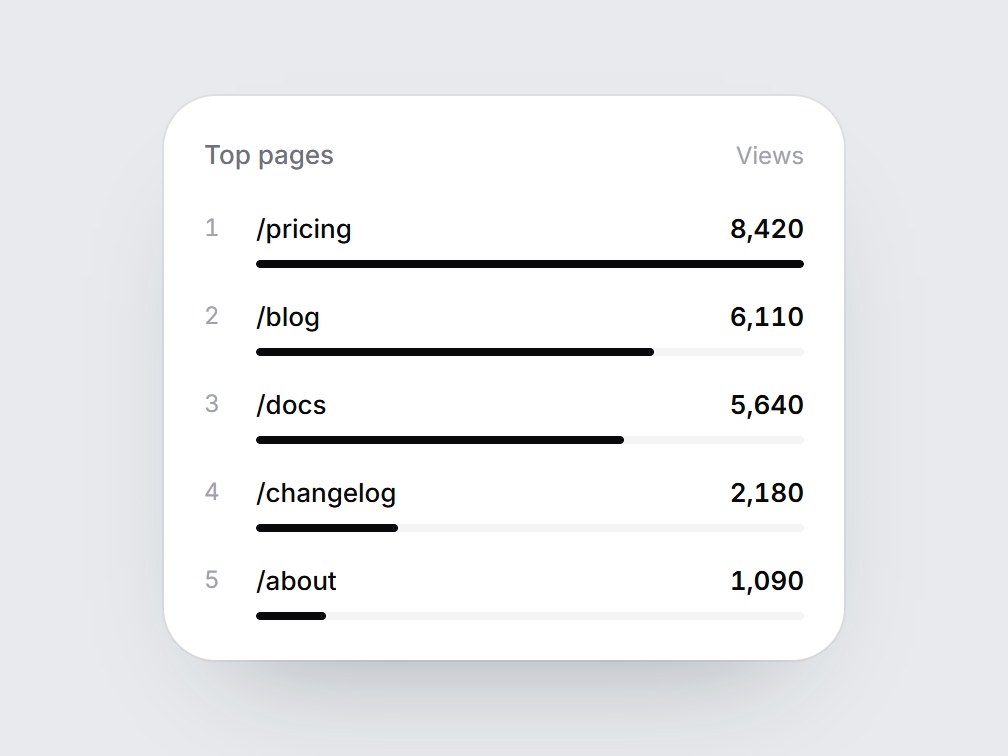
これは何か
順位・名前・件数と、その下の細いバーを5行並べた白いランキングカードです。画面に入るとバーが上の行から順に伸び、件数も一緒に現れます。タイトル・列名・項目を差し替えて、人気ページのレポートやランキング、分析機能の紹介にそのまま置けます。
TSX の全文です。アカウントは不要です。
rank-bar-list.tsx
"use client"; import * as React from "react";import { cn } from "@/lib/utils"; export type RankBarItem = { label: string; value: number;}; export const RANK_BAR_LIST_DEFAULT_ITEMS: readonly RankBarItem[] = [ { label: "/pricing", value: 8420 }, { label: "/blog", value: 6110 }, { label: "/docs", value: 5640 }, { label: "/changelog", value: 2180 }, { label: "/about", value: 1090 },]; export type RankBarListProps = React.ComponentPropsWithoutRef<"div"> & { title?: string; /** Column name on the right of the header, e.g. "Views". */ valueLabel?: string; /** Highest first. The rank number comes from the position. */ items?: readonly RankBarItem[];}; const EASE = "cubic-bezier(0.22, 1, 0.36, 1)";const BAR_MS = 800;const STAGGER_MS = 80; export const RankBarList = React.forwardRef<HTMLDivElement, RankBarListProps>( ( { title = "Top pages", valueLabel = "Views", items = RANK_BAR_LIST_DEFAULT_ITEMS, className, ...props }, ref, ) => { const localRef = React.useRef<HTMLDivElement>(null); React.useImperativeHandle(ref, () => localRef.current as HTMLDivElement); const [drawn, setDrawn] = React.useState(false); const top = Math.max(1, ...items.map((item) => item.value)); React.useEffect(() => { const node = localRef.current; if (!node || typeof IntersectionObserver === "undefined") { setDrawn(true); return; } const observer = new IntersectionObserver( ([entry]) => { if (entry?.isIntersecting) { setDrawn(true); observer.disconnect(); } }, { threshold: 0.35 }, ); observer.observe(node); return () => observer.disconnect(); }, []); return ( <div ref={localRef} data-tsuna-id="rank-bar-list" className={cn( "w-[340px] max-w-full rounded-[26px] bg-white p-5 text-zinc-950", "shadow-[0_30px_60px_-34px_rgba(15,23,42,0.35),0_0_0_1px_rgba(15,23,42,0.05)]", className, )} {...props} > <div className="flex items-baseline justify-between gap-3"> <span className="text-[13px] font-medium text-zinc-500">{title}</span> {valueLabel ? <span className="text-[12px] text-zinc-400">{valueLabel}</span> : null} </div> <ol className="m-0 mt-4 flex list-none flex-col gap-3.5 p-0"> {items.map((item, index) => { const delay = index * STAGGER_MS; return ( <li key={item.label} className="grid grid-cols-[18px_minmax(0,1fr)] gap-x-2"> <span className="text-[12px] leading-5 text-zinc-400 tabular-nums">{index + 1}</span> <div className="min-w-0"> <div className="flex items-baseline justify-between gap-3"> <span className="truncate text-[13px] leading-5 font-medium">{item.label}</span> <span className="text-[13px] leading-5 font-semibold tabular-nums motion-reduce:!transition-none" style={{ opacity: drawn ? 1 : 0, transition: `opacity 400ms ${EASE} ${delay + 150}ms`, }} > {item.value.toLocaleString("en-US")} </span> </div> <div className="mt-1.5 h-1 overflow-hidden rounded-full bg-zinc-100"> <div className="h-full origin-left rounded-full bg-zinc-950 motion-reduce:!transition-none" style={{ width: `${Math.max(2, (item.value / top) * 100)}%`, transform: `scaleX(${drawn ? 1 : 0})`, transition: `transform ${BAR_MS}ms ${EASE} ${delay}ms`, }} /> </div> </div> </li> ); })} </ol> </div> ); },); RankBarList.displayName = "RankBarList";
コンポーネント
ランクバーリスト
順位・名前・件数と、その下の細いバーを5行並べた白いランキングカードです。画面に入るとバーが上の行から順に伸び、件数も一緒に現れます。タイトル・列名・項目を差し替えて、人気ページのレポートやランキング、分析機能の紹介にそのまま置けます。
Verified Technical Spec
- アニメーション
- CSS / Tailwind
- Reduced motion
- 確認済み
- キーボードフォーカス
- ソース上では未検出
- 対応環境
- Tailwind CSS v3.4 + v4 · React 19 / Next.js 15 App Router + Vite / Remix 対応
含まれるもの
- ソースを Cursor / Claude に渡してエージェントに組み込める
- React · TypeScript · Tailwind CSS の完成 UI
依存パッケージ
- React 19.0.0
- Typescript 5.7.2
- Tailwindcss 3.4.16
技術スタック
- React
- TypeScript
- Tailwind CSS
バージョン 1.0.0