Approval Queue Card
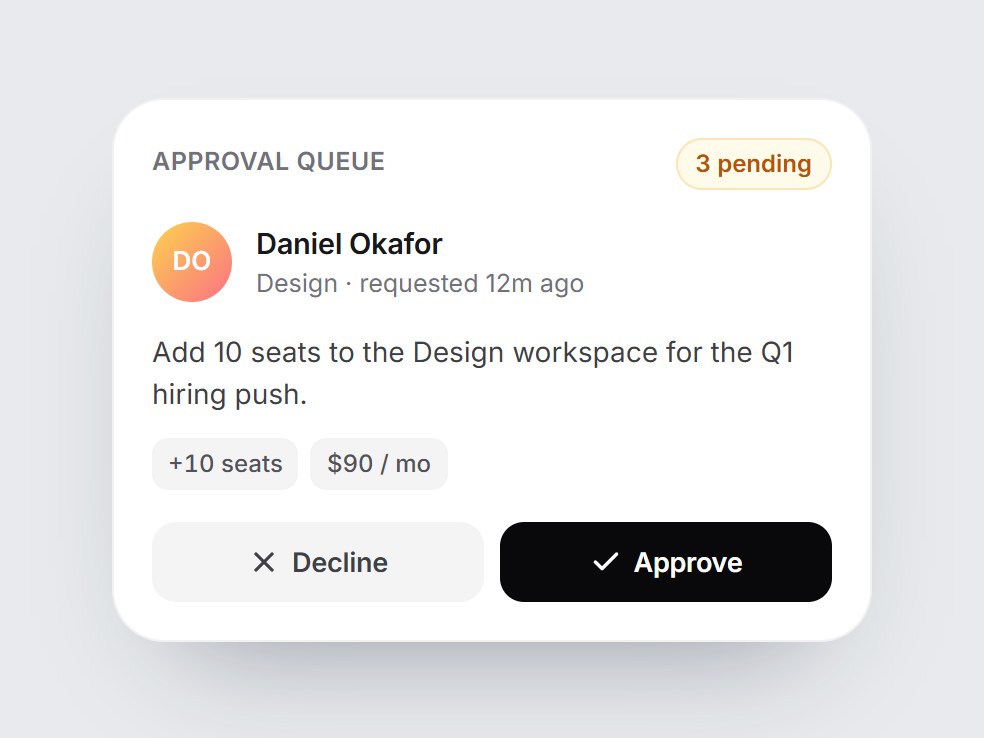
What is this?
A white approval tile: a queue count, the requester with their team, a one-line summary, small detail chips, and Decline / Approve buttons. Approving swaps the buttons for a green “Approved” bar with a check that pops in, plus an Undo; declining shows a quiet gray “Declined”. The pending count drops by one. Swap the people, copy, and chips, then drop it into an admin, finance, or workflow feature block.
Approval Queue Card
A white approval tile: a queue count, the requester with their team, a one-line summary, small detail chips, and Decline / Approve buttons. Approving swaps the buttons for a green “Approved” bar with a check that pops in, plus an Undo; declining shows a quiet gray “Declined”. The pending count drops by one. Swap the people, copy, and chips, then drop it into an admin, finance, or workflow feature block.
Verified Technical Spec
- Animation
- CSS / Tailwind
- Reduced motion
- Verified
- Keyboard focus
- Verified
- Compatibility
- Tailwind CSS v3.4 + v4 · React 19 / Next.js 15 App Router + Vite / Remix compatible
Included
- Copy source into Cursor or Claude for agent install
- Finished React · TypeScript · Tailwind CSS · Lucide UI
Dependencies
- React 19.0.0
- Typescript 5.7.2
- Tailwindcss 3.4.16
- Lucide-react 1.23.0
Tech Stack
- React
- TypeScript
- Tailwind CSS
- Lucide
Version 1.0.0