コンポーネント一覧へ戻る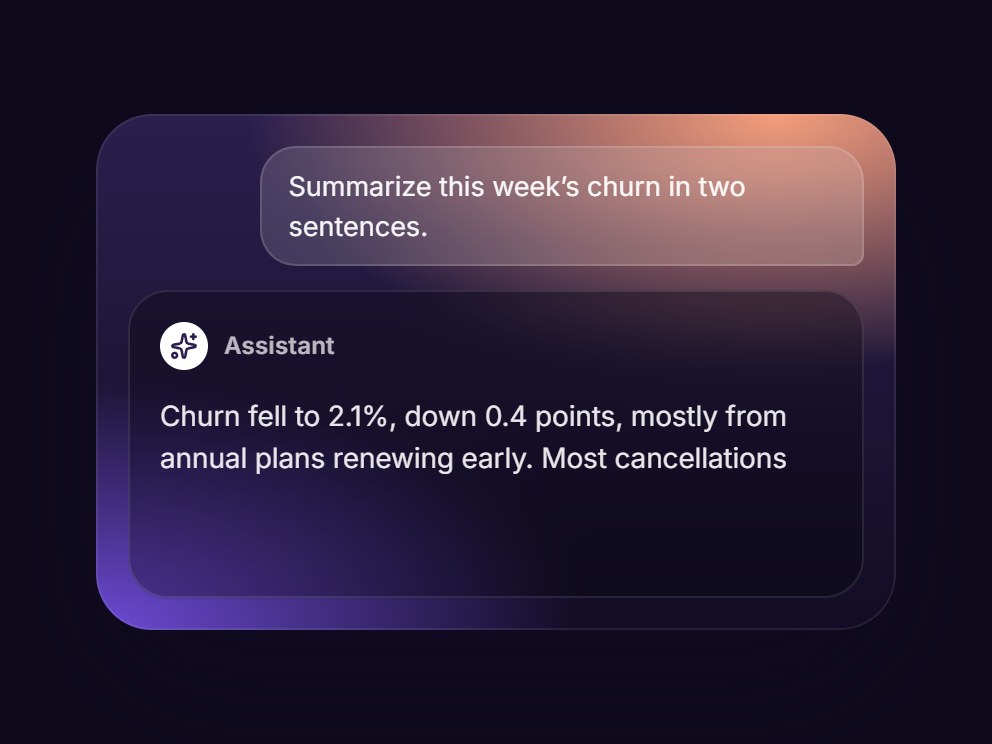
これは何か
夕暮れ色の AI のタイルです。プロンプトはガラスの吹き出しに入り、回答欄では Thinking の文字が光って骨組みの行が揺らめいたあと、返答が点滅するキャレットとともに1語ずつ流れ込みます。最終の回答の高さを先に確保するので、カードの大きさは変わりません。視差を減らす設定では最終の回答だけを表示します。プロンプト・回答・文言・背景写真を差し替えて、AI 機能の紹介にそのまま置けます。
TSX の全文です。アカウントは不要です。
ai-generating-card.tsx
"use client"; import * as React from "react";import { Sparkles } from "lucide-react";import { cn } from "@/lib/utils"; export type AiGeneratingCardProps = React.ComponentPropsWithoutRef<"div"> & { prompt?: string; /** The answer that streams in word by word. */ result?: string; generatingLabel?: string; /** Name over the answer. */ assistantLabel?: string; /** How long the finished answer stays before the demo replays (ms). */ intervalMs?: number; /** Optional photo behind the panel (a dark wash keeps it readable). */ backgroundImage?: string;}; type Phase = "prompt" | "generating" | "streaming" | "done"; const EASE = "cubic-bezier(0.22, 1, 0.36, 1)";const WORD_MS = 55; const CSS = `@keyframes ai-generating-card-shimmer { from { background-position: 200% 0; } to { background-position: -200% 0; } }@keyframes ai-generating-card-dot { 0%, 80%, 100% { opacity: 0.25; transform: translateY(0); } 40% { opacity: 1; transform: translateY(-2px); } }@keyframes ai-generating-card-caret { 0%, 50% { opacity: 1; } 51%, 100% { opacity: 0; } }.ai-generating-card-shimmer { background: linear-gradient(90deg, rgba(255,255,255,0.35) 0%, rgba(255,255,255,0.95) 50%, rgba(255,255,255,0.35) 100%); background-size: 200% 100%; -webkit-background-clip: text; background-clip: text; color: transparent; animation: ai-generating-card-shimmer 1.8s linear infinite;}.ai-generating-card-bar { background: linear-gradient(90deg, rgba(255,255,255,0.06) 0%, rgba(255,255,255,0.16) 50%, rgba(255,255,255,0.06) 100%); background-size: 200% 100%; animation: ai-generating-card-shimmer 1.8s linear infinite;}.ai-generating-card-dot { animation: ai-generating-card-dot 1.1s ease-in-out infinite; }.ai-generating-card-caret { animation: ai-generating-card-caret 0.9s steps(1, end) infinite; }@media (prefers-reduced-motion: reduce) { .ai-generating-card-shimmer, .ai-generating-card-bar, .ai-generating-card-dot, .ai-generating-card-caret { animation: none; }}`; function usePrefersReducedMotion() { const [reduced, setReduced] = React.useState(false); React.useEffect(() => { const query = window.matchMedia("(prefers-reduced-motion: reduce)"); const update = () => setReduced(query.matches); update(); query.addEventListener("change", update); return () => query.removeEventListener("change", update); }, []); return reduced;} function useInView<T extends Element>(ref: React.RefObject<T | null>) { const [inView, setInView] = React.useState(false); React.useEffect(() => { const node = ref.current; if (!node || typeof IntersectionObserver === "undefined") { setInView(true); return; } const observer = new IntersectionObserver( ([entry]) => setInView(Boolean(entry?.isIntersecting)), { threshold: 0.25, }, ); observer.observe(node); return () => observer.disconnect(); }, [ref]); return inView;} export const AiGeneratingCard = React.forwardRef< HTMLDivElement, AiGeneratingCardProps>( ( { prompt = "Summarize this week’s churn in two sentences.", result = "Churn fell to 2.1%, down 0.4 points, mostly from annual plans renewing early. Most cancellations came from teams that never connected a data source.", generatingLabel = "Thinking", assistantLabel = "Assistant", intervalMs = 3600, backgroundImage, className, ...props }, ref, ) => { const localRef = React.useRef<HTMLDivElement>(null); React.useImperativeHandle(ref, () => localRef.current as HTMLDivElement); const reduced = usePrefersReducedMotion(); const inView = useInView(localRef); const words = React.useMemo( () => result.split(/(\s+)/).filter(Boolean), [result], ); const [phase, setPhase] = React.useState<Phase>("prompt"); const [count, setCount] = React.useState(0); const shown: Phase = reduced ? "done" : phase; React.useEffect(() => { if (reduced || !inView) return; let timer = 0; if (phase === "prompt") timer = window.setTimeout(() => setPhase("generating"), 700); else if (phase === "generating") timer = window.setTimeout(() => setPhase("streaming"), 1700); else if (phase === "streaming") { if (count >= words.length) setPhase("done"); else timer = window.setTimeout(() => setCount((n) => n + 1), WORD_MS); } else { timer = window.setTimeout(() => { setCount(0); setPhase("prompt"); }, intervalMs); } return () => window.clearTimeout(timer); }, [phase, count, words.length, reduced, inView, intervalMs]); const visibleText = shown === "done" ? result : shown === "streaming" ? words.slice(0, count).join("") : ""; const answering = shown === "streaming" || shown === "done"; return ( <div ref={localRef} data-tsuna-id="ai-generating-card" data-phase={shown} className={cn( "relative isolate w-[400px] max-w-full overflow-hidden rounded-[28px] p-4 text-white", "shadow-[0_30px_60px_-30px_rgba(20,10,40,0.75),inset_0_0_0_1px_rgba(255,255,255,0.08)]", className, )} style={{ background: "radial-gradient(120% 90% at 85% 0%, #f59e7b 0%, rgba(245,158,123,0) 55%), radial-gradient(100% 80% at 0% 100%, #6d4bd6 0%, rgba(109,75,214,0) 60%), linear-gradient(180deg, #2a1f4d 0%, #120d24 100%)", }} {...props} > <style>{CSS}</style> {backgroundImage ? ( <> {/* eslint-disable-next-line @next/next/no-img-element */} <img src={backgroundImage} alt="" aria-hidden className="absolute inset-0 -z-10 h-full w-full object-cover" /> <div aria-hidden className="absolute inset-0 -z-10" style={{ background: "linear-gradient(180deg, rgba(12,8,24,0.55), rgba(12,8,24,0.78))", }} /> </> ) : null} <div className="flex justify-end"> <p className="m-0 max-w-[82%] rounded-[18px] rounded-br-[6px] bg-white/[0.14] px-3.5 py-2.5 text-[13.5px] leading-5 text-white/95 shadow-[inset_0_0_0_1px_rgba(255,255,255,0.14)] backdrop-blur-md"> {prompt} </p> </div> <div className="mt-3 rounded-[20px] bg-black/25 p-4 shadow-[inset_0_0_0_1px_rgba(255,255,255,0.1)] backdrop-blur-md"> <div className="flex items-center gap-2 text-[12px] font-semibold tracking-[0.01em] text-white/70"> <span className="grid size-6 place-items-center rounded-full bg-white text-[#2a1f4d]"> <Sparkles aria-hidden className="size-3.5" strokeWidth={2.2} /> </span> {assistantLabel} {shown === "generating" ? ( <span className="ml-1 inline-flex items-center gap-1.5"> <span className="ai-generating-card-shimmer"> {generatingLabel} </span> <span aria-hidden className="inline-flex gap-0.5"> {[0, 1, 2].map((i) => ( <span key={i} className="ai-generating-card-dot size-1 rounded-full bg-white/80" style={{ animationDelay: `${i * 140}ms` }} /> ))} </span> </span> ) : null} </div> {/* The full answer reserves the height so the card never jumps. */} <div className="relative mt-3 grid text-[14px] leading-[1.55] tracking-[-0.005em]"> <p aria-hidden className="invisible col-start-1 row-start-1 m-0"> {result} </p> {shown === "generating" ? ( <div aria-hidden className="col-start-1 row-start-1 flex flex-col gap-2 pt-1" > <span className="ai-generating-card-bar h-3 w-full rounded-full" /> <span className="ai-generating-card-bar h-3 w-[86%] rounded-full" /> <span className="ai-generating-card-bar h-3 w-[58%] rounded-full" /> </div> ) : null} {answering ? ( <p aria-hidden className="col-start-1 row-start-1 m-0 text-white/90" > {visibleText} {shown === "streaming" ? ( <span aria-hidden className="ai-generating-card-caret ml-0.5 inline-block h-[1.05em] w-[2px] translate-y-[2px] rounded-full bg-white" /> ) : null} </p> ) : null} </div> <span className="sr-only" aria-live="polite"> {shown === "done" ? result : shown === "generating" ? generatingLabel : ""} </span> </div> </div> ); },); AiGeneratingCard.displayName = "AiGeneratingCard";
コンポーネント
AI 生成カード
夕暮れ色の AI のタイルです。プロンプトはガラスの吹き出しに入り、回答欄では Thinking の文字が光って骨組みの行が揺らめいたあと、返答が点滅するキャレットとともに1語ずつ流れ込みます。最終の回答の高さを先に確保するので、カードの大きさは変わりません。視差を減らす設定では最終の回答だけを表示します。プロンプト・回答・文言・背景写真を差し替えて、AI 機能の紹介にそのまま置けます。
Verified Technical Spec
- アニメーション
- CSS / Tailwind
- Reduced motion
- 確認済み
- キーボードフォーカス
- ソース上では未検出
- 対応環境
- Tailwind CSS v3.4 + v4 · React 19 / Next.js 15 App Router + Vite / Remix 対応
含まれるもの
- ソースを Cursor / Claude に渡してエージェントに組み込める
- React · TypeScript · Tailwind CSS · Lucide の完成 UI
依存パッケージ
- React 19.0.0
- Typescript 5.7.2
- Tailwindcss 3.4.16
- Lucide-react 1.23.0
技術スタック
- React
- TypeScript
- Tailwind CSS
- Lucide
バージョン 1.0.0