コンポーネント一覧へ戻る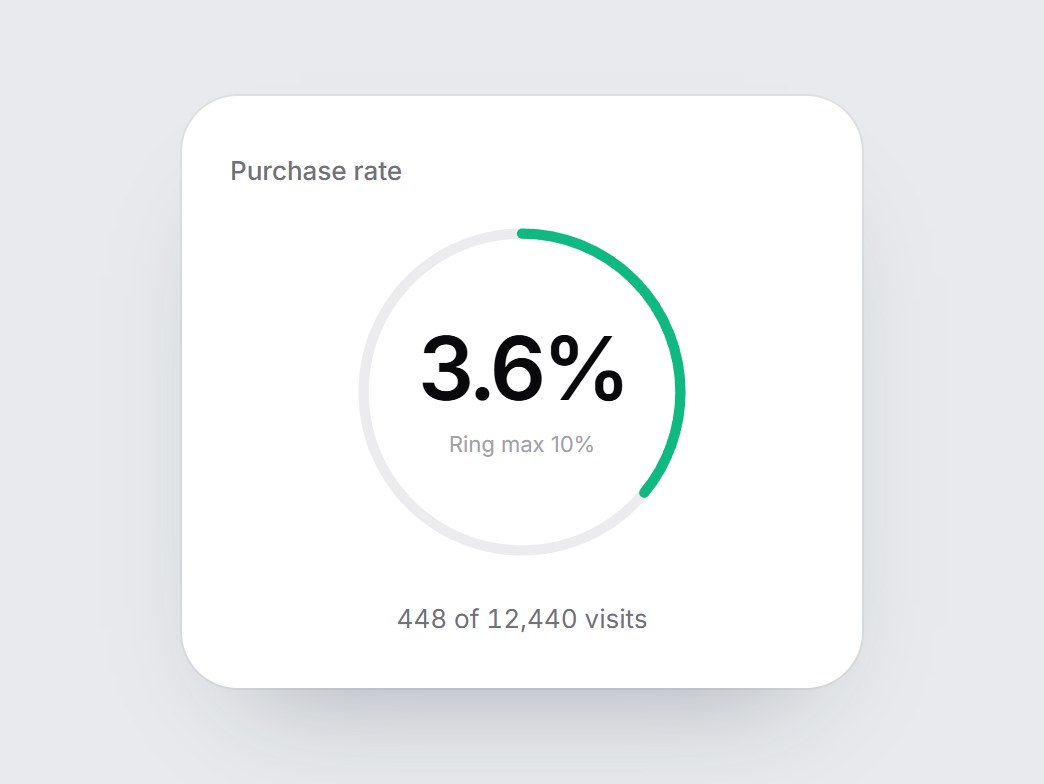
これは何か
細い閉じたリングの中央に大きな割合を置き、下に「448 of 12,440 visits」のような内訳を添えた白いカードです。画面に入ると緑の弧がリングに沿って描かれ、割合が数え上がります。小さな割合でも読めるよう、既定ではリング一周が10%です。ラベル・件数・目盛りの上限を差し替えて、購入レポートやコンバージョン機能の紹介にそのまま置けます。
TSX の全文です。アカウントは不要です。
conversion-rate-ring.tsx
"use client"; import * as React from "react";import { cn } from "@/lib/utils"; export const CONVERSION_RATE_RING_DEFAULT_NUMER = 448;export const CONVERSION_RATE_RING_DEFAULT_DENOM = 12440; export type ConversionRateRingProps = React.ComponentPropsWithoutRef<"div"> & { label?: string; /** 0–1. Defaults to numer / denom. */ rate?: number; /** Conversions, e.g. 448. */ numer?: number; /** Total it is measured against, e.g. 12,440. */ denom?: number; /** Noun after the total, e.g. "visits". */ unitLabel?: string; /** * Rate (0–1) that a full turn of the ring stands for. Small rates are unreadable * on a 0–100% ring, so the default full turn is 10%. */ scaleMax?: number; /** Small line under the percent. Defaults to "Ring max {scaleMax}%". */ scaleLabel?: string; /** Line under the ring. Defaults to "{numer} of {denom} {unitLabel}". */ caption?: string;}; const EASE = "cubic-bezier(0.22, 1, 0.36, 1)";const DRAW_MS = 1100; function usePrefersReducedMotion() { const [reduced, setReduced] = React.useState(false); React.useEffect(() => { const query = window.matchMedia("(prefers-reduced-motion: reduce)"); const update = () => setReduced(query.matches); update(); query.addEventListener("change", update); return () => query.removeEventListener("change", update); }, []); return reduced;} function trimPercent(n: number) { return `${Math.round(n * 10) / 10}%`;} export const ConversionRateRing = React.forwardRef<HTMLDivElement, ConversionRateRingProps>( ( { label = "Purchase rate", rate, numer = CONVERSION_RATE_RING_DEFAULT_NUMER, denom = CONVERSION_RATE_RING_DEFAULT_DENOM, unitLabel = "visits", scaleMax = 0.1, scaleLabel, caption, className, ...props }, ref, ) => { const resolved = Math.max(0, rate ?? (denom > 0 ? numer / denom : 0)); const percent = resolved * 100; const safeScale = scaleMax > 0 ? scaleMax : 1; const ratio = Math.min(1, resolved / safeScale); const localRef = React.useRef<HTMLDivElement>(null); React.useImperativeHandle(ref, () => localRef.current as HTMLDivElement); const reduced = usePrefersReducedMotion(); const [started, setStarted] = React.useState(false); const [count, setCount] = React.useState(0); React.useEffect(() => { const node = localRef.current; if (!node || typeof IntersectionObserver === "undefined") { setStarted(true); return; } const observer = new IntersectionObserver( ([entry]) => { if (entry?.isIntersecting) { setStarted(true); observer.disconnect(); } }, { threshold: 0.35 }, ); observer.observe(node); return () => observer.disconnect(); }, []); React.useEffect(() => { if (!started) return; if (reduced) { setCount(percent); return; } let frame = 0; const from = performance.now(); const tick = (now: number) => { const t = Math.min(1, (now - from) / DRAW_MS); setCount(percent * (1 - Math.pow(1 - t, 3))); if (t < 1) frame = requestAnimationFrame(tick); }; frame = requestAnimationFrame(tick); return () => cancelAnimationFrame(frame); }, [started, reduced, percent]); const shown = started ? ratio : 0; const scaleText = scaleLabel ?? `Ring max ${trimPercent(safeScale * 100)}`; const line = caption ?? `${numer.toLocaleString("en-US")} of ${denom.toLocaleString("en-US")} ${unitLabel}`; return ( <div ref={localRef} data-tsuna-id="conversion-rate-ring" className={cn( "w-[340px] max-w-full rounded-[28px] bg-white p-6 text-zinc-950", "shadow-[0_30px_60px_-34px_rgba(15,23,42,0.35),0_0_0_1px_rgba(15,23,42,0.05)]", className, )} {...props} > <span className="text-[13px] font-medium text-zinc-500">{label}</span> <div role="img" aria-label={`${label} ${percent.toFixed(1)}%, ${line}. The ring is drawn on a 0 to ${trimPercent( safeScale * 100, )} scale.`} className="relative mx-auto mt-3 aspect-square w-[176px] max-w-full" > <svg aria-hidden viewBox="0 0 120 120" className="absolute inset-0 h-full w-full -rotate-90"> <circle cx={60} cy={60} r={54} fill="none" stroke="#ececef" strokeWidth={3.5} /> <circle cx={60} cy={60} r={54} pathLength={100} fill="none" stroke="#10b981" strokeWidth={3.5} strokeLinecap="round" className="motion-reduce:!transition-none" style={{ strokeDasharray: "100 100", strokeDashoffset: 100 - shown * 100, opacity: shown > 0 ? 1 : 0, transition: `stroke-dashoffset ${DRAW_MS}ms ${EASE}, opacity 200ms linear`, }} /> </svg> <div className="absolute inset-0 flex flex-col items-center justify-center"> <span className="text-[44px] leading-none font-semibold tabular-nums tracking-[-0.05em]"> {count.toFixed(1)}% </span> <span className="mt-2 text-[11px] text-zinc-400">{scaleText}</span> </div> </div> <p className="m-0 mt-4 text-center text-[13px] text-zinc-500 tabular-nums motion-reduce:!transition-none" style={{ opacity: started ? 1 : 0, transition: `opacity 400ms ${EASE} 400ms` }} > {line} </p> </div> ); },); ConversionRateRing.displayName = "ConversionRateRing";
コンポーネント
コンバージョン率リング
細い閉じたリングの中央に大きな割合を置き、下に「448 of 12,440 visits」のような内訳を添えた白いカードです。画面に入ると緑の弧がリングに沿って描かれ、割合が数え上がります。小さな割合でも読めるよう、既定ではリング一周が10%です。ラベル・件数・目盛りの上限を差し替えて、購入レポートやコンバージョン機能の紹介にそのまま置けます。
Verified Technical Spec
- アニメーション
- CSS / Tailwind
- Reduced motion
- 確認済み
- キーボードフォーカス
- ソース上では未検出
- 対応環境
- Tailwind CSS v3.4 + v4 · React 19 / Next.js 15 App Router + Vite / Remix 対応
含まれるもの
- ソースを Cursor / Claude に渡してエージェントに組み込める
- React · TypeScript · Tailwind CSS の完成 UI
依存パッケージ
- React 19.0.0
- Typescript 5.7.2
- Tailwindcss 3.4.16
技術スタック
- React
- TypeScript
- Tailwind CSS
バージョン 1.0.0