コンポーネント一覧へ戻る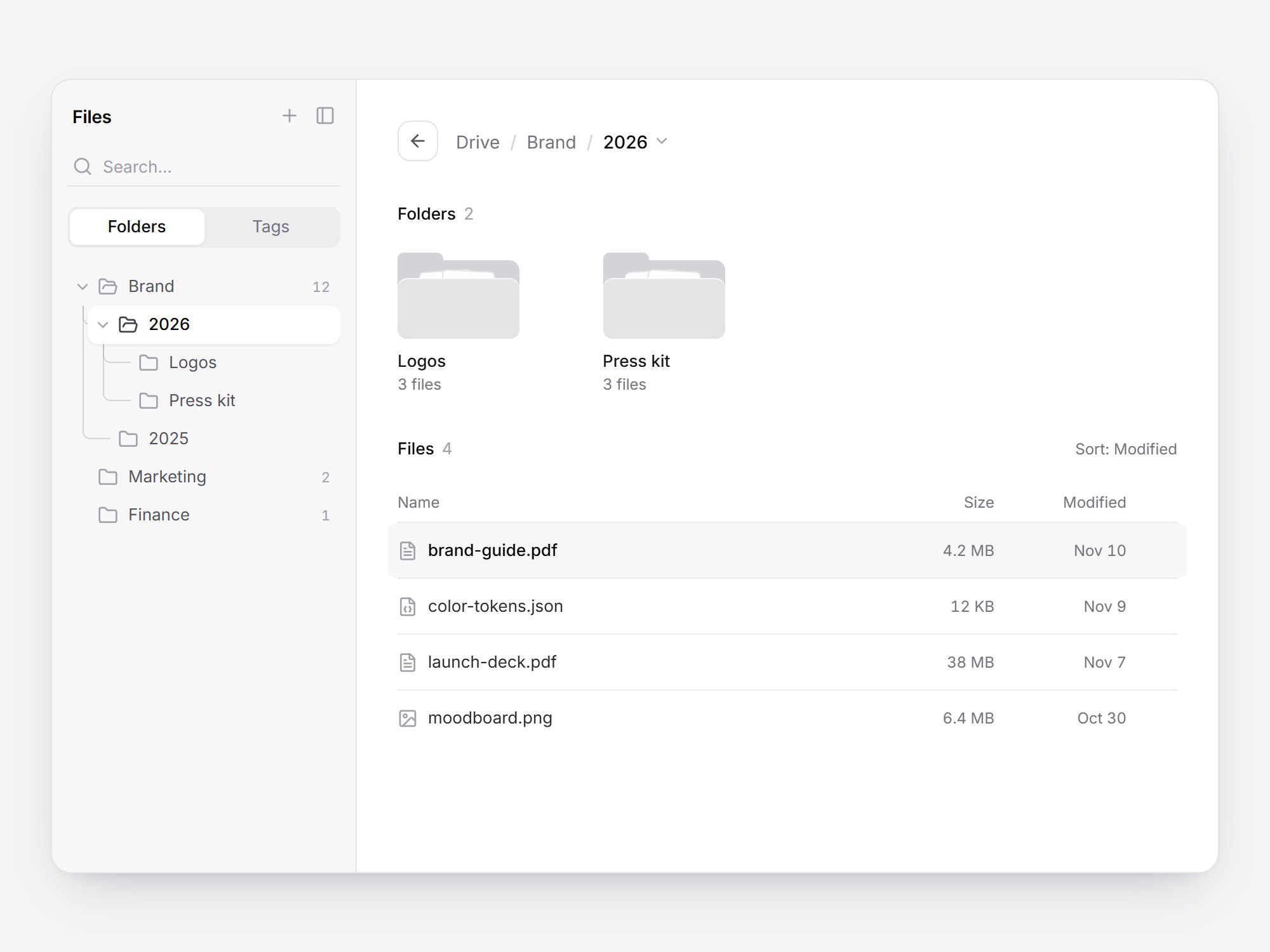
これは何か
ドライブの中身を見せる白いパネルです。左のグレーのサイドバーには、検索、Folders と Tags の切り替え、ガイド線付きのフォルダツリーが並びます。右の上には Drive / Brand / 2026 のパンくずがあり、最後の 2026 から同じ階層のフォルダへ切り替えられます。その下にフォルダのタイルと、名前・サイズ・更新日のファイル表が並びます。タイルにホバーすると、フォルダから白い紙が少し飛び出します。ツリーかタイルでフォルダを開くと、中身がクロスフェードで入れ替わります。ツリーの開閉は高さがなめらかに動きます。フォルダとファイルを差し替えて、ストレージやアセット管理、ドキュメント共有の画面にそのまま置けます。
TSX の全文です。アカウントは不要です。
file-browser-panel.tsx
"use client"; import * as React from "react";import { AnimatePresence, motion, useReducedMotion } from "motion/react";import { ArrowLeft, Check, ChevronDown, ChevronRight, Ellipsis, File, FileJson, FileText, Folder, FolderOpen, Image as ImageIcon, PanelLeft, Plus, Search, Tag,} from "lucide-react";import { cn } from "@/lib/utils"; export type FileBrowserNode = { id: string; name: string; kind: "folder" | "file"; /** Pre-formatted, e.g. "4.2 MB". */ size?: string; /** Pre-formatted, e.g. "Nov 10". */ modified?: string; children?: readonly FileBrowserNode[];}; export type FileBrowserTag = { id: string; name: string; count?: number }; export type FileBrowserLabels = { /** Sidebar title. */ title?: string; name?: string; size?: string; modified?: string; back?: string; folders?: string; files?: string; tags?: string; search?: string; noResults?: string; empty?: string; /** Unit after a file count, plural ("3 files"). */ items?: string; /** Unit after a file count of 1 ("1 file"). */ item?: string; newFolder?: string; toggleSidebar?: string; moreActions?: string; switchFolder?: string; sortBy?: string;}; export type FileBrowserPanelProps = React.ComponentPropsWithoutRef<"div"> & { /** The root folder. Its name is the first breadcrumb. */ root?: FileBrowserNode; /** Folder ids from the root down, without the root itself. */ path?: readonly string[]; defaultPath?: readonly string[]; onPathChange?: (path: string[]) => void; defaultSelectedId?: string; onSelect?: (node: FileBrowserNode) => void; /** Shown in the sidebar's Tags tab. */ tags?: readonly FileBrowserTag[]; /** The sidebar's Plus button. */ onNewFolder?: () => void; onToggleSidebar?: () => void; onFileMenu?: (node: FileBrowserNode) => void; labels?: FileBrowserLabels;}; const EASE = "cubic-bezier(0.22, 1, 0.36, 1)";const FOCUS = "focus-visible:outline-none focus-visible:ring-2 focus-visible:ring-zinc-900/35 focus-visible:ring-offset-1";const ICON_BUTTON = cn( "grid size-6 shrink-0 cursor-pointer place-items-center rounded-md border-0 bg-transparent text-zinc-400", "transition-colors [transition-duration:150ms] hover:bg-zinc-200/50 hover:text-zinc-700 motion-reduce:transition-none", FOCUS,);const SHADOW = "shadow-[0_18px_40px_-18px_rgba(15,23,42,0.28),0_4px_12px_-8px_rgba(15,23,42,0.14)]";/** Same white surface + soft shadow as the active segment. */const RAISED = "bg-white shadow-[0_1px_2px_rgba(15,23,42,0.06)]";const HOVER = "hover:bg-zinc-100/70";const HEADING = "m-0 flex items-baseline gap-1.5 text-[13px] font-medium text-zinc-950";const COLUMNS = "grid grid-cols-[minmax(0,1fr)_96px_32px] items-center gap-2 sm:grid-cols-[minmax(0,1fr)_96px_96px_32px]"; const CSS = `@keyframes file-browser-panel-crumb { from { opacity: 0; transform: translateX(-8px); } to { opacity: 1; transform: none; } }.file-browser-panel-crumb { animation: file-browser-panel-crumb 420ms ${EASE} both; }@media (prefers-reduced-motion: reduce) { .file-browser-panel-crumb { animation: none; } }`; const DEFAULT_ROOT: FileBrowserNode = { id: "drive", name: "Drive", kind: "folder", children: [ { id: "brand", name: "Brand", kind: "folder", modified: "Nov 10", children: [ { id: "2026", name: "2026", kind: "folder", modified: "Nov 10", children: [ { id: "logos", name: "Logos", kind: "folder", modified: "Nov 8", children: [ { id: "logo-mark", name: "logo-mark.svg", kind: "file", size: "18 KB", modified: "Nov 8" }, { id: "logo-wordmark", name: "logo-wordmark.svg", kind: "file", size: "24 KB", modified: "Nov 8" }, { id: "logo-pack", name: "logo-pack.zip", kind: "file", size: "3.1 MB", modified: "Nov 7" }, ], }, { id: "press-kit", name: "Press kit", kind: "folder", modified: "Nov 6", children: [ { id: "press-release", name: "press-release.pdf", kind: "file", size: "220 KB", modified: "Nov 6" }, { id: "founder-portrait", name: "founder-portrait.jpg", kind: "file", size: "2.8 MB", modified: "Nov 5" }, { id: "product-shots", name: "product-shots.zip", kind: "file", size: "48 MB", modified: "Nov 4" }, ], }, { id: "brand-guide", name: "brand-guide.pdf", kind: "file", size: "4.2 MB", modified: "Nov 10" }, { id: "color-tokens", name: "color-tokens.json", kind: "file", size: "12 KB", modified: "Nov 9" }, { id: "launch-deck", name: "launch-deck.pdf", kind: "file", size: "38 MB", modified: "Nov 7" }, { id: "moodboard", name: "moodboard.png", kind: "file", size: "6.4 MB", modified: "Oct 30" }, ], }, { id: "2025", name: "2025", kind: "folder", modified: "Jan 14", children: [ { id: "brand-guide-2025", name: "brand-guide-2025.pdf", kind: "file", size: "3.9 MB", modified: "Jan 14" }, { id: "retired-logos", name: "retired-logos.zip", kind: "file", size: "9.6 MB", modified: "Jan 9" }, ], }, ], }, { id: "marketing", name: "Marketing", kind: "folder", modified: "Nov 3", children: [ { id: "campaign-plan", name: "campaign-plan.pdf", kind: "file", size: "1.4 MB", modified: "Nov 3" }, { id: "launch-post", name: "launch-post.md", kind: "file", size: "8 KB", modified: "Nov 2" }, ], }, { id: "finance", name: "Finance", kind: "folder", modified: "Oct 28", children: [{ id: "q3-report", name: "q3-report.pdf", kind: "file", size: "2.2 MB", modified: "Oct 28" }], }, ],}; const DEFAULT_TAGS: readonly FileBrowserTag[] = [ { id: "final", name: "Final", count: 5 }, { id: "in-review", name: "In review", count: 3 }, { id: "shared", name: "Shared", count: 4 }, { id: "archive", name: "Archive", count: 2 },]; const DEFAULT_LABELS: Required<FileBrowserLabels> = { title: "Files", name: "Name", size: "Size", modified: "Modified", back: "Back", folders: "Folders", files: "Files", tags: "Tags", search: "Search...", noResults: "No folders found.", empty: "This folder is empty.", items: "files", item: "file", newFolder: "New folder", toggleSidebar: "Toggle sidebar", moreActions: "More actions", switchFolder: "Switch folder", sortBy: "Sort: Modified",}; function iconFor(node: FileBrowserNode) { if (node.kind === "folder") return Folder; if (/\.json$/i.test(node.name)) return FileJson; if (/\.(png|jpe?g|svg|gif|webp)$/i.test(node.name)) return ImageIcon; if (/\.(pdf|md|txt|docx?)$/i.test(node.name)) return FileText; return File;} function resolve(root: FileBrowserNode, path: readonly string[]) { const trail: FileBrowserNode[] = [root]; for (const id of path) { const next = trail[trail.length - 1]?.children?.find((child) => child.id === id && child.kind === "folder"); if (!next) break; trail.push(next); } return trail;} const foldersOf = (node: FileBrowserNode) => (node.children ?? []).filter((child) => child.kind === "folder");const filesOf = (node: FileBrowserNode) => (node.children ?? []).filter((child) => child.kind === "file"); function countFiles(node: FileBrowserNode): number { return (node.children ?? []).reduce((sum, child) => sum + (child.kind === "file" ? 1 : countFiles(child)), 0);} function flattenFolders(node: FileBrowserNode, trail: string[] = []): { node: FileBrowserNode; path: string[] }[] { return foldersOf(node).flatMap((child) => { const path = [...trail, child.id]; return [{ node: child, path }, ...flattenFolders(child, path)]; });} const modifiedTime = (node: FileBrowserNode) => { const t = node.modified ? Date.parse(`${node.modified} 2000`) : NaN; return Number.isNaN(t) ? 0 : t;}; const PAPERS = [ { left: 18, rotate: -4 }, { left: 34, rotate: 3 },] as const; /** 96×72: back panel + tab one step darker than the front, two paper sheets peeking 6px. */function FolderArt({ reduce }: { reduce: boolean }) { return ( <span aria-hidden className="relative block h-[72px] w-24"> <span className="absolute top-1 left-0 h-2 w-9 rounded-t-[5px] bg-zinc-300" /> <span className="absolute inset-x-0 top-2.5 bottom-0 rounded-lg rounded-tl-none bg-zinc-300" /> {PAPERS.map((paper, i) => ( <motion.span key={i} className="absolute top-[18px] h-11 w-[42px] rounded-[4px] border border-zinc-200 bg-white" style={{ left: paper.left, rotate: paper.rotate }} variants={{ rest: { y: 0 }, hover: { y: reduce ? 0 : -6 } }} transition={ reduce ? { duration: 0 } : { type: "spring", stiffness: 420, damping: 22, mass: 0.6, delay: i * 0.03 } } /> ))} <span className="absolute inset-x-0 bottom-0 h-12 rounded-lg bg-zinc-200 shadow-[inset_0_1px_0_rgb(255_255_255/0.7)]" /> </span> );} export const FileBrowserPanel = React.forwardRef<HTMLDivElement, FileBrowserPanelProps>( ( { root = DEFAULT_ROOT, path, defaultPath = ["brand", "2026"], onPathChange, defaultSelectedId = "brand-guide", onSelect, tags = DEFAULT_TAGS, onNewFolder, onToggleSidebar, onFileMenu, labels, className, ...props }, ref, ) => { const text = { ...DEFAULT_LABELS, ...labels }; const reduce = useReducedMotion() ?? false; const [ownPath, setOwnPath] = React.useState<readonly string[]>(defaultPath); const trail = resolve(root, path ?? ownPath); const ids = trail.slice(1).map((node) => node.id); const key = ids.join("/"); const folder = trail[trail.length - 1] ?? root; const subfolders = foldersOf(folder); const files = filesOf(folder); const [tab, setTab] = React.useState<"folders" | "tags">("folders"); const [query, setQuery] = React.useState(""); const [expanded, setExpanded] = React.useState<ReadonlySet<string>>(() => new Set(ids)); const [selected, setSelected] = React.useState<string | undefined>(defaultSelectedId); const [menuOpen, setMenuOpen] = React.useState(false); const [sortDir, setSortDir] = React.useState<"desc" | "asc">("desc"); const sortedFiles = [...files].sort((a, b) => sortDir === "desc" ? modifiedTime(b) - modifiedTime(a) : modifiedTime(a) - modifiedTime(b), ); const viewRef = React.useRef<HTMLDivElement>(null); const moved = React.useRef(false); const triggerRef = React.useRef<HTMLButtonElement>(null); const menuRef = React.useRef<HTMLDivElement>(null); React.useEffect(() => { setExpanded((current) => (ids.every((id) => current.has(id)) ? current : new Set([...current, ...ids]))); if (!moved.current) return; moved.current = false; viewRef.current?.querySelector<HTMLElement>("button")?.focus({ preventScroll: true }); // eslint-disable-next-line react-hooks/exhaustive-deps }, [key]); React.useEffect(() => { if (!menuOpen) return; ( menuRef.current?.querySelector<HTMLElement>("[aria-checked='true']") ?? menuRef.current?.querySelector<HTMLElement>("button") )?.focus(); const onDown = (event: PointerEvent) => { const target = event.target as Node; if (!menuRef.current?.contains(target) && !triggerRef.current?.contains(target)) setMenuOpen(false); }; document.addEventListener("pointerdown", onDown); return () => document.removeEventListener("pointerdown", onDown); }, [menuOpen]); const navigate = (next: string[], focusContent = false) => { setMenuOpen(false); if (next.join("/") === key) return; moved.current = focusContent; if (path === undefined) setOwnPath(next); onPathChange?.(next); }; const toggle = (id: string) => setExpanded((current) => { const next = new Set(current); if (next.has(id)) next.delete(id); else next.add(id); return next; }); const select = (node: FileBrowserNode) => { setSelected(node.id); onSelect?.(node); }; const fileCountLabel = (node: FileBrowserNode) => { const n = countFiles(node); return `${n} ${n === 1 ? text.item : text.items}`; }; // Siblings of the current folder (or the root's folders when at the root). const switchParent = trail.length > 1 ? trail[trail.length - 2] : root; const switchBase = trail.length > 1 ? ids.slice(0, -1) : []; const switchOptions = switchParent ? foldersOf(switchParent) : []; const onMenuKeyDown = (event: React.KeyboardEvent<HTMLDivElement>) => { const items = Array.from(event.currentTarget.querySelectorAll<HTMLButtonElement>("button")); const at = items.indexOf(document.activeElement as HTMLButtonElement); if (event.key === "ArrowDown" || event.key === "ArrowUp") { event.preventDefault(); const step = event.key === "ArrowDown" ? 1 : -1; items[(at + step + items.length) % items.length]?.focus(); } else if (event.key === "Escape" || event.key === "Tab") { if (event.key === "Escape") event.preventDefault(); setMenuOpen(false); triggerRef.current?.focus(); } }; const onContentKeyDown = (event: React.KeyboardEvent<HTMLDivElement>) => { if (event.key === "Backspace" && ids.length > 0) { event.preventDefault(); navigate(ids.slice(0, -1), true); } }; const treeRowClass = (current: boolean) => cn( "flex h-[30px] w-full min-w-0 cursor-pointer items-center gap-2 rounded-lg border-0 pr-2 pl-6 text-left text-[13px]", "transition-[background-color,color,box-shadow] [transition-duration:150ms] motion-reduce:transition-none", current ? cn(RAISED, "font-medium text-zinc-950") : "bg-transparent text-zinc-600 hover:bg-zinc-200/50 hover:text-zinc-900", FOCUS, ); const count = (value: number) => ( <span className="ml-auto shrink-0 text-[11px] text-zinc-400 tabular-nums">{value}</span> ); // 30px rows; children indent 16px; guides sit under the parent's chevron (x = 12px). const renderTree = (node: FileBrowserNode, depth: number, trailIds: string[]): React.ReactNode => { const children = foldersOf(node); return children.map((child, index) => { const childPath = [...trailIds, child.id]; const current = ids.length === depth + 1 && ids[depth] === child.id; const nested = foldersOf(child).length > 0; const open = nested && expanded.has(child.id); const last = index === children.length - 1; const Icon = current || open ? FolderOpen : Folder; return ( <li key={child.id} className="relative"> {depth > 0 ? ( <> {!last ? <span aria-hidden className="absolute top-0 bottom-0 -left-1 border-l border-zinc-400/40" /> : null} <span aria-hidden className="absolute top-0 -left-1 h-[15px] rounded-bl-[6px] border-b border-l border-zinc-400/40" style={{ width: nested ? 8 : 22 }} /> </> ) : null} <div className="relative"> {nested ? ( <button type="button" aria-label={child.name} aria-expanded={open} tabIndex={-1} onClick={() => toggle(child.id)} className={cn( "absolute top-[7px] left-1 z-10 grid size-4 cursor-pointer place-items-center rounded border-0 bg-transparent p-0 text-zinc-400 hover:text-zinc-700", FOCUS, )} > <ChevronRight aria-hidden className="size-3.5 transition-transform motion-reduce:transition-none" style={{ transform: open ? "rotate(90deg)" : "none", transitionDuration: "160ms" }} /> </button> ) : null} <button type="button" aria-current={current ? "true" : undefined} aria-expanded={nested ? open : undefined} onClick={() => { if (nested && !open) toggle(child.id); navigate(childPath); }} onKeyDown={(event) => { if (!nested) return; if ((event.key === "ArrowRight" && !open) || (event.key === "ArrowLeft" && open)) { event.preventDefault(); toggle(child.id); } }} className={treeRowClass(current)} > <Icon aria-hidden className={cn("size-4 shrink-0", current ? "text-zinc-700" : "text-zinc-400")} /> <span className="min-w-0 truncate">{child.name}</span> {depth === 0 ? count(countFiles(child)) : null} </button> </div> <AnimatePresence initial={false}> {open ? ( <motion.ul key="children" initial={{ height: 0, opacity: 0 }} animate={{ height: "auto", opacity: 1 }} exit={{ height: 0, opacity: 0 }} transition={{ duration: reduce ? 0 : 0.16, ease: [0.22, 1, 0.36, 1] }} className="relative m-0 list-none overflow-hidden p-0 pl-4" > {renderTree(child, depth + 1, childPath)} </motion.ul> ) : null} </AnimatePresence> </li> ); }); }; const switchMenu = ( <AnimatePresence> {menuOpen && switchOptions.length > 0 ? ( <motion.div ref={menuRef} role="menu" aria-label={text.switchFolder} onKeyDown={onMenuKeyDown} initial={{ opacity: 0, y: reduce ? 0 : -4, scale: reduce ? 1 : 0.98 }} animate={{ opacity: 1, y: 0, scale: 1 }} exit={{ opacity: 0, y: reduce ? 0 : -4, scale: reduce ? 1 : 0.98 }} transition={{ duration: reduce ? 0 : 0.14, ease: [0.22, 1, 0.36, 1] }} className={cn( "absolute top-[calc(100%+6px)] left-0 z-30 w-[200px] origin-top-left rounded-xl border border-zinc-200 bg-white p-1", SHADOW, )} > {switchOptions.map((option) => { const current = option.id === folder.id && trail.length > 1; return ( <button key={option.id} type="button" role="menuitemradio" aria-checked={current} onClick={() => navigate([...switchBase, option.id], true)} className={cn( "flex h-8 w-full cursor-pointer items-center gap-2 rounded-lg border-0 bg-transparent px-2 text-left text-[13px]", "transition-colors [transition-duration:150ms] motion-reduce:transition-none", HOVER, current ? "font-medium text-zinc-950" : "text-zinc-700", FOCUS, )} > <Folder aria-hidden className="size-4 shrink-0 text-zinc-400" /> <span className="min-w-0 flex-1 truncate">{option.name}</span> {current ? <Check aria-hidden className="size-3.5 shrink-0 text-zinc-500" /> : null} </button> ); })} </motion.div> ) : null} </AnimatePresence> ); const q = query.trim().toLowerCase(); const matches = q ? flattenFolders(root).filter(({ node }) => node.name.toLowerCase().includes(q)) : []; return ( <div ref={ref} data-tsuna-id="file-browser-panel" data-path={key} className={cn( "flex w-[920px] max-w-full overflow-clip rounded-2xl border border-zinc-200 bg-white text-zinc-900", SHADOW, className, )} {...props} > <style>{CSS}</style> <aside aria-label={text.folders} className="hidden w-[240px] shrink-0 flex-col border-r border-zinc-200 bg-zinc-100/70 p-3 sm:flex" > <div className="flex h-8 items-center gap-1 pl-1"> <p className="m-0 mr-auto text-[14px] font-semibold tracking-[-0.01em] text-zinc-950">{text.title}</p> <button type="button" aria-label={text.newFolder} title={text.newFolder} onClick={onNewFolder} className={ICON_BUTTON}> <Plus aria-hidden className="size-4" /> </button> <button type="button" aria-label={text.toggleSidebar} onClick={onToggleSidebar} className={ICON_BUTTON}> <PanelLeft aria-hidden className="size-4" /> </button> </div> <label className="mt-2 flex h-8 items-center gap-2 border-b border-zinc-200 px-1 text-zinc-400 focus-within:text-zinc-600"> <Search aria-hidden className="size-4 shrink-0" /> <input type="search" value={query} onChange={(event) => setQuery(event.target.value)} placeholder={text.search} aria-label={text.search.replace(/\.+$/, "")} className="h-full min-w-0 flex-1 border-0 bg-transparent p-0 text-[13px] text-zinc-900 outline-none placeholder:text-zinc-400 [&::-webkit-search-cancel-button]:hidden" /> </label> <div role="tablist" aria-label={text.title} className="relative mt-4 grid h-8 grid-cols-2 rounded-lg bg-zinc-200/50 p-0.5"> <span aria-hidden className={cn("absolute top-0.5 bottom-0.5 left-0.5 w-[calc(50%-2px)] rounded-md motion-reduce:!transition-none", RAISED)} style={{ transform: tab === "tags" ? "translateX(100%)" : "none", transition: `transform 220ms ${EASE}` }} /> {(["folders", "tags"] as const).map((value) => ( <button key={value} type="button" role="tab" aria-selected={tab === value} onClick={() => setTab(value)} className={cn( "relative cursor-pointer rounded-md border-0 bg-transparent text-[13px] transition-colors [transition-duration:150ms] motion-reduce:transition-none", tab === value ? "font-medium text-zinc-950" : "text-zinc-500 hover:text-zinc-800", FOCUS, )} > {value === "folders" ? text.folders : text.tags} </button> ))} </div> <div className="-mx-1 mt-4 min-h-0 flex-1 overflow-y-auto px-1"> {tab === "tags" ? ( <ul className="m-0 flex list-none flex-col gap-0.5 p-0"> {tags.map((tag) => ( <li key={tag.id} className="flex h-[30px] items-center gap-2 rounded-lg pr-2 pl-2 text-[13px] text-zinc-600 transition-colors [transition-duration:150ms] hover:bg-zinc-200/50 hover:text-zinc-900" > <Tag aria-hidden className="size-4 shrink-0 text-zinc-400" /> <span className="min-w-0 truncate">{tag.name}</span> {tag.count !== undefined ? count(tag.count) : null} </li> ))} </ul> ) : q ? ( matches.length ? ( <ul className="m-0 flex list-none flex-col gap-0.5 p-0"> {matches.map(({ node, path: matchPath }) => { const current = matchPath.join("/") === key; const Icon = current ? FolderOpen : Folder; return ( <li key={matchPath.join("/")}> <button type="button" aria-current={current ? "true" : undefined} onClick={() => navigate(matchPath)} className={cn(treeRowClass(current), "pl-2")} > <Icon aria-hidden className={cn("size-4 shrink-0", current ? "text-zinc-700" : "text-zinc-400")} /> <span className="min-w-0 truncate">{node.name}</span> </button> </li> ); })} </ul> ) : ( <p className="m-0 px-2 py-6 text-center text-[12px] text-zinc-400">{text.noResults}</p> ) ) : ( <ul className="m-0 flex list-none flex-col p-0">{renderTree(root, 0, [])}</ul> )} </div> </aside> <div className="flex min-w-0 flex-1 flex-col"> <div className="flex h-16 shrink-0 items-end gap-2 px-6 sm:px-8"> <button type="button" aria-label={text.back} disabled={ids.length === 0} onClick={() => navigate(ids.slice(0, -1))} className={cn( "grid size-8 shrink-0 cursor-pointer place-items-center rounded-[10px] border border-zinc-200 bg-white text-zinc-600", "transition-[background-color,color,opacity] [transition-duration:180ms] hover:bg-zinc-50 hover:text-zinc-950 motion-reduce:transition-none", "disabled:cursor-default disabled:opacity-40 disabled:hover:bg-white", FOCUS, )} > <ArrowLeft aria-hidden className="size-4" /> </button> <nav aria-label="Breadcrumb" className="relative min-w-0 flex-1"> <ol className="m-0 flex h-8 min-w-0 list-none items-center p-0 text-[14px]"> {trail.map((node, i) => { const lastCrumb = i === trail.length - 1; return ( <li key={node.id} className="file-browser-panel-crumb relative flex min-w-0 items-center"> {i > 0 ? <span aria-hidden className="px-0.5 text-zinc-300">/</span> : null} {lastCrumb ? ( <> <button ref={triggerRef} type="button" aria-current="page" aria-haspopup="menu" aria-expanded={menuOpen} aria-label={`${node.name}, ${text.switchFolder}`} onClick={() => setMenuOpen((open) => !open)} className={cn( "flex max-w-[180px] cursor-pointer items-center gap-1 rounded-lg border-0 py-1 pr-1 pl-1.5 font-medium text-zinc-950", "transition-colors [transition-duration:150ms] motion-reduce:transition-none", menuOpen ? "bg-zinc-100/70" : cn("bg-transparent", HOVER), FOCUS, )} > <span className="truncate">{node.name}</span> <ChevronDown aria-hidden className="size-3.5 shrink-0 text-zinc-400 transition-transform motion-reduce:transition-none" style={{ transform: menuOpen ? "rotate(180deg)" : "none", transitionDuration: "160ms" }} /> </button> {switchMenu} </> ) : ( <button type="button" onClick={() => navigate(ids.slice(0, i))} className={cn( "max-w-[160px] cursor-pointer truncate rounded-lg border-0 bg-transparent px-1.5 py-1 text-zinc-500", "transition-colors [transition-duration:150ms] hover:text-zinc-900 motion-reduce:transition-none", HOVER, FOCUS, )} > {node.name} </button> )} </li> ); })} </ol> </nav> </div> <div className="relative grid h-[560px] grid-cols-[minmax(0,1fr)] grid-rows-[minmax(0,1fr)] overflow-hidden"> <AnimatePresence initial={false}> <motion.div key={key} ref={viewRef} role="group" aria-label={folder.name} onKeyDown={onContentKeyDown} initial={{ opacity: 0 }} animate={{ opacity: 1 }} exit={{ opacity: 0, pointerEvents: "none" }} transition={{ duration: reduce ? 0 : 0.15, ease: "linear" }} className="min-w-0 overflow-y-auto px-6 pt-8 pb-8 [grid-area:1/1] sm:px-8" > {subfolders.length > 0 ? ( <section> <h3 className={HEADING}> {text.folders} <span className="font-normal text-zinc-400 tabular-nums">{subfolders.length}</span> </h3> <div className="-mx-2 mt-2 grid grid-cols-2 gap-4 sm:grid-cols-4"> {subfolders.map((child) => ( <motion.button key={child.id} type="button" initial="rest" animate="rest" whileHover="hover" whileFocus="hover" onClick={() => navigate([...ids, child.id], true)} className={cn( "flex min-w-0 cursor-pointer flex-col items-start rounded-xl border-0 bg-transparent p-2 text-left", "transition-colors [transition-duration:120ms] motion-reduce:transition-none", HOVER, FOCUS, )} > <FolderArt reduce={reduce} /> <span className="mt-2 w-full truncate text-[13px] font-medium text-zinc-900">{child.name}</span> <span className="text-[12px] text-zinc-500 tabular-nums">{fileCountLabel(child)}</span> </motion.button> ))} </div> </section> ) : null} {files.length > 0 ? ( <section className={subfolders.length > 0 ? "mt-6" : undefined}> <div className="flex items-baseline justify-between"> <h3 className={HEADING}> {text.files} <span className="font-normal text-zinc-400 tabular-nums">{files.length}</span> </h3> <button type="button" onClick={() => setSortDir((dir) => (dir === "desc" ? "asc" : "desc"))} title={sortDir === "desc" ? "Newest first" : "Oldest first"} className={cn( "cursor-pointer rounded border-0 bg-transparent p-0 text-[12px] text-zinc-500 transition-colors [transition-duration:120ms] hover:text-zinc-900 motion-reduce:transition-none", FOCUS, )} > {text.sortBy} </button> </div> <div role="table" aria-label={text.files} className="-mx-2 mt-4"> <div role="row" className={cn(COLUMNS, "relative h-8 px-2 text-[12px] text-zinc-500")}> <span role="columnheader">{text.name}</span> <span role="columnheader" className="text-right"> {text.size} </span> <span role="columnheader" className="hidden text-right sm:block"> {text.modified} </span> <span role="columnheader" aria-label={text.moreActions} /> <span aria-hidden className="absolute inset-x-2 bottom-0 h-px bg-zinc-200/70" /> </div> {sortedFiles.map((node, i) => { const Icon = iconFor(node); const active = node.id === selected; return ( <div key={node.id} role="row" className={cn( COLUMNS, "group relative h-11 rounded-lg px-2 transition-colors [transition-duration:120ms] motion-reduce:transition-none", active ? "bg-zinc-100/70" : HOVER, )} > <span role="cell" className="min-w-0"> <button type="button" aria-pressed={active} onClick={() => select(node)} className={cn( "flex w-full min-w-0 cursor-pointer items-center gap-2 border-0 bg-transparent p-0 text-left", "after:absolute after:inset-0 after:rounded-lg after:content-['']", "focus-visible:outline-none focus-visible:after:ring-2 focus-visible:after:ring-zinc-900/35", )} > <Icon aria-hidden className="size-4 shrink-0 text-zinc-400" /> <span className={cn("truncate text-[13px]", active ? "font-medium text-zinc-950" : "text-zinc-800")}> {node.name} </span> </button> </span> <span role="cell" className="text-right text-[12px] text-zinc-500 tabular-nums"> {node.size} </span> <span role="cell" className="hidden text-right text-[12px] text-zinc-500 tabular-nums sm:block"> {node.modified} </span> <span role="cell" className="flex justify-end"> <button type="button" aria-label={`${text.moreActions}: ${node.name}`} onClick={() => onFileMenu?.(node)} className={cn( ICON_BUTTON, "relative z-10 opacity-0 transition-opacity group-hover:opacity-100 focus-visible:opacity-100", )} > <Ellipsis aria-hidden className="size-4" /> </button> </span> {i < sortedFiles.length - 1 ? ( <span aria-hidden className="absolute inset-x-2 bottom-0 h-px bg-zinc-200/70" /> ) : null} </div> ); })} </div> </section> ) : null} {subfolders.length === 0 && files.length === 0 ? ( <p className="m-0 py-12 text-center text-[13px] text-zinc-400">{text.empty}</p> ) : null} </motion.div> </AnimatePresence> </div> </div> </div> ); },); FileBrowserPanel.displayName = "FileBrowserPanel";
コンポーネント
ファイルブラウザパネル
ドライブの中身を見せる白いパネルです。左のグレーのサイドバーには、検索、Folders と Tags の切り替え、ガイド線付きのフォルダツリーが並びます。右の上には Drive / Brand / 2026 のパンくずがあり、最後の 2026 から同じ階層のフォルダへ切り替えられます。その下にフォルダのタイルと、名前・サイズ・更新日のファイル表が並びます。タイルにホバーすると、フォルダから白い紙が少し飛び出します。ツリーかタイルでフォルダを開くと、中身がクロスフェードで入れ替わります。ツリーの開閉は高さがなめらかに動きます。フォルダとファイルを差し替えて、ストレージやアセット管理、ドキュメント共有の画面にそのまま置けます。
Verified Technical Spec
- アニメーション
- Framer Motion
- Reduced motion
- 確認済み
- キーボードフォーカス
- 確認済み
- 対応環境
- Tailwind CSS v3.4 + v4 · React 19 / Next.js 15 App Router + Vite / Remix 対応
含まれるもの
- ソースを Cursor / Claude に渡してエージェントに組み込める
- スマートフォン・タブレット・パソコン対応
- React · TypeScript · Tailwind CSS · Motion · Lucide の完成 UI
依存パッケージ
- React 19.0.0
- Typescript 5.7.2
- Tailwindcss 3.4.16
- Lucide-react 1.23.0
- Motion 12.42.2
技術スタック
- React
- TypeScript
- Tailwind CSS
- Motion
- Lucide
バージョン 1.0.0