DesignLayer
マンスリーカレンダー
コンポーネント一覧へ戻る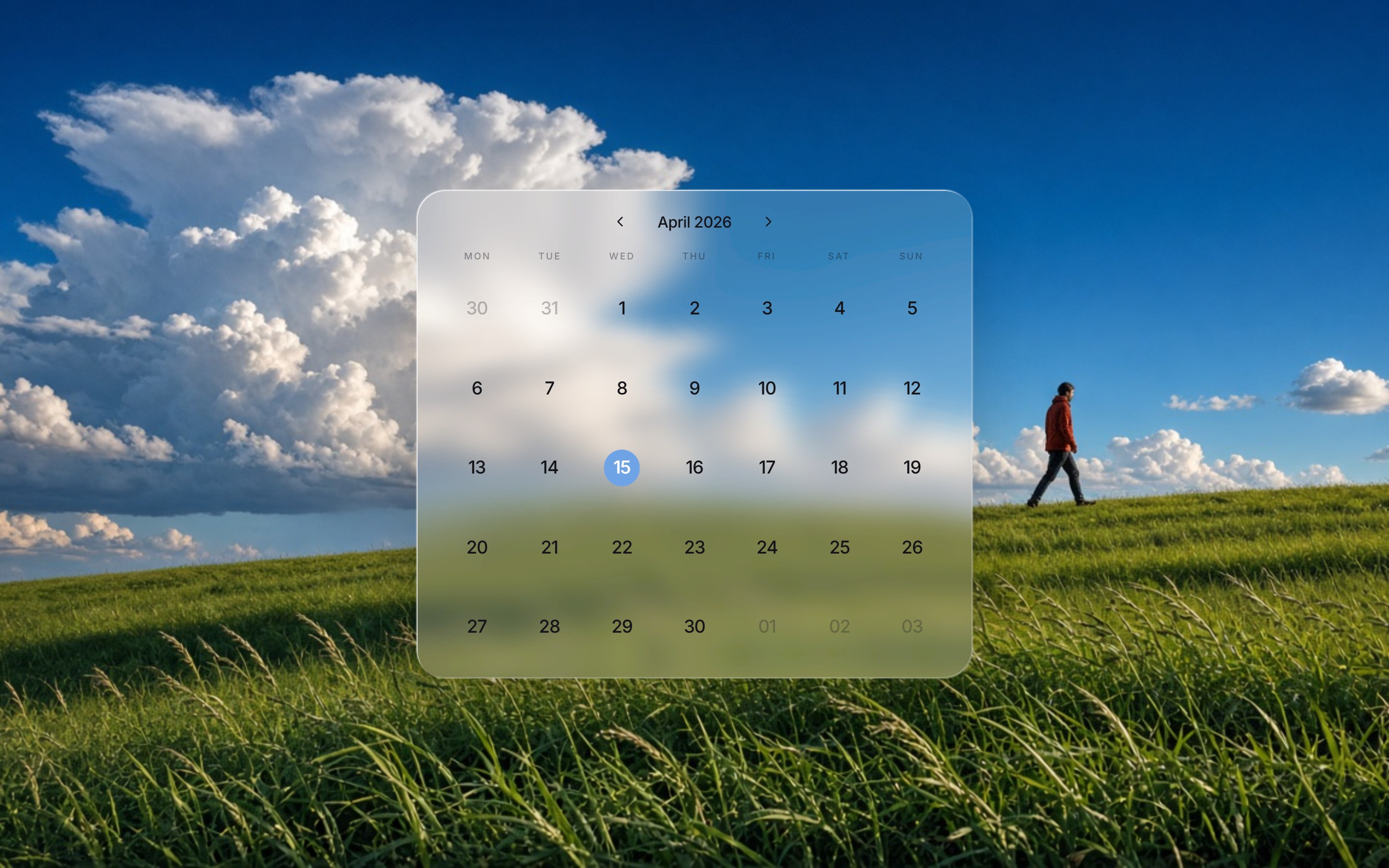
これは何か
草原と積乱雲の写真を全面に敷き、中央にリキッドガラスのマンスリーカレンダーを置くフルスクリーンセクションです。月名と前後送り、曜日行、日付グリッドが揃っています。背景写真を差し替えて、プロダクトやブランドの LP 中盤にそのまま置けます。
ソースコード全文を見る(無料サンプル)
このコンポーネントの実TSXです。未ログインのままでも、購入前に読めます。
src/components/ui/album-calendar.tsx
"use client";

import { useEffect, useMemo, useRef, useState, type PointerEvent } from "react";
import { ChevronLeft, ChevronRight } from "lucide-react";
import { GlassEffect, GlassFilter } from "@/components/ui/liquid-glass";
import { cn } from "@/lib/utils";

const FONT_LINK_ID = "album-calendar-fonts";
const FONT_HREF =
  "https://fonts.googleapis.com/css2?family=Inter:wght@400;500;600;700&display=swap";
const UI_FONT =
  'Inter, "SF Pro Display", "Helvetica Neue", Helvetica, Arial, ui-sans-serif, sans-serif';

export const ALBUM_CALENDAR_BG_SRC = "https://design-layer.com/dev/album-calendar/bg.png?v=2";

const WEEKDAYS = ["MON", "TUE", "WED", "THU", "FRI", "SAT", "SUN"] as const;

const MONTH_NAMES = [
  "January",
  "February",
  "March",
  "April",
  "May",
  "June",
  "July",
  "August",
  "September",
  "October",
  "November",
  "December",
] as const;

export type AlbumCalendarProps = {
  year?: number;
  month?: number;
  weekdayLabels?: readonly string[];
  backgroundSrc?: string;
  backgroundAlt?: string;
  className?: string;
};

function pad2(value: number) {
  return String(value).padStart(2, "0");
}

function toIsoDate(year: number, monthIndex: number, day: number) {
  return `${year}-${pad2(monthIndex + 1)}-${pad2(day)}`;
}

function mondayOffset(year: number, monthIndex: number) {
  const dow = new Date(year, monthIndex, 1).getDay();
  return dow === 0 ? 6 : dow - 1;
}

function isoBetween(from: string, to: string) {
  const [startIso, endIso] = from <= to ? [from, to] : [to, from];
  const start = new Date(`${startIso}T00:00:00`);
  const end = new Date(`${endIso}T00:00:00`);
  const dates: string[] = [];
  for (let cursor = new Date(start); cursor <= end; cursor.setDate(cursor.getDate() + 1)) {
    dates.push(toIsoDate(cursor.getFullYear(), cursor.getMonth(), cursor.getDate()));
  }
  return dates;
}

function isoFromTarget(target: EventTarget | null) {
  const el = target instanceof Element ? target.closest("[data-alc-iso]") : null;
  return el?.getAttribute("data-alc-iso") ?? null;
}

function useAlbumCalendarFonts() {
  useEffect(() => {
    if (typeof document === "undefined") return;
    if (document.getElementById(FONT_LINK_ID)) return;
    const link = document.createElement("link");
    link.id = FONT_LINK_ID;
    link.rel = "stylesheet";
    link.href = FONT_HREF;
    document.head.appendChild(link);
  }, []);
}

type CalendarCell = {
  key: string;
  day: number;
  iso: string;
  current: boolean;
};

function buildCells(year: number, monthIndex: number): CalendarCell[] {
  const lead = mondayOffset(year, monthIndex);
  const days = new Date(year, monthIndex + 1, 0).getDate();
  const cells: CalendarCell[] = [];

  const prevMonth = monthIndex === 0 ? 11 : monthIndex - 1;
  const prevYear = monthIndex === 0 ? year - 1 : year;
  const prevDays = new Date(prevYear, prevMonth + 1, 0).getDate();
  for (let i = lead; i > 0; i -= 1) {
    const day = prevDays - i + 1;
    cells.push({
      key: `prev-${day}`,
      day,
      iso: toIsoDate(prevYear, prevMonth, day),
      current: false,
    });
  }
  for (let day = 1; day <= days; day += 1) {
    cells.push({
      key: toIsoDate(year, monthIndex, day),
      day,
      iso: toIsoDate(year, monthIndex, day),
      current: true,
    });
  }

  const remainder = cells.length % 7;
  if (remainder !== 0) {
    const nextMonth = monthIndex === 11 ? 0 : monthIndex + 1;
    const nextYear = monthIndex === 11 ? year + 1 : year;
    const fill = 7 - remainder;
    for (let day = 1; day <= fill; day += 1) {
      cells.push({
        key: `next-${day}`,
        day,
        iso: toIsoDate(nextYear, nextMonth, day),
        current: false,
      });
    }
  }

  return cells;
}

/**
 * 草原写真の上に、リキッドガラスのマンスリーカレンダーを置くフルスクリーン。
 * 月送りで前後の月を見られる。
 */
export function AlbumCalendar({
  year = 2026,
  month = 4,
  weekdayLabels = WEEKDAYS,
  backgroundSrc = ALBUM_CALENDAR_BG_SRC,
  backgroundAlt = "",
  className,
}: AlbumCalendarProps) {
  useAlbumCalendarFonts();

  const initialMonth = Math.min(11, Math.max(0, month - 1));
  const [cursor, setCursor] = useState({ year, monthIndex: initialMonth });
  const [selected, setSelected] = useState<string[]>([]);
  const [draft, setDraft] = useState<{ start: string; end: string } | null>(null);
  const dragging = useRef(false);

  const cells = useMemo(
    () => buildCells(cursor.year, cursor.monthIndex),
    [cursor.year, cursor.monthIndex],
  );

  const marked = useMemo(() => {
    const dates = draft ? isoBetween(draft.start, draft.end) : selected;
    return new Set(dates);
  }, [draft, selected]);

  const monthLabel = `${MONTH_NAMES[cursor.monthIndex]} ${cursor.year}`;

  useEffect(() => {
    const finish = () => {
      if (!dragging.current) return;
      dragging.current = false;
      setDraft((current) => {
        if (current) setSelected(isoBetween(current.start, current.end));
        return null;
      });
    };
    window.addEventListener("pointerup", finish);
    window.addEventListener("pointercancel", finish);
    return () => {
      window.removeEventListener("pointerup", finish);
      window.removeEventListener("pointercancel", finish);
    };
  }, []);

  const startDrag = (iso: string, event: PointerEvent<HTMLDivElement>) => {
    event.preventDefault();
    dragging.current = true;
    event.currentTarget.setPointerCapture?.(event.pointerId);
    setDraft({ start: iso, end: iso });
  };

  const extendDrag = (iso: string | null) => {
    if (!dragging.current || !iso) return;
    setDraft((current) => (current ? { ...current, end: iso } : current));
  };

  const go = (delta: number) => {
    setCursor((prev) => {
      const next = prev.monthIndex + delta;
      if (next < 0) return { year: prev.year - 1, monthIndex: 11 };
      if (next > 11) return { year: prev.year + 1, monthIndex: 0 };
      return { year: prev.year, monthIndex: next };
    });
  };

  return (
    <section
      data-tsuna-id="album-calendar"
      aria-label={`${monthLabel} calendar`}
      className={cn("gen-alc-root relative isolate w-full overflow-hidden", className)}
    >
      <style>{`
        .gen-alc-root {
          --alc-font: ${UI_FONT};
          --alc-ink: #141418;
          --alc-muted: rgba(20, 22, 28, 0.42);
          min-height: 100svh;
          height: 100%;
          display: flex;
          flex-direction: column;
          align-items: center;
          justify-content: center;
          box-sizing: border-box;
          padding: clamp(1rem, 3.2vh, 2.4rem) clamp(1rem, 4vw, 3rem);
          background: #1d6fd4;
          color: var(--alc-ink);
          font-family: var(--alc-font);
        }
        .gen-alc-bg {
          position: absolute;
          inset: 0;
          z-index: 0;
          width: 100%;
          height: 100%;
          object-fit: cover;
          object-position: center 42%;
          pointer-events: none;
          user-select: none;
        }
        .gen-alc-card {
          position: relative;
          z-index: 1;
          width: min(100%, 36rem);
          border-radius: clamp(1.2rem, 2.4vw, 1.85rem);
          background: transparent;
        }
        .gen-alc-card-inner {
          width: 100%;
          padding: clamp(0.95rem, 2vh, 1.45rem) clamp(1rem, 2.4vw, 1.6rem) clamp(0.85rem, 1.8vh, 1.25rem);
        }
        .gen-alc-toolbar {
          display: flex;
          align-items: center;
          justify-content: center;
          gap: 0.15rem;
          margin-bottom: clamp(0.65rem, 1.6vh, 1rem);
        }
        .gen-alc-month {
          margin: 0;
          min-width: 7.5rem;
          text-align: center;
          font-size: clamp(0.85rem, 1.5vw, 1rem);
          font-weight: 500;
          letter-spacing: -0.02em;
        }
        .gen-alc-nav {
          display: contents;
        }
        .gen-alc-nav button {
          display: grid;
          place-items: center;
          width: 1.85rem;
          height: 1.85rem;
          border: 0;
          background: transparent;
          color: #141418;
          border-radius: 999px;
          cursor: pointer;
        }
        .gen-alc-nav button:hover {
          background: rgba(20, 22, 28, 0.06);
        }
        .gen-alc-nav svg {
          width: 1.1rem;
          height: 1.1rem;
        }
        .gen-alc-week {
          display: grid;
          grid-template-columns: repeat(7, minmax(0, 1fr));
          margin-bottom: clamp(0.4rem, 1.1vh, 0.7rem);
        }
        .gen-alc-week span {
          text-align: center;
          font-size: clamp(0.5rem, 0.95vw, 0.6rem);
          font-weight: 500;
          letter-spacing: 0.16em;
          color: var(--alc-muted);
          white-space: nowrap;
        }
        .gen-alc-grid {
          display: grid;
          grid-template-columns: repeat(7, minmax(0, 1fr));
          gap: clamp(0.28rem, 1vh, 0.55rem) 0.1rem;
          user-select: none;
          touch-action: none;
        }
        .gen-alc-cell {
          aspect-ratio: 1;
          display: grid;
          place-items: center;
          position: relative;
          z-index: 0;
          padding: 0;
          border: 0;
          background: transparent;
          cursor: pointer;
          color: inherit;
          font: inherit;
        }
        .gen-alc-cell.is-on::before {
          content: "";
          position: absolute;
          top: 50%;
          left: -0.06rem;
          right: -0.06rem;
          height: 2.35rem;
          transform: translateY(-50%);
          background: #6ea4e6;
          pointer-events: none;
        }
        .gen-alc-cell.is-start::before {
          border-radius: 999px 0 0 999px;
        }
        .gen-alc-cell.is-end::before {
          border-radius: 0 999px 999px 0;
        }
        .gen-alc-cell.is-start.is-end::before {
          left: 50%;
          right: auto;
          width: 2.35rem;
          height: 2.35rem;
          transform: translate(-50%, -50%);
          border-radius: 999px;
        }
        .gen-alc-num {
          position: relative;
          z-index: 1;
          display: grid;
          place-items: center;
          font-size: clamp(0.9rem, 1.7vw, 1.15rem);
          font-weight: 500;
          letter-spacing: -0.03em;
          color: #141418;
        }
        .gen-alc-num.is-out {
          color: rgba(20, 22, 28, 0.28);
        }
        .gen-alc-num.is-on,
        .gen-alc-num.is-out.is-on {
          color: #ffffff;
          font-weight: 500;
        }
        @media (max-width: 640px) {
          .gen-alc-week span {
            letter-spacing: 0.1em;
            font-size: 0.52rem;
          }
        }
      `}</style>

      <img className="gen-alc-bg" src={backgroundSrc} alt={backgroundAlt} />
      <GlassFilter />

      <GlassEffect
        className="gen-alc-card font-normal"
        contentClassName="w-full"
        overlay="rgba(255, 255, 255, 0.2)"
        blur={16}
        rimShadow="inset 1px 1px 0 0 rgba(255, 255, 255, 0.72), inset -1px -1px 0 0 rgba(255, 255, 255, 0.22)"
        style={{
          boxShadow: "0 24px 64px rgba(0, 0, 0, 0.18), 0 0 0 1px rgba(255, 255, 255, 0.28)",
        }}
      >
        <div className="gen-alc-card-inner">
        <div className="gen-alc-toolbar">
          <div className="gen-alc-nav">
            <button type="button" aria-label="Previous month" onClick={() => go(-1)}>
              <ChevronLeft strokeWidth={1.75} />
            </button>
          </div>
          <p className="gen-alc-month">{monthLabel}</p>
          <div className="gen-alc-nav">
            <button type="button" aria-label="Next month" onClick={() => go(1)}>
              <ChevronRight strokeWidth={1.75} />
            </button>
          </div>
        </div>

        <div className="gen-alc-week" aria-hidden>
          {weekdayLabels.map((label) => (
            <span key={label}>{label}</span>
          ))}
        </div>

        <div
          className="gen-alc-grid"
          role="grid"
          aria-label={monthLabel}
          onPointerDown={(event) => {
            const iso = isoFromTarget(event.target);
            if (iso) startDrag(iso, event);
          }}
          onPointerMove={(event) => {
            if (!dragging.current) return;
            const under = document.elementFromPoint(event.clientX, event.clientY);
            extendDrag(isoFromTarget(under));
          }}
        >
          {cells.map((cell, index) => {
            const on = marked.has(cell.iso);
            const prevOn =
              index > 0 &&
              index % 7 !== 0 &&
              marked.has(cells[index - 1].iso);
            const nextOn =
              index < cells.length - 1 &&
              index % 7 !== 6 &&
              marked.has(cells[index + 1].iso);
            const start = on && !prevOn;
            const end = on && !nextOn;
            return (
              <button
                key={cell.key}
                type="button"
                className={cn(
                  "gen-alc-cell",
                  on && "is-on",
                  start && "is-start",
                  end && "is-end",
                )}
                role="gridcell"
                data-alc-iso={cell.iso}
                aria-selected={on}
                aria-label={cell.iso}
              >
                <span
                  className={cn(
                    "gen-alc-num",
                    !cell.current && "is-out",
                    on && "is-on",
                  )}
                >
                  {cell.current ? cell.day : pad2(cell.day)}
                </span>
              </button>
            );
          })}
        </div>
        </div>
      </GlassEffect>
    </section>
  );
}
ガイドを読む

コンポーネント無料サンプル
マンスリーカレンダー
草原と積乱雲の写真を全面に敷き、中央にリキッドガラスのマンスリーカレンダーを置くフルスクリーンセクションです。月名と前後送り、曜日行、日付グリッドが揃っています。背景写真を差し替えて、プロダクトやブランドの LP 中盤にそのまま置けます。
確認しています…
ライブプレビューVerified Technical Spec
- アニメーション
- CSS / Tailwind
- Reduced motion
- 標準モーション
- キーボードフォーカス
- ソース上では未検出
- 対応環境
- Tailwind CSS v3.4 + v4 · React 19 / Next.js 15 App Router + Vite / Remix 対応
含まれるもの
- ソースを Cursor / Claude に渡してエージェントに組み込める
- React · TypeScript · Tailwind CSS · Lucide の完成 UI
依存パッケージ
- React 19.0.0
- Typescript 5.7.2
- Tailwindcss 3.4.16
- Lucide-react 1.23.0
技術スタック
- React
- TypeScript
- Tailwind CSS
- Lucide
バージョン 1.0.0